
The Hybrid Meeting Room Problem: Why Most Conference Rooms Are Killing Productivity
A slow, noisy, poorly laid out conference room can cost employees 68 to 74 minutes a week and turn a one-minute meeting join into an eight-minute delay. Office Gallery breaks down the three failures behind bad hybrid meetings, setup, sound, and layout, and the fixes with the fastest payoff.
Post Summary
Hybrid meeting rooms waste time in three specific, recurring ways: setup friction, poor acoustics, and layout that leaves remote participants out of the conversation. Setup friction shows up as hard-to-find cables, weak power access, and room controls that take too many steps, which delays the start of nearly every meeting and pulls IT into problems that shouldn't need support. Poor acoustics come from hard surfaces like glass, concrete, and bare ceilings that create echo and muddy speech, causing remote attendees to miss details and disengage. Layout problems include cameras that miss seats, deep tables that block faces, and oversized rooms that make small meetings feel distant. Together, these failures can cost employees 68 to 74 minutes a week, and a single distraction from any one of them can take about 23 minutes to fully recover from.
Slow setup is one of the most expensive, and most fixable, problems in a hybrid meeting room. When people have to hunt for power, cables, or a working connection, a join that should take under a minute can stretch into an eight-minute delay. Employees separately lose an average of 8.4 minutes a day searching for outlets or untangling cables, and table clutter has been shown to increase cognitive load by 19%, which cuts into focus well after the meeting starts. Across a 10-room office, cutting that setup friction with integrated power and one-touch join systems can save about $145,800 a year, and standardized join systems have been shown to cut IT support calls by 80%. The fix is largely physical: power within arm's reach at every seat and cable access wide enough to use without clearing the table.
Remote participants struggle in poorly treated meeting rooms because hard surfaces such as glass walls, bare ceilings, and polished concrete floors bounce sound instead of absorbing it. That reflected sound, or reverberation, makes speech sound muddy by the time it reaches a remote microphone, so remote attendees miss details, lose the thread of the conversation, and start to disengage. The problem compounds when a single microphone sits near the display, since it picks up the people closest to it clearly while everyone else comes through faint or uneven. That imbalance forces constant repetition: remote attendees ask people to repeat themselves, in-room participants pause to explain again, and those small interruptions add up across every meeting on the calendar. Fabric-wrapped acoustic panels on walls, plus baffles or clouds on ceilings, address the reflective surfaces directly, while table-wide microphone coverage closes the gap a single mic leaves behind.
Conference table shape and room size directly determine how evenly people can participate in a hybrid meeting. A large rectangular table often puts people along the sides partly or fully outside the camera frame, so remote attendees may only clearly see whoever sits directly in front of the lens, which makes some voices feel present and others barely register. Shallow arcs or V-shaped tables keep more faces visible than deep rectangular ones, which changes the feel of the meeting from a room with an audience into something closer to a shared conversation. Room size creates a separate problem: putting a small group into an oversized boardroom built for ten or twelve people leaves too much empty space and makes remote participants feel unusually distant. Matching room size to actual meeting size, rather than defaulting to a small number of oversized rooms, addresses both the space waste and the participation gap at once.
One-touch join and integrated power tend to deliver the fastest return because they eliminate the friction that delays nearly every meeting before it starts. Cutting setup time from eight minutes to under one minute can save roughly $145,800 a year across a 10-room office, and standardizing on one-touch systems can cut IT support calls by 80%. Acoustic panels and ceiling baffles are the next fastest win for rooms full of hard, reflective surfaces, since they address echo and speech clarity at a fraction of the cost of structural soundproofing, with pricing as low as $3 per square foot. Sound masking specifically has been shown to raise productivity by 10% to 25% and save employees up to 21 minutes a day. Both fixes share a common trait: they solve a documented, specific failure point rather than adding new technology for its own sake, which is why they outperform a general room refresh on a per-dollar basis.
Hybrid meeting rooms waste time when three things go wrong: setup, sound, and layout. In this article, we show that employees can lose 68 to 74 minutes a week, setup problems can turn into 8-minute delays, and one interruption can cost 23 more minutes of lost focus. The main fix is simple: make rooms easy to start, easy to hear, and easy for remote people to join as part of the discussion.
Here’s the short version:
- Setup friction slows meetings before they begin
- hard-to-find cables
- poor power access
- room controls that take too many steps
- result: meetings start late and IT gets pulled in
- Bad audio leaves remote attendees behind
- echo from glass, concrete, and bare ceilings
- microphones too far from parts of the table
- result: repeats, pauses, and missed points
- Poor layout makes participation uneven
- cameras miss seats
- deep tables block faces
- oversized rooms make small meetings feel distant
- result: slower discussion and weaker remote presence
- The fixes are not complex
- one-touch join
- integrated power at each seat
- room-wide mic coverage
- acoustic panels or ceiling treatment
- tables and seating that keep people in frame
If we had to reduce the whole article to one idea, it would be this: a room is not “hybrid-ready” just because it has a big screen and new gear. It has to pass a few plain tests: Can people start in under a minute? Can every seat be heard? Can remote attendees see who is talking?
So before spending on a room refresh, let's focus on the friction points that waste meeting minutes every day.

How to run a great hybrid meeting
Technology Failures That Slow Meetings Before They Start
Setup friction is the first hard cost of a weak hybrid room. When people have to hunt for power, cables, and a live connection, a setup that should take less than a minute can drag into an eight-minute delay [7]. That adds up fast. In a 10-room office, cutting that friction can save about $145,800 a year [7].
Camera Placement and Display Positioning That Cover Every Seat
After setup speed, visibility becomes the next problem. If the camera is mounted too high, too low, or off-center, remote participants can end up partly visible or missing from the frame altogether [1][2]. Wide-angle cameras that cover every seat solve that issue and help everyone stay part of the conversation [1][2].
One-Touch Join and Simple Room Controls Cut Setup Delays
Complicated launch steps eat up the first few minutes of every meeting. That’s why standardized, one-touch join systems matter so much. They can cut IT support calls by 80% [7].
The room also needs simple physical access for people bringing their own devices. Power outlets should be within arm’s reach, and cable grommets should be at least 3 inches in diameter so people can plug in without fumbling around [7].
Here’s a simple test: if someone can’t plug in within 10 seconds without clearing the table, the room is too hard to use.
Once the room starts fast, the next bottleneck is whether remote participants can actually hear the discussion.
Poor Acoustics Are Cutting Off Remote Participants
Even the fastest join tools fall flat when the room sounds bad. Glass walls, bare ceilings, and polished concrete floors bounce sound around instead of soaking it up. That extra bounce creates reverberation, which makes speech sound muddy to people joining remotely. They miss details, lose the thread, and start checking out.
Once the room is clear enough to hear, the next question is simple: can every seat be heard equally well?
How Echo and Distant Voices Add Time to Every Meeting
A microphone placed near the display usually picks up one side of the table far better than the rest. The people closest to it sound fine. Everyone else comes through faint, distant, or uneven. Then the meeting slows down in the most familiar way possible: remote attendees ask people to repeat themselves, in-room participants pause to explain again, and those small interruptions stack up across every meeting.
Acoustic Treatments and Audio Placement With Documented Return
The fix comes down to two things: sound absorption and close-range audio pickup. Fabric-wrapped acoustic panels on walls, plus baffles or clouds on ceilings, help deal with the most reflective surfaces first. That cuts down the echo that makes speech hard to follow [1][6]. On top of that, table-wide microphone coverage should be set up to pick up every seat, not just the people closest to the mic.
These changes improve hybrid meetings in direct, practical ways. Acoustic absorption can cut repeats, shorten discussions, and reduce follow-up clarification. And the return has been documented: sound masking can increase productivity by 10% to 25% and save employees up to 21 minutes per day in a conference room setting, at a cost of as little as $3 per square foot compared with structural soundproofing [1][3]. In plain English, targeted acoustic treatment can improve meeting quality without tearing the room apart.
With audio fixed, furniture layout becomes the next source of delay and uneven participation.
Furniture and Layout Problems That Create Unequal Participation
Once the audio works, the room itself starts to matter just as much. Furniture and layout often decide whether a hybrid meeting feels smooth and fair, or clunky and slow.
A lot of meeting rooms were built for in-person use first. That sounds harmless, but it creates problems in hybrid settings. The table blocks views, some people disappear from the camera, and the group slips into choppy turn-taking. The result: slower discussion and slower decisions.
Conference Tables That Block Cameras, Sightlines, and Turn-Taking
A big rectangular conference table is usually a bad fit for hybrid meetings. People sitting along the sides can end up partly or fully outside the camera frame, which means remote attendees may only see the person directly in front of the lens [1][7]. In practice, that makes the room feel lopsided. Some voices feel present. Others barely register.
Table shape makes a big difference here. Shallow arcs or V-shapes keep more faces visible than deep rectangular tables [1]. That one change can make the conversation feel less like a room with an audience and more like a shared meeting.
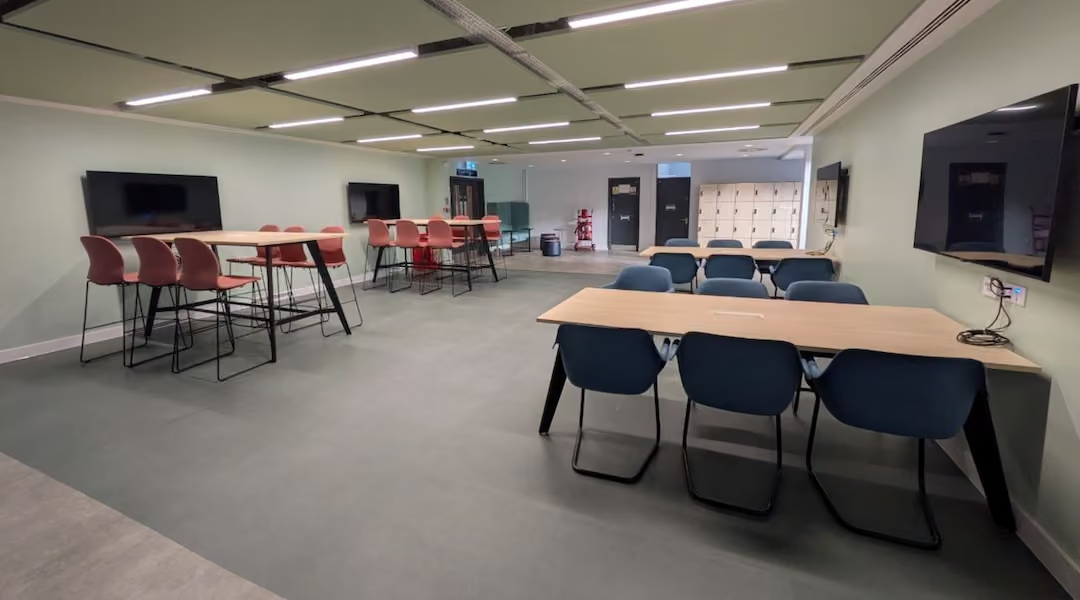
Then there’s room size. After sightlines, scale becomes the next drag on time. Putting three people in a 12-person boardroom creates too much empty space and makes the meeting feel oddly distant for remote participants. It’s the office version of trying to have a casual chat across a parking lot.
Room size should match actual attendance. When companies turn underused large rooms into smaller spaces, they get more room availability and avoid the problem of booked rooms that sit mostly empty [5].
Power Access, Seating Orientation, and Room Flow That Reduce Delays
Even if everyone is visible, the meeting can still lose momentum fast when people are dealing with cables, chargers, and awkward seat placement.
Employees lose an average of 8.4 minutes per day searching for outlets or untangling cables, and table clutter increases cognitive load by 19%, which cuts focus during the meeting itself [7]. That lost focus doesn’t just disappear once the laptop is plugged in. It can take an average of 23 minutes to fully re-engage after a single distraction, so a cable scramble at the start can throw off attention long after the agenda begins [1][4].
The fix is pretty simple:
- Put integrated power at every seat
- Place outlets within easy reach
- Arrange seating so people can join without crossing cables or shifting furniture
When furniture supports that setup, meeting prep time can drop from 8 minutes to under 1 minute [7]. That’s a small room change with a very clear payoff.
A Practical Hybrid Meeting Room Standard for Higher Productivity
Start with the fixes that give time back fastest, not the ones that look biggest on a renovation plan. Once the main failure points are clear, the next move is simple: rank each fix by how many meeting minutes it saves.
Which Fixes Deliver the Fastest Productivity Return
One-touch join and integrated power tend to pay off first because they cut the mess at the start of a meeting. If setup time drops from 8 minutes to under 1 minute, that adds up to about $145,800 in annual savings for a 10-room office [7].
For rooms full of hard surfaces, acoustic panels and baffles are still the easiest path to better audio without tearing the room apart. They deal with echo and poor clarity at a far lower cost than structural soundproofing, with pricing as low as $3 per square foot [1][3].
Conclusion: Better Hybrid Rooms Start With Fewer Friction Points
A good hybrid room standard does three things well: it helps meetings start fast, makes speech clear, and keeps every person in the meeting involved. Rooms built mainly for in-person use haven't kept up with split-attendance meetings, and that gap shows up in lost focus, slower decisions, and remote attendees drifting to the sidelines.
The fixes with the biggest payoff - integrated power, one-touch join, and basic acoustic treatment - don't call for a full rebuild. A hybrid meeting room should be judged by a few plain tests: how fast the meeting starts, how well people can hear and be heard, and whether remote participants have a fair seat at the table.
FAQs
How do I know if a room is truly hybrid-ready?
A hybrid-ready meeting room needs to work well for people in the room and people joining online. Four things matter most: a wide-angle camera, a clear display, audio pickup that covers the whole table, and power within easy reach at every seat.
Room layout matters too. Everyone should be visible on camera, not just the person sitting closest to it. And acoustics can make or break the experience. Good acoustic treatment cuts background noise and helps keep meeting audio from leaking into nearby work areas.
What should we fix first in an existing conference room?
Start with a 30-day utilization audit to see how rooms are actually being used. Look at room use, occupancy patterns, and the gap between bookings and what happens in practice. That first round of measurement helps you avoid chasing assumed problems and zero in on the issues causing the most friction.
Then go after the fastest-return fixes. For example, add acoustic treatment if noise complaints keep popping up, or upgrade cameras and audio if hybrid meetings feel lopsided for remote attendees.
How many people should a hybrid meeting room be designed for?
A hybrid meeting room should match how people actually meet, not some fixed template.
One of the biggest problems is easy to spot: a 10- or 12-person boardroom gets booked for a meeting with only two or three people. That setup wastes space. It can also feel awkward, like using a banquet hall for coffee with a friend.
A better move is to rightsize the room mix. If large boardrooms sit empty or get used by tiny groups, turn some of them into smaller huddle spaces, like 4-person rooms. Then build a mix of room sizes so different meeting types have a better fit.
•••••
The right workplace design measurably improves employee performance, satisfaction, and retention. Office Gallery partners with businesses on that strategy, and welcomes architects and interior designers looking for a furniture and space-planning partner on their own projects. Contact the team at 781-762-3733, email info@officegallery.net, or visit the showroom at 151 Carnegie Row in Norwood.
Key Points
What does the setup-friction data reveal about the true cost of a slow-starting meeting room?
- A setup that should take under a minute can stretch into an eight-minute delay -- a gap this large recurring on every meeting compounds into a substantial share of a workday lost before any actual discussion begins [7]
- Cutting that friction can save about $145,800 a year across a 10-room office -- a figure this specific gives facilities and finance a shared number to justify the upgrade rather than a general comfort argument [7]
- Standardized one-touch join systems can cut IT support calls by 80% -- a reduction this large indicates most support tickets stem from a small number of fixable friction points rather than genuine technical failures [7]
- Employees lose an average of 8.4 minutes a day searching for outlets or untangling cables -- a daily loss at this scale adds up to real annual hours per employee, independent of any single meeting's delay [7]
- Table clutter increases cognitive load by 19%, cutting focus during the meeting itself -- this shows setup friction damages meeting quality even after the technical connection succeeds, not just the start time
- Cable grommets at least 3 inches in diameter and power within arm's reach are what actually make a room fast to use -- these are small, low-cost specification details, which is why setup friction is one of the least expensive problems on this list to fix [7]
What does the acoustic research reveal about why hard-surfaced rooms specifically fail remote participants?
- Glass walls, bare ceilings, and polished concrete floors bounce sound instead of absorbing it -- these are common finishes in modern offices, which means the acoustic failure described here is closer to a design default than an unusual mistake [1] [6]
- Reverberation makes speech sound muddy specifically for remote attendees, even when in-room participants can follow the conversation -- this asymmetry means a room can feel fine to everyone physically present while still failing half the meeting
- A single microphone near the display favors the people seated closest to it -- this creates uneven audio quality that maps directly onto seating position rather than anything about who is speaking
- Sound masking increases productivity by 10% to 25% and saves up to 21 minutes a day -- a range this wide still clears the bar for most workplace interventions on cost alone [1] [3]
- Acoustic treatment costs as little as $3 per square foot compared with structural soundproofing -- this cost gap is what makes acoustic fixes a near-term budget decision rather than a capital project requiring construction [1] [3]
- Fabric-wrapped panels and ceiling baffles address the reflective surfaces directly, while table-wide microphone coverage closes the gap a single mic leaves behind -- treating absorption and pickup as two separate problems is what produces a complete fix rather than a partial one [1] [6]
What does the camera and table-shape data reveal about why some attendees disappear from hybrid meetings?
- A large rectangular table can leave people along the sides partly or fully outside the camera frame -- this means table shape alone can determine who gets to fully participate in a hybrid meeting, independent of anything about the conversation itself [1] [7]
- Remote attendees may only clearly see whoever sits directly in front of the lens -- a single camera angle can flatten an entire meeting into one visible participant, which explains why some hybrid meetings feel one-sided
- Shallow arcs or V-shaped tables keep more faces visible than deep rectangular tables -- this is a furniture and layout decision with a direct, measurable effect on participation equity, not a subjective preference [1]
- Wide-angle cameras that cover every seat address the visibility problem directly -- pairing the right table shape with the right camera coverage is what actually solves the problem, since either fix alone leaves a gap [1] [2]
- A 12-person boardroom used by two or three people creates an oddly distant feeling for remote participants -- excess empty space in frame changes how present the room feels on a screen, not just how it feels to be physically present
- The room's physical geometry, not just its technology, decides who gets to feel like a full participant -- this reframes furniture and layout choices as core to meeting equity rather than a secondary concern to the technology stack
What does the room-sizing data reveal about matching meeting space to actual attendance?
- Room size should match actual attendance rather than defaulting to a small number of oversized rooms -- mismatched sizing wastes space and creates a worse hybrid experience simultaneously, which makes it a rare fix that improves two problems at once [5]
- Turning underused large rooms into smaller spaces increases overall room availability -- converting existing square footage rather than adding new construction is the lower-cost path to solving a chronic booking shortage [5]
- Booked-but-empty large rooms block access for other teams that actually need meeting space -- this shows oversized rooms create a scarcity problem elsewhere in the building, not just an experience problem inside the room itself
- A small meeting in an oversized room can feel comparable to a casual conversation held across unnecessary distance -- this framing captures why remote participants specifically notice and are affected by room-to-group size mismatches
- Matching room size to meeting size requires the same audit data used to diagnose other office space problems -- room sizing decisions benefit from the same occupancy and booking data recommended for broader office space planning
- A mixed portfolio of room sizes, rather than a uniform standard, is what accommodates the actual range of meeting types an office holds -- this treats room sizing as a planning problem with a data-driven answer rather than a fixed template applied everywhere
What does the return-on-investment data reveal about which fixes to fund first?
- One-touch join and integrated power typically pay off first because they remove friction present in every single meeting held in the room -- fixes affecting every use case compound faster than fixes affecting only some meetings, which is why sequencing matters as much as the fix itself [7]
- Acoustic panels and baffles are the next fastest win specifically in rooms with hard, reflective surfaces -- targeting the fix to the rooms with the actual problem avoids spending on acoustic treatment where it will not measurably help [1] [6]
- Both leading fixes solve a documented, specific failure point rather than adding new technology broadly -- this is the shared trait that explains why they outperform a general room refresh on a per-dollar basis
- Camera and layout changes matter most in rooms where remote participants specifically report feeling excluded -- this ties a furniture and AV investment to a named symptom rather than a general modernization goal
- Ranking fixes by meeting-minutes saved, rather than visual impact on a renovation plan, is the organizing principle behind the whole prioritization -- this criterion is what keeps spending tied to a measurable outcome instead of an aesthetic one
- None of the top-tier fixes require a full room rebuild -- this lowers the practical barrier to acting on the findings, since meaningful improvement does not depend on a large capital project
What does the interruption-recovery research reveal about how meeting friction compounds across a workday?
- A single interruption can take about 23 minutes to fully recover from -- at that rate, even a handful of small meeting frictions can consume the better part of a working session's worth of attention [1] [4]
- A cable scramble at the start of a meeting can throw off attention long after the agenda begins -- this shows setup friction has a cost that extends well past the literal minutes lost to the delay itself
- Combined, hybrid meeting rooms can waste employees 68 to 74 minutes a week -- a range this specific turns a vague sense of meeting inefficiency into a number that can be tracked and reduced over time
- Repeated requests to repeat oneself due to poor audio function as a form of recurring interruption -- reframing acoustic failure as an interruption source connects it to the same recovery-time research affecting setup and layout problems
- Every category of friction, setup, acoustics, and layout, contributes separately to the same weekly time loss -- addressing only one category leaves the other two still eroding meeting time, which argues for treating the three as one connected problem
- The fixes that remove friction fastest also protect the most total attention across a week, since a room used daily multiplies even a small per-meeting improvement into a large cumulative gain -- this is the mechanism that connects a room-level furniture change to a measurable productivity outcome