
Why Your Office's Power and Connectivity Setup Is Costing You More Than You Think
Poor office power and connectivity setups cost businesses through lost productivity, equipment damage, and safety risks most organizations never trace back to their infrastructure. This guide covers the hidden costs, integrated furniture solutions, power load planning, cable management best practices, and how Office Gallery International solves these challenges for Boston-area businesses.
Post Summary
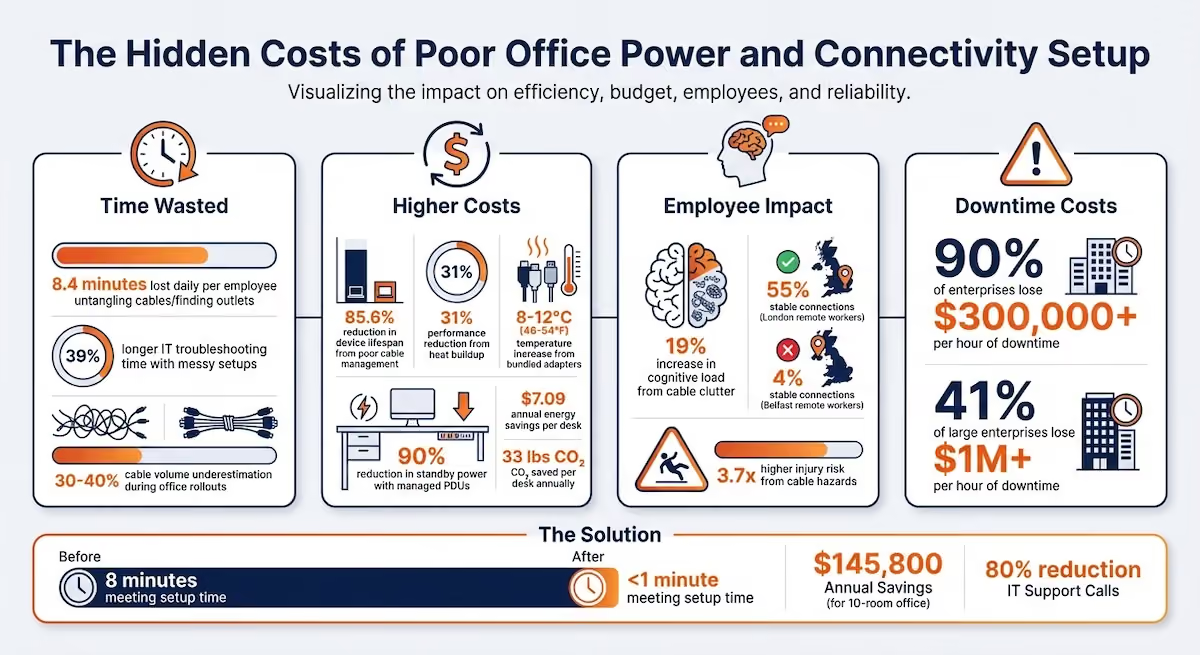
Disorganized power and cable setups create three compounding cost categories: employees lose an average of 8.4 minutes daily untangling cables or locating outlets; poor cable management damages equipment and can reduce device lifespan by up to 85.6%; and tangled cables increase cognitive load by 19%, reducing focus and job satisfaction, while businesses with critical service failures lose an average of $300,000 or more per hour of downtime.
Desks with integrated power outlets and cable management systems – including grommets at least 3 inches in diameter, rear-edge cable gaps, and under-desk trays for proper adapter airflow – eliminate the need for ad-hoc cable solutions, reduce cognitive clutter, and prevent the heat buildup that cuts computer performance by up to 31% and shortens equipment lifespan.
Inventory every device at each workstation, noting amperage for each – laptop adapters typically draw 1.5 to 2.0 amps, 27-inch monitors draw 0.5 to 0.8 amps, and sit-stand desk motors pull 2.0 to 4.0 amps during adjustment – then keep continuous loads under 12 amps per standard 15-amp circuit, which typically supports 5 to 6 workstations depending on device mix.
Organize cable routing in three layers – floor to desk underside, across the desk structure, and vertically to devices – keeping power and data cables separated by at least 10mm to prevent electromagnetic interference, using service loops shaped like an S for sit-stand desks, labeling both ends of every cable, and performing monthly dusting and quarterly audits to prevent wear and maintain airflow.
Upgrading from traditional setups to integrated power and connectivity furniture can reduce meeting room setup time from 8 minutes to under 1 minute – saving approximately $145,800 annually for a 10-room office – while cutting IT support calls by 80%, reducing standby power consumption by 90% through managed PDUs, and saving approximately $7.09 in energy costs and 33 pounds of CO₂ per desk annually.
Your office's outdated power and connectivity setup is silently draining time, money, and employee productivity. Here's how:
- Time Wasted: Employees lose 8.4 minutes daily untangling cables or finding outlets. IT teams spend 39% longer troubleshooting messy setups.
- Higher Costs: Poor cable management damages equipment, increases replacements, and can cut device lifespan by up to 85.6%. Heat buildup from improper setups reduces performance by 31%.
- Employee Focus: Tangled cables create visual clutter, increasing cognitive load by 19%, which hurts concentration and job satisfaction.
- Safety Risks: Tripping hazards from exposed power strips and improperly managed cables raise injury risks by 3.7 times.
Upgrading to desks and storage with built-in power and cable management can eliminate these issues. For example, integrated solutions reduce meeting setup time from 8 minutes to under 1 minute, potentially saving $145,800 annually for a 10-room office. Organized setups also improve focus and extend equipment lifespan.
The solution? Evaluate your current setup, calculate power needs, and invest in furniture that simplifies power access and cable management. This small change can make a big difference in efficiency, safety, and employee satisfaction.
DO NOT Buy Cable Management Products Until You Watch This
How Poor Power and Connectivity Setups Cost Your Business
Disorganized power and connectivity setups can quietly drain your business resources in three major areas: lost time, higher maintenance and equipment costs, and reduced employee morale. These seemingly small inefficiencies can snowball into significant financial losses over time.
Time Lost to Cable and Power Problems
When employees spend time dealing with messy cables instead of focusing on their work, productivity takes a hit. Tasks like untangling cords or dealing with accidental disconnections pull attention away from critical responsibilities. It’s not just a minor nuisance - it’s an ongoing productivity drain.
IT teams feel the pain, too. Poor cable management makes troubleshooting and hardware upgrades a much longer process. For example, tracing connections in a tangled mess can increase IT dispatch times by up to 39% compared to organized setups[5]. On top of that, IT departments often underestimate cable volume by 30% to 40% during office rollouts, leading to chaotic "nests" of cables that turn simple maintenance tasks into hours-long projects[3]. These delays disrupt workflows and create a ripple effect of inefficiencies.
Increased Maintenance and Equipment Replacement Expenses
Messy cables don’t just look bad - they can physically damage your equipment. Exposed wires are vulnerable to foot traffic or furniture movement, which can lead to wear and tear, and ultimately, premature failure[2].
"When cables are left unmanaged, the impact is not always immediate. Over time the problems compound, slowing repairs, creating avoidable outages, and eroding system performance." - Parallel Technologies[8]
Heat buildup is another silent culprit. Bundled power adapters without proper airflow can increase ambient temperatures by 8–12°C (46–54°F), cutting computer performance by up to 31% and shortening equipment lifespan[5]. This leads to more frequent replacements and higher costs. Switching to managed Power Distribution Units (PDUs) not only reduces these risks but also cuts standby power consumption by 90%, saving about $7.09 in energy costs and 33 lbs of CO₂ per desk annually[7].
As equipment fails more frequently, the inefficiencies pile up, shaking employee confidence in the reliability of their tools and systems.
Effects on Employee Focus and Job Satisfaction
The clutter caused by unmanaged cables doesn’t just affect your hardware - it also impacts your people. Tangled cables create visual chaos, which can increase cognitive load by 19%, making it harder for employees to focus on their tasks[5]. This mental fatigue can drag down productivity and overall job satisfaction.
In 2025, 66% of employees working from home in the United States reported inadequate internet connections, making it the most common technical barrier to remote work.
"Unstable networks drain profit, push IT into crisis mode and hide behind the vague label of 'productivity issues.'" - Entrepreneur[6]
The financial impact of these issues is staggering. When critical services fail, 90% of midsize and large enterprises lose at least $300,000 per hour, and 41% of large enterprises report losses exceeding $1 million per hour of downtime[3][6]. These numbers highlight the importance of investing in ergonomic furniture and integrated solutions that streamline power and connectivity, reducing disruptions and keeping your team focused.
How Ergonomic Furniture Solves Power and Connectivity Problems
The right furniture does more than just support your devices - it becomes part of your office's infrastructure. When desks, storage, and workstations are equipped with built-in power and connectivity features, they eliminate the hassle and expense of ad-hoc cable management. This thoughtful design directly tackles the cable clutter and inefficiencies that can disrupt your workflow.
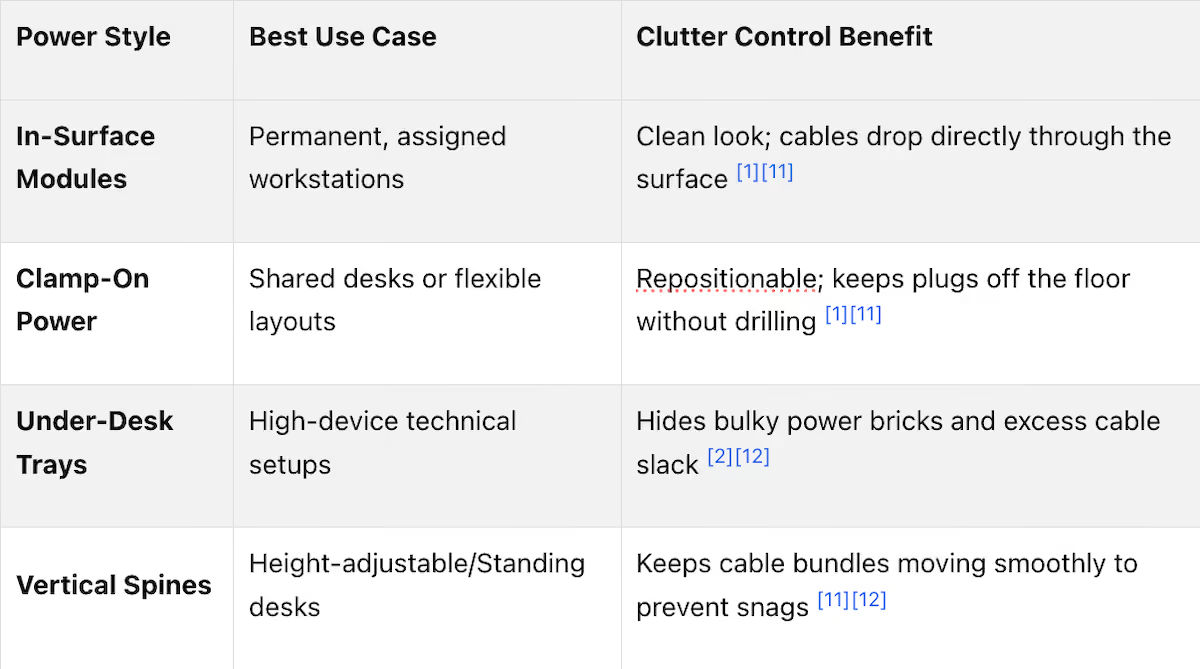
Desks with Integrated Power Outlets and Cable Management
Modern desks are designed to bring power right where you need it. By placing outlets within your "reach zone" - the primary area accessible to your dominant hand - these desks eliminate the need to stretch, lean, or rearrange items just to plug in a device. The "10-second plug-in test" highlights this convenience: if you can't connect a device in under 10 seconds without moving other items, your desk setup is likely causing unnecessary friction [10].
Integrated cable management systems also reduce the mental strain caused by tangled or exposed cords. Features like grommets (ideally 3 inches or larger) and rear-edge gaps direct cables neatly, cutting down on exposed lengths and preventing the dreaded "cord waterfall" effect.
For height-adjustable desks, cable management becomes even more critical. Vertical routing spines or flexible sleeves ensure cables move smoothly as the desk height changes, avoiding snags or accidental disconnections. Under-desk trays provide additional benefits by concealing bulky adapters and allowing proper airflow, which helps prevent overheating and equipment damage [9][12].
But desks aren't the only furniture that can simplify your workspace. Storage solutions tailored for technology can also play a big role in keeping your setup organized.
Storage Designed for Technology and Cables
Well-designed storage solutions ensure your workspace stays functional and accessible. Heavy-duty, ventilated cable trays, for instance, lift power strips and adapters off the floor. This not only clears legroom but also reduces trip hazards [4][9]. To accommodate future hardware needs, these trays are often selected with the "50% buffer rule" in mind - choosing trays with 50% more capacity than currently required [3].
Separating power cables from data lines (like HDMI or Ethernet) into different routing lanes helps prevent electromagnetic interference and makes troubleshooting easier. Additionally, incorporating small service loops - intentional slack in the cables - allows devices to be repositioned without straining their ports or connectors [12][13].
These thoughtful storage features create a workspace that’s not only organized but also supports better focus and productivity.
Advantages of an Organized Workspace
A well-organized workspace doesn’t just look professional - it actively boosts performance. By minimizing visual distractions, employees can focus better and work more efficiently.
"A cluttered desk costs concentration. Cables, adapters and loose chargers create visual distractions, even when you don't consciously notice them." - Zens [14]
Office Gallery International's Solutions for Boston-Area Businesses
Office Gallery International focuses on creating workspaces that emphasize connectivity and efficiency, offering tailored solutions to businesses across the Boston area, including Norwood, Beverly, Marlborough, Plymouth, Quincy, and Waltham. Their expertise isn't just about selling furniture - it's about designing complete, tech-ready workspaces that address power and connectivity challenges from the start.
Workstations and Desks with Built-In Power Features
Office Gallery International integrates power and cable management directly into their workstation designs, setting a higher standard for office functionality. Their offerings include:
- Smart tables for effortless collaboration
- Acoustic pods with built-in power for private, focused work
- Lounge sofas equipped with charging capabilities
For high-density office setups, they recommend solutions like the Enwork Ambition 36-foot power Beam, which supports up to 12 workstations while maintaining open sightlines. For open-plan designs, modular systems like the AIS Matrix deliver reliable power and data access without the clutter of traditional cabling [16].
"Collaborative seating helps offices reduce real estate costs by up to 30% through modular, tech-integrated furniture - lounge sofas, acoustic pods, and smart tables." - Office Gallery International [15]
On-Site Consultations and Space Planning
To ensure every workspace meets the needs of its users, Office Gallery International offers on-site consultations. These visits allow their team to analyze your current setup, identify areas where power access is lacking, and propose optimized furniture layouts. Using advanced visualization tools, they help clients choose furniture that balances technology needs with aesthetic preferences.
A great example of their work is the transformation of Jack Conway & Co., Inc. in Bridgewater, MA. They partnered with brands like Three H Furniture and SitOnIt Seating to create a workspace tailored to modern productivity [16].
"We provide on-site consultations so that we may fully understand your business and how you work. We then specify, space-plan and design the best solutions to meet your individual needs." - Office Gallery International [16]
Complete Project Management from Design to Installation
As an independent boutique dealer, Office Gallery International collaborates with manufacturers like AIS, Global Furniture Group, and Enwork to provide furniture that matches your budget and requirements [16]. Their six-step process ensures a smooth transition from initial design to final installation, covering every detail along the way [15].
Their Norwood, MA showroom gives clients the opportunity to see ergonomic and tech-integrated furniture options firsthand, making it easier to make informed decisions. This hands-on approach ensures your workspace upgrade is functional, stylish, and ready to meet your team's needs.
How to Upgrade Your Office Power and Connectivity Setup
Evaluate Your Current Power and Connectivity Infrastructure
Start by taking stock of every device at each workstation. Separate permanent fixtures like monitors and docking stations from temporary items such as phone chargers and laptops [1][2]. This step gives you a clear picture of your actual power requirements instead of relying on assumptions.
Next, calculate your power load. For reference:
- A laptop adapter typically uses 1.5–2.0 amps.
- A 27-inch monitor draws about 0.5–0.8 amps.
- Sit-stand desk motors can pull 2.0–4.0 amps during adjustments [17].
To avoid overloading circuits, keep continuous loads under 12 amps on a standard 15-amp circuit. Generally, this means a single circuit can support 5–6 workstations, depending on the devices in use [17].
Measure cable runs from wall outlets to desks and from desks to devices. Identify unnecessary cable loops and streamline where possible. Add a buffer to your estimates for future needs.
Check for safety issues like daisy-chained power strips, which can be hazardous. Ensure integrated power components meet UL 962 certification standards [3][18]. Visible desk cords can increase cognitive load by 13–19%, while unmanaged cables can raise workplace injury risks by 3.7 times [18]. Also, remember to replace standard power strips every three years, as their surge protection diminishes over time [18].
Once this assessment is complete, you’ll be ready to choose furniture that integrates power and connectivity features.
Choose Furniture with Integrated Power and Cable Management
The next step is to invest in furniture that simplifies power and connectivity. Look for desks with built-in outlets and USB-C ports positioned for easy access. This reduces cable lengths and keeps power where it’s needed most [1][13]. Make sure desk grommets are at least 3 inches (76mm) in diameter to accommodate multiple DisplayPort cables and power plugs simultaneously [3][17].
For cable management, opt for heavy-duty trays with 50% more capacity than your current needs. This extra space allows for future hardware additions [3][17]. When selecting sit-stand desks, prioritize flexible vertical cable management spines that move with the desk to prevent snagging [1][9][2].
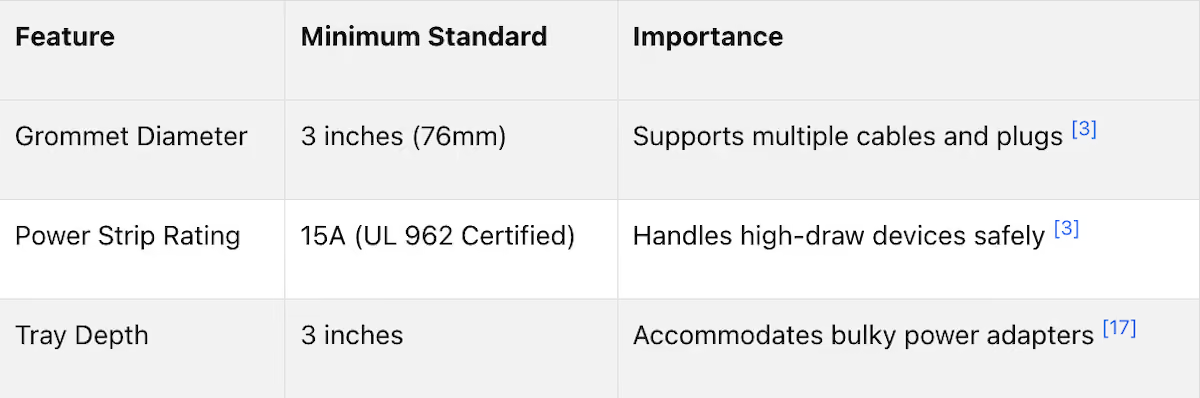
Ensure built-in power strips support at least 15 amps to handle high-performance setups [3]. For shared or leased offices, consider clamp-mounted power solutions that attach securely to desk edges without requiring permanent modifications [2][9].
Install and Maintain Your Organized Workspace
Once you’ve chosen the right furniture, focus on a structured installation and maintenance plan. Organize cable routing in three layers:
- From the floor to the underside of the desk.
- Across the desk structure.
- Vertically rising to devices [9].
Keep power and data cables separate to minimize interference and improve airflow [9][17]. Maintain at least 10mm of separation between AC power cables and data cables to prevent data transmission errors [18].
For sit-stand desks, create service loops - slack in vertical cables shaped like an "S" - to ensure smooth desk movement without straining ports [9][1]. Distribute power adapters within cable trays, leaving at least a finger-width of space between them to avoid heat buildup [9].
Label both ends of your cables with clear identifiers, such as "Desk A1 - Monitor." This simple practice can save up to 15–20 hours of IT troubleshooting annually for a 50-person office [17]. Use color-coded labels for quick identification: blue for video, green for data, and red for power [9].
Perform monthly maintenance by dusting and untangling cables to prevent permanent kinks [4]. Conduct quarterly audits to rewrap slack, inspect mounting clips, and replace any worn or frayed cables [9]. During upgrades, double-check that your total load on each circuit remains under 12 amps [17]. These routine checks will keep your workspace organized and extend the lifespan of your equipment.
Conclusion
Switching to ergonomic furniture with built-in power and connectivity isn't just about comfort - it's about eliminating hidden costs that quietly eat away at your budget and efficiency. For example, upgrading from traditional setups to integrated solutions can slash meeting setup time from 8 minutes to under 1 minute. For a facility with 10 meeting rooms, this could mean saving around $145,800 annually while also cutting IT support calls by 80% [19]. Plus, it helps prevent equipment damage caused by poorly managed cables, which can reduce a device's lifespan by as much as 85.6% [18].
But the benefits go beyond dollars and cents. A well-designed workspace can boost cognitive efficiency. As Mia, a digital productivity coach, puts it:
"True tech efficiency begins not with faster processors or newer software - but with eliminating physical and cognitive friction in your immediate environment" [18].
Ergonomic setups also encourage healthier work habits. With proper cable management, employees are more likely to follow the 20-8-2 rhythm - 20 minutes sitting, 8 minutes standing, and 2 minutes moving. This can reduce daily sitting time by 84 to 116 minutes [3][7]. The result? Less muscle fatigue, fewer issues from prolonged sitting, and a more dynamic, comfortable environment.
FAQs
How do I figure out how much power each workstation needs?
To figure out your power requirements, start by making a list of all the devices at your workstation - things like laptops, monitors, and phones. Then, check each device's power specifications, which are usually listed on the label or in the manual. Look for the wattage or amperage, and add them up to estimate the total power demand.
Make sure the power strip or outlet setup you’re using has enough outlets and USB ports to handle all your devices at once. It’s also crucial that the setup can manage the combined power load to prevent overloading or potential outages.
What furniture features matter most for cable management?
Effective cable management is all about keeping your workspace organized and your cables protected. Here are some features that make it easier to manage cords and maintain a clutter-free setup:
- Integrated power outlets and USB ports: These built-in options reduce the need for extra power strips and keep everything within reach.
- Cable routing systems: Designed with smooth downward angles, these systems help guide cables neatly and prevent tangling.
- Strain-relief points near connection ports: These features minimize stress on cables, reducing the risk of wear and tear at connection points.
- Under-desk trays or organizers: These tools keep cords out of sight and prevent them from creating a mess under your desk.
By incorporating these elements, you can maintain a tidy workspace while extending the life of your cables.
What safety red flags should I fix first?
When it comes to creating a safer workspace, electrical safety and cable management should be top priorities. Start by inspecting your power outlets to ensure they’re in good working condition. Faulty outlets can be a hidden hazard, so addressing them early is crucial.
Next, focus on how your cables are routed. Properly secured cables not only reduce the risk of tripping but also minimize the chance of wear and tear that could lead to electrical fires. Investing in cable organizers or clips can help keep everything tidy and out of harm's way. A well-organized cable setup doesn’t just enhance safety - it also contributes to a more efficient and professional-looking workspace.
•••
Ready to transform your workspace? Contact us today to explore how our expert team can design a tailor-made solution that aligns with your brand and enhances productivity. From design inspiration to project management, we'll guide you through every step of the process to create an office space that fosters creativity, collaboration, and success. Let's embark on a journey to redefine your workspace together.
Key Points
What are the measurable costs of poor office power and connectivity setups?
- Employees lose 8.4 minutes daily to cable-related friction – untangling cords, locating outlets, and dealing with accidental disconnections, which across a team of 50 employees compounds into significant lost productivity that never appears as a line item but consistently shows up as reduced output and IT escalations
- IT teams spend 39% longer troubleshooting disorganized setups and routinely underestimate cable volume by 30 to 40% during office rollouts, turning simple maintenance tasks into hours-long projects that delay other infrastructure work and create a ripple effect of workflow disruptions
- Heat buildup from improperly bundled power adapters raises ambient temperatures by 8 to 12°C, cutting computer performance by up to 31% and reducing equipment lifespan – directly increasing replacement frequency and the capital cost of maintaining a functioning workstation fleet
- Visual cable clutter increases cognitive load by 19% – a measurable psychological tax on employee focus that compounds across full workdays, contributing to mental fatigue, reduced job satisfaction, and the kind of low-grade distraction that drags down output without being easily attributable to a single cause
- Exposed cables and improperly managed power strips raise workplace injury risk by 3.7 times and represent both a safety liability and a facilities management failure that standard office audits frequently miss until an incident occurs
How does ergonomic furniture with integrated power and cable management solve connectivity problems?
- Desks with power outlets positioned within the reach zone – the area accessible to the dominant hand without repositioning – eliminate the stretching, leaning, and item-moving that add friction to every device connection, with the 10-second plug-in test serving as a practical benchmark for whether a desk setup is causing unnecessary workflow interruption
- Grommets at least 3 inches in diameter and rear-edge cable gaps direct cables neatly through the desk structure, eliminating exposed cord lengths and preventing the cord waterfall effect where cables hang visibly from desk surfaces in ways that create both visual clutter and tripping hazards
- Vertical routing spines and flexible sleeves for height-adjustable desks ensure cables travel with the desk as it moves between sitting and standing positions – preventing snags, avoiding accidental disconnections, and maintaining the clean cable routing that static desks achieve with fixed routing channels
- Under-desk trays that conceal power adapters and allow airflow address the heat buildup that bundled adapters create when stacked directly on floors or in enclosed spaces – with proper separation between adapters preventing the temperature increases that degrade both performance and equipment lifespan
- Heavy-duty ventilated cable trays selected with the 50% buffer rule – 50% more capacity than current requirements – accommodate future hardware additions without requiring infrastructure changes, while lifting power strips off floors to clear legroom and eliminate one of the most common sources of workplace trip hazards
What power load planning does a modern office workstation setup require?
- A complete device inventory at each workstation separating permanent fixtures from temporary devices is the essential starting point – monitors, docking stations, and desk motors are permanent loads; phone chargers and laptops are variable – and accurate amperage totals from this inventory prevent the circuit overloading that trips breakers and interrupts work across multiple stations simultaneously
- Standard 15-amp circuits support continuous loads up to 12 amps – roughly 5 to 6 workstations depending on device mix – and planning circuits against this limit during furniture installation prevents the daisy-chained power strip arrangements that UL 962 certification standards flag as safety hazards and that standard power strips are not designed to handle reliably
- Sit-stand desk motors drawing 2.0 to 4.0 amps during adjustment represent a load spike that circuits shared with multiple workstations may not accommodate reliably – particularly in offices with synchronized standing desk schedules where multiple motors activate simultaneously and can exceed circuit capacity
- Switching to managed Power Distribution Units reduces standby power consumption by 90% compared to standard power strips, saving approximately $7.09 in energy costs and 33 pounds of CO₂ per desk annually – a meaningful operational cost reduction that scales significantly across large floor plates
- Replacing standard power strips every three years addresses the surge protection degradation that occurs with age – protection that diminishes without any visible indication, leaving equipment exposed to voltage spikes while the strip continues to function normally as a power source
What cable management best practices should offices implement and maintain?
- Three-layer cable routing – floor to desk underside, across desk structure, vertically to devices – provides the organized infrastructure that makes troubleshooting fast and maintenance predictable, versus the ad-hoc routing that turns simple cable traces into extended IT investigations
- Maintaining at least 10mm of separation between AC power cables and data cables prevents electromagnetic interference that causes data transmission errors – a source of intermittent connectivity problems that frequently gets misattributed to network infrastructure or device software rather than physical cable routing
- Service loops shaped like an S for sit-stand desks provide the intentional slack that allows desk height adjustment without placing strain on cable ports – the most common source of premature connector failure on height-adjustable workstations where cables are routed without accommodation for vertical travel
- Labeling both ends of every cable with identifiers like "Desk A1 – Monitor" saves 15 to 20 hours of IT troubleshooting annually for a 50-person office, and color-coding by type – blue for video, green for data, red for power – enables anyone to trace a connection without specialized knowledge of the installation
- Monthly dusting and untangling combined with quarterly audits to rewrap slack, inspect mounting clips, and replace worn cables maintains the organized infrastructure that furniture installation creates – preventing the gradual degradation back to tangled cable accumulation that offices without maintenance schedules consistently experience within 12 to 18 months of a new installation
What should businesses evaluate when assessing their current office power and connectivity setup?
- A full device inventory at every workstation separating permanent from temporary loads provides the accurate power demand picture that circuit planning requires – with estimates that omit variable devices consistently producing circuit loads higher than anticipated during peak usage periods
- Visible cable runs measured from wall outlets to desks and from desks to devices identify unnecessary loop lengths and routing inefficiencies that consume space, create visual clutter, and increase the cable volume that maintenance must manage – with identified loops eliminated before new furniture is specified
- Safety red flags requiring immediate attention include daisy-chained power strips, which exceed the design parameters of standard strips and represent a documented fire risk, and any power strip older than three years whose surge protection may have degraded without visible indication
- UL 962 certification verification for all integrated power components confirms that furniture-integrated electrical elements meet the safety standards that commercial office installations require – a check that matters most when furniture is purchased from vendors who source electrical components from unverified suppliers
- Cognitive load indicators like visible desk cords that increase focus impairment by 13 to 19% may seem like aesthetic concerns but represent a measurable productivity factor – making cable visibility not just a tidiness preference but a workspace performance variable worth quantifying in productivity assessments
How does Office Gallery International support Boston-area businesses with power and connectivity upgrades?
- On-site consultations analyzing existing power access, cable routing, and workstation configuration allow Office Gallery International's team to identify specific gaps in connectivity infrastructure before specifying solutions – avoiding the generic product recommendations that fail to address the actual constraints of a given floor plate
- Advanced visualization tools including space planning software help clients preview furniture layouts with integrated power components before installation – enabling informed decisions about outlet placement, cable routing paths, and desk positioning relative to wall power sources before any physical changes are made
- Partnerships with manufacturers including AIS, Global Furniture Group, and Enwork provide access to solutions scaled to specific office densities – from the Enwork Ambition 36-foot power beam supporting up to 12 workstations to AIS Matrix modular systems for open-plan environments requiring reliable power and data access without traditional cabling infrastructure
- Smart collaboration tables, acoustic pods with built-in power, and lounge sofas with charging capability extend integrated connectivity beyond individual workstations to the full range of collaborative and focus spaces that modern offices require – with modular tech-integrated furniture reducing real estate costs by up to 30% through space efficiency
- Complete project management from design through installation ensures that power and data drop placement, furniture positioning, and cable routing are coordinated as a single integrated project rather than separate workstreams – the coordination failure that most commonly produces installations where furniture and infrastructure do not align on the first day of use