
Ultimate Guide to Custom Ergonomic Furniture Designs
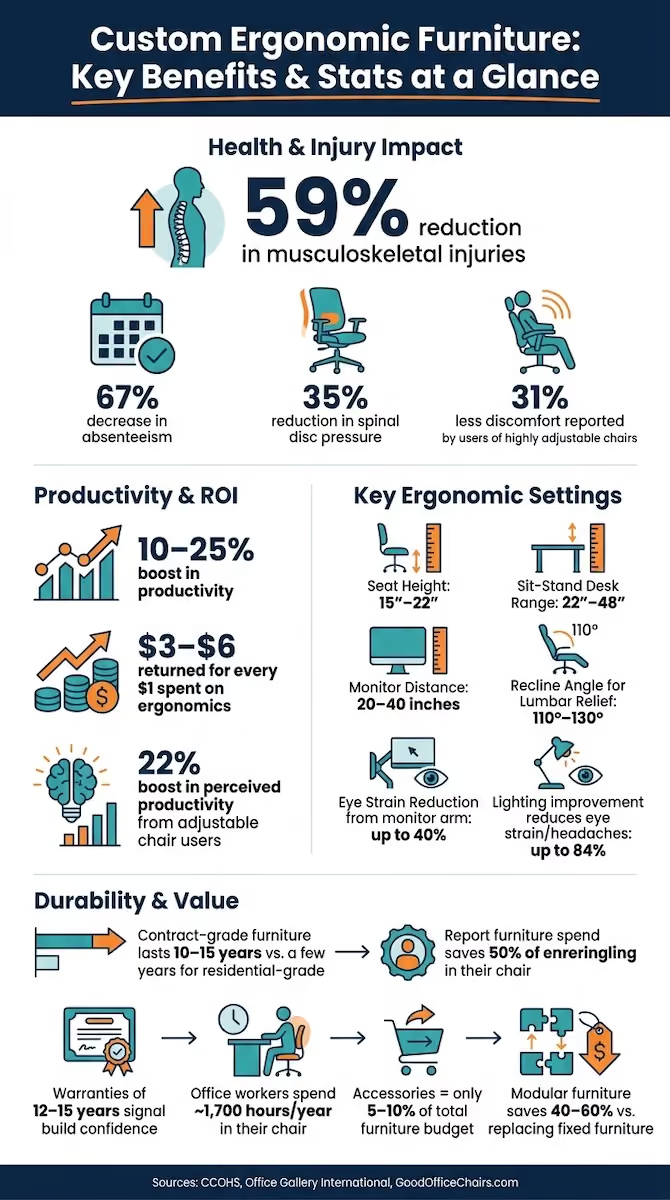
Custom ergonomic furniture cuts musculoskeletal injuries by 59%, reduces absenteeism by 67%, and returns $3 to $6 per dollar invested. Key features include 4D adjustable chairs, sit-stand desks spanning 22 to 48 inches, and monitor arms reducing eye strain by 40% — with contract-grade durability lasting 10 to 15 years.
Post Summary
Custom ergonomic furniture is designed to match individual body dimensions, work habits, and workspace layouts rather than approximating an average user. Professional ergonomic programs pairing properly fitted furniture with user training reduce musculoskeletal injuries by 59% and absenteeism by 67%. Workers using highly adjustable chairs experience 31% less discomfort and report a 22% boost in perceived productivity compared to those using standard chairs. A well-fitted chair alone can reduce spinal disc pressure by up to 35%. Every dollar invested in ergonomics returns $3 to $6 in savings and productivity gains — making custom setups a financial as much as a health decision.
Seat height should span 15 to 22 inches to accommodate users from 5'0" to 6'4", with feet resting flat on the floor and knees at a 90-degree angle. A sliding seat pan should maintain a 2 to 4 finger gap between the seat edge and the back of the knees. Armrests with 4D adjustability — height, width, depth, and pivot — keep forearms parallel to the floor without shoulder strain. Synchro-tilt recline moves the backrest two degrees for every one degree the seat tilts, maintaining pelvis support through a recline range of 110 to 130 degrees, which research shows reduces lumbar disc pressure. Adjustable lumbar support in both height and depth is far superior to fixed options for L3–L4 vertebrae support.
Sit-stand desks should offer a height range of 22 to 48 inches to accommodate the full range of seated and standing working positions. Electric lift speed should be at least 1.5 inches per second, and programmable memory presets make it easy to switch between positions throughout the day. Softened front edges reduce forearm strain during extended typing, and integrated cable management keeps the workspace organized. Pairing the desk with a monitor arm — positioning the screen 20 to 40 inches away with the top at or just below eye level — can reduce eye strain by up to 40%. Alternating between sitting and standing every 20 to 30 minutes minimizes muscle strain and supports long-term comfort.
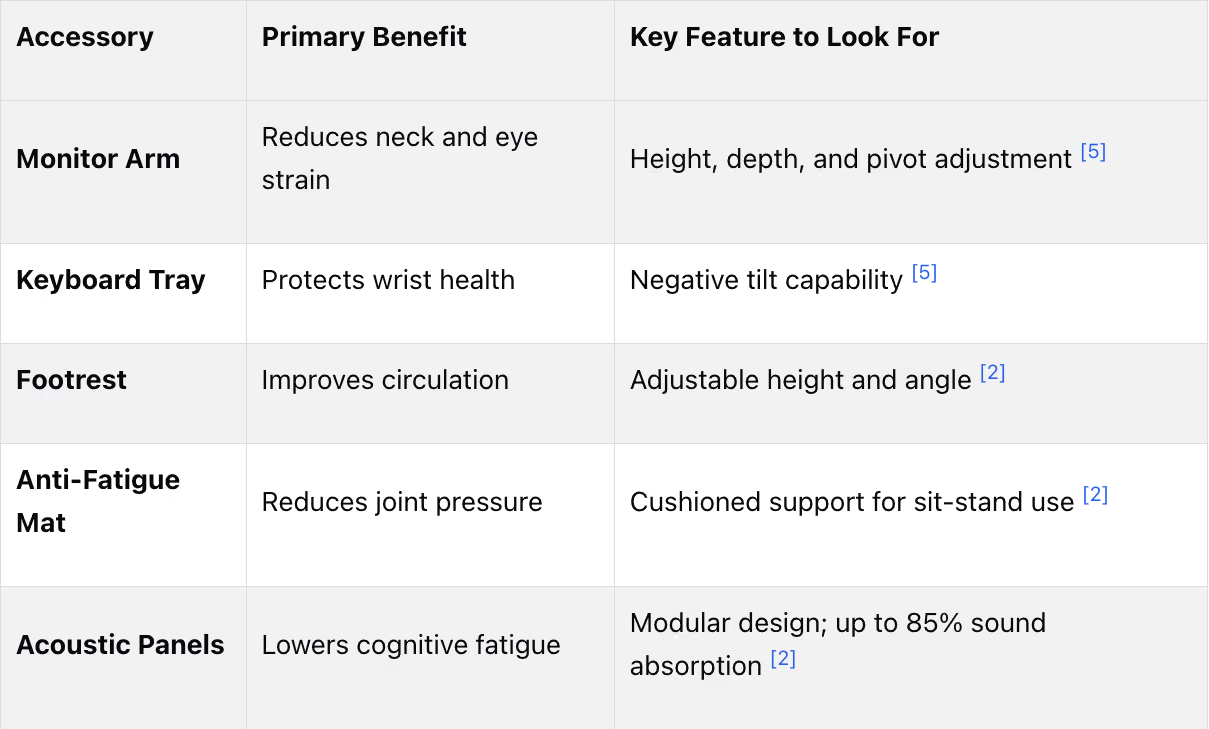
Monitor arms, keyboard trays, footrests, and anti-fatigue mats are the highest-impact ergonomic accessories and typically represent only 5 to 10% of a total office furniture budget — making them among the most cost-effective investments available. A monitor arm positions the screen at the correct height and distance, reducing neck and eye strain. A keyboard tray with negative tilt keeps wrists neutral and elbows at 90 degrees, minimizing repetitive strain during long typing sessions. Anti-fatigue mats reduce joint pressure during standing periods at sit-stand desks. In open-plan offices, modular acoustic panels absorb up to 85% of ambient sound, significantly reducing noise distraction and cognitive fatigue.
A useful starting point is allocating approximately $15 per square foot for office furniture, with an additional 10 to 15% reserved for delivery and assembly. Custom-sized desks can use up to 30% less floor space than standard off-the-shelf options, making right-sizing a practical space and cost efficiency strategy. The full process from ordering through installation typically takes 7 to 10 weeks, so planning should begin 4 to 12 weeks before a move-in date. Applying the 80/20 rule — designing primarily around the 80% of tasks performed most frequently and keeping the remaining 20% flexible — avoids overloading the space with unnecessary furniture. High-end ergonomic chairs carry 12 to 15-year warranties, and professional installation is required to maintain warranty validity.
Custom ergonomic furniture is built to fit your body, workspace, and work habits, unlike standard options that often lead to discomfort. By prioritizing adjustability, material quality, and proper posture support, these solutions can improve health, productivity, and comfort.
Key Takeaways:
- Why It Matters: Poor ergonomics can lead to back injuries, musculoskeletal disorders, and reduced productivity. Custom furniture can lower such injuries by up to 59%.
- Core Features: Adjustable chairs (seat height, armrests, lumbar support), sit-stand desks, and monitor arms ensure proper posture and reduce strain.
- Material Durability: High-quality materials like zoned suspension mesh and solid hardwoods ensure longevity, with warranties often lasting 12–15 years.
- Types of Furniture: Includes ergonomic chairs, sit-stand desks, and accessories like keyboard trays, footrests, and anti-fatigue mats.
- Choosing the Right Setup: Measure your space, focus on your most frequent tasks, and invest in professional consultation and installation for optimal results.
Custom setups reduce workplace injuries, boost productivity, and ensure long-term comfort. Investing in the right furniture and support services pays off in health and efficiency.
Best Office Ergonomics Chair-Desk-Computer Setup For Neck, Shoulder, & Back Pain
Core Features of Custom Ergonomic Furniture
Custom ergonomic furniture combines personalization and functionality to support your body during extended work sessions. Let’s dive into the standout features that make these pieces essential for a productive and comfortable workspace.
Adjustability Options
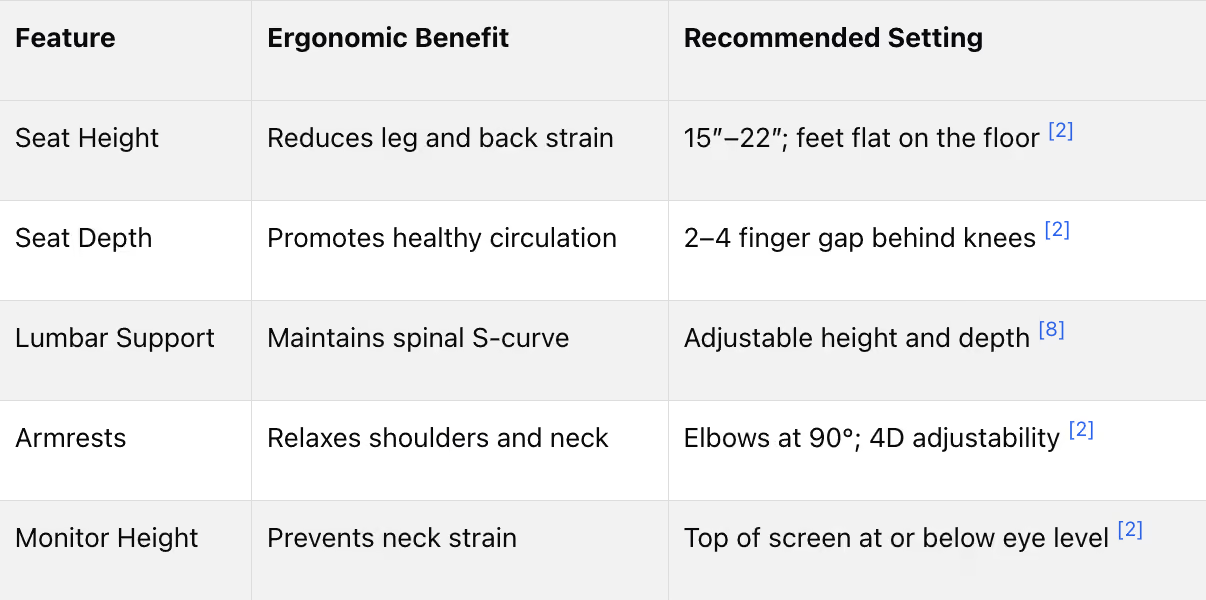
Adjustability is the backbone of ergonomic furniture. For chairs, an ideal seat height ranges from 15″ to 22″, accommodating users from 5′0″ to 6′4″. This ensures your feet rest flat on the floor, with your knees forming a 90° angle. A sliding seat pan is another must-have, maintaining a 2–4 finger gap between the seat edge and the back of your knees to encourage healthy blood flow.
Armrests with 4D adjustability - height, width, depth, and pivot - are key for keeping your forearms parallel to the floor without straining your shoulders, which helps prevent neck and upper back discomfort. For desks, sit-stand models should offer a height range of 22″ to 48″ and feature electric lift speeds of at least 1.5 inches per second. Programmable memory presets make it easy to switch between sitting and standing positions throughout the day.
A monitor arm is also a game-changer. It allows you to position your screen 20–40 inches away, with the top of the screen at or just below eye level. This setup can reduce eye strain by up to 40% [2]. Together, these features create a workspace that balances comfort and productivity.
Material Quality and Durability
The materials used in ergonomic furniture play a huge role in both durability and performance. Contract-grade furniture is built for heavy use, lasting 10 to 15 years, while residential-grade pieces often wear out within a couple of years in professional settings [2]. Considering that office workers spend around 1,700 hours per year in their chairs, this durability is a worthwhile investment [2].
Zoned suspension mesh is a standout material for chairs, offering better breathability and pressure relief compared to foam. For desks, high-pressure laminate (HPL) resists scratches and heat, making it ideal for high-traffic use. Solid hardwoods like oak or maple offer exceptional longevity since they can be refinished as needed. Steel frames with welded construction add structural integrity to desk bases and storage units [2].
"Warranty length is a direct signal of build confidence: manufacturers who offer 12–15 year warranties are stating that their engineering is built for long-term daily use." - Office Gallery International [3]
A warranty of 12 to 15 years on frames and mechanisms is a reliable indicator of quality and durability.
Support for Proper Posture
Custom ergonomic furniture is designed to align with the body’s natural curves, particularly the S-curve of the spine. Lumbar support is critical, especially for the L3–L4 vertebrae. Adjustable lumbar pads - both in height and depth - are far superior to fixed options, which often signal lower-quality designs [8].
Recline mechanics also play a role in posture. A synchronized recline (or synchro-tilt) moves the backrest two degrees for every one degree the seat tilts, ensuring your pelvis stays supported even as you lean back. Research shows that lumbar disc pressure is reduced when chairs allow a recline angle between 110° and 130° [2].
Keyboard trays complement this ergonomic setup by keeping your wrists neutral, elbows at a 90° angle, and forearms parallel to the floor. This positioning minimizes repetitive strain and enhances comfort during long typing sessions.
These features work together to promote proper posture and improve overall efficiency in your workspace.
Types of Custom Ergonomic Furniture
Choosing the right ergonomic furniture can make a huge difference in comfort and productivity, whether you're setting up a corporate office or a home workspace. Here's a closer look at the main categories that offer tailored ergonomic solutions.
Ergonomic Chairs and Seating
Ergonomic chairs come in a variety of designs, and finding the right one depends on your body type, work habits, and how your workspace is used. Customizable seating ensures you get the support you need.
- Task chairs are available in small, medium, and large sizes, accommodating users from 4′10″ to 6′6″ and supporting weights up to 350 lbs.
- Self-adjusting chairs feature weight-sensitive recline mechanisms, automatically adapting to different users - ideal for shared workstations.
- Dynamic backrest chairs are designed for active users, offering 4D armrests and backrests that move with your spine throughout the day.
Research shows that workers using highly adjustable chairs experience 31% less discomfort and report a 22% boost in perceived productivity compared to those using standard chairs. Additionally, a well-fitted chair can reduce spinal disc pressure by up to 35% [10].
"A standard office chair is like that off-the-rack garment - it might fit okay, but it will never feel perfect. A fully adjustable office chair is the bespoke suit of seating." - GoodOfficeChairs.com [10]
Now, let's see how custom desks can take your ergonomic setup to the next level.
Desks and Workstations
Custom desks are more than just about picking a size or finish - they're designed to match your specific ergonomic needs. One of the most effective options is a sit-stand desk, which encourages healthy movement throughout the day. Other features to consider include:
- Integrated cable management to keep your workspace tidy.
- Tailored storage solutions for unique office setups.
- Softened front edges, which reduce forearm strain during long hours of typing.
For durability, materials like solid hardwoods (e.g., oak or maple) can be refinished over time, while high-pressure laminates are built to withstand heavy use without showing wear.
"Height-adjustable desks... are not just a trend now, but for the foreseeable future, too. Any facility manager looking to 'future proof' their office environments... need to invest in these more versatile desks." - Global Industrial [2]
Pairing these desks with the right accessories can further enhance your workspace.
Accessories and Add-Ons
The right accessories can complete your ergonomic setup and provide extra comfort and efficiency. Here are some must-haves:
- A monitor arm helps position your screen at the ideal height and distance, reducing neck and eye strain.
- A keyboard tray with negative tilt keeps wrists in a neutral position, minimizing strain during long typing sessions.
- Footrests are perfect for maintaining proper circulation when using a raised chair with a fixed-height desk.
"Office accessories, often overlooked, can provide the biggest ergonomic benefits." Mike Troia Office Gallery
For sit-stand setups, an anti-fatigue mat reduces joint pressure during standing periods. In open-plan offices, modular acoustic panels absorb up to 85% of sound [2], significantly cutting down on noise distractions and cognitive fatigue. Interestingly, accessories like these typically account for only 5–10% of a total office furniture budget [2][6], making them a cost-effective addition.
How to Choose the Right Custom Setup
Once you’ve figured out the type of furniture you need, the next step is making sure it fits - your space, your body, and your daily habits. Getting this right from the start helps you avoid expensive mistakes later on.
Assess Your Workspace and Needs
Start by measuring your room with care. Don’t rely on guesswork - accurate dimensions are crucial to avoid a layout that feels cramped or awkward. For example, standard desks off the shelf can take up 30% more space than custom-sized options [11]. Aim to leave at least 3 inches of clearance between furniture and walls to make room for cables and power cords [2].
Next, think about how you actually work. A helpful method is applying the 80/20 rule: focus first on the 80% of tasks you do most often, like writing, video calls, or drafting. Design your workspace around these “hot zones,” and keep the other 20% flexible [11]. This approach avoids overloading your space with unnecessary furniture.
Budgeting is another critical piece. A good rule of thumb is to allocate about $15 per square foot for office furniture, with an extra 10–15% for delivery and assembly costs [2]. These considerations lay the groundwork for creating an ergonomic setup that works for you.
Prioritize Adjustability and Comfort
Your chair is the centerpiece of any ergonomic workspace. Considering you’ll spend roughly 1,700 hours a year sitting in it, it’s worth investing in one with multiple adjustment options - seat height, lumbar support, seat depth, and armrests. When setting up, adjust the chair in this order: seat height, depth, lumbar support, and armrests to ensure proper posture [2][7][12].
Desks are equally important. Sit-stand desks are a great option, allowing you to alternate between sitting and standing every 20–30 minutes to minimize muscle strain [4][9].
"Ergonomics is not a product but a process: a process of matching furniture (including tools, workstation, equipment, and environment) to the workers (and their work tasks) to reduce the hazards for injury and discomfort." - Canadian Centre for Occupational Health and Safety [2]
Review Support Services
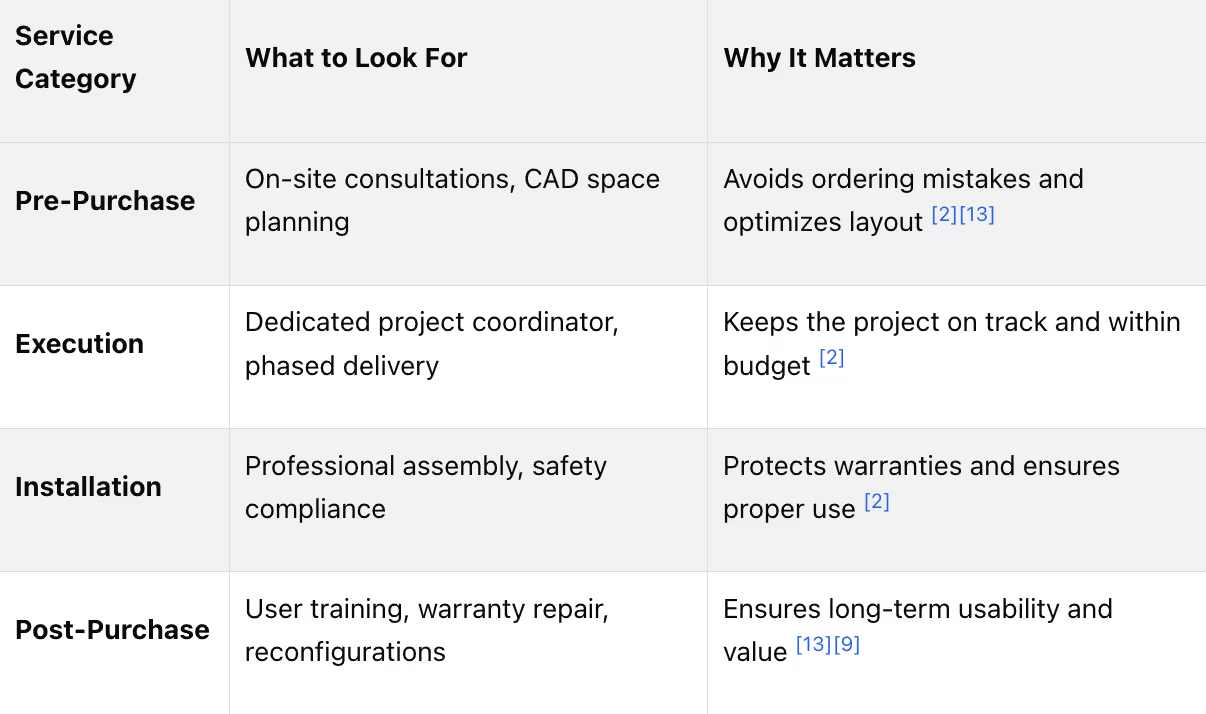
Choosing the right furniture is just one part of the equation - support services can make a big difference in long-term comfort and safety. For example, professional ergonomic programs have been shown to reduce musculoskeletal injuries by 59% and cut absenteeism by 67% when furniture is set up properly and users are trained [1].
Check for providers that offer user training along with installation. Warranty coverage is another key factor. High-end ergonomic chairs often come with 12 to 15-year warranties that cover parts, labor, and service [3]. However, improper self-assembly can void these warranties, so professional installation is a must.
Plan ahead, as the full process - from ordering to installation - can take 7 to 10 weeks [2]. Starting 4 to 12 weeks before your move-in date ensures everything is ready when you need it.
Designing a Custom Ergonomic Home Office
Space Planning Basics
Start by measuring your floor dimensions accurately before arranging your furniture. Heather Stephens, Lead Interior Designer at Work Office Furniture, emphasizes:
"Look at the floor. Often irregularities in wall and window sill alignments, but your furniture sits on the floor, so use this as your guide." [2]
Two key decisions can have a major impact on your setup. First, place your desk in the "command position" - facing the room's entryway. This position helps minimize distractions and gives you a sense of control over your space [14]. Second, align your desk perpendicular to windows. This placement takes advantage of natural light while avoiding screen glare [14]. Proper lighting can make a huge difference, reducing eye strain, headaches, and blurred vision by as much as 84% [4].
Once the layout prioritizes functionality, think about how materials and design choices can reflect your personal style.
Balancing Function and Style
Ergonomic furniture doesn’t have to sacrifice aesthetics. Choose materials that match the atmosphere you want to create. For example:
- Walnut or mahogany finishes for a warm, classic feel.
- Glass, metal, or light oak for a sleek, modern vibe [14].
Create clear boundaries in your space by designating a work zone and a separate lounge area. This separation can improve focus and comfort [4].
Don’t overlook cable management. Furniture with built-in cable channels or under-desk outlet strips can help keep cords neat and out of sight [15].
Keeping Your Setup Flexible
Your work needs may change over time, and a rigid setup can quickly become limiting. Modular furniture systems - which allow you to add, remove, or rearrange pieces - are a smart choice. They can also save you 40% to 60% in costs compared to replacing fixed furniture [6].
For dual-purpose spaces, such as a home office that doubles as a guest room, opt for versatile furniture like castered, nesting, or wall-mounted pieces. For example, a wall-mounted desk requires just 24 inches of width and 12 inches of depth, making it ideal for compact spaces.
"Multi-functional spaces, and furniture that enables open-plan areas to be temporarily repurposed for meetings, gives organizations the flexibility to scale up or down according to changing occupancy and needs." - Guzman de Yarza Blache, Head of Workplace Strategy, EMEA, JLL [2]
When choosing modular furniture, check the warranty as a measure of quality. High-end ergonomic furniture often comes with warranties lasting 12 to 15 years, signaling durability and adaptability [3]. This ensures your setup can grow and change alongside your needs.
The Role of Professional Design and Installation Services
Benefits of Professional Consultation
After a thorough workspace assessment, professional consultation becomes essential to refine your ergonomic setup. Even the best ergonomic furniture can lose its effectiveness if it's improperly placed, sized, or assembled. A trained designer evaluates your space by measuring dimensions, noting window and outlet placements, and understanding your daily work habits before making recommendations.
This on-site evaluation goes beyond just making the space look good. Consultants focus on practical factors like desk height, monitor distance, reach zones, and traffic flow to reduce strain and help prevent long-term musculoskeletal problems. It's much more cost-effective to get the setup right from the beginning than to fix mistakes later.
"Ergonomics is not a product but a process: a process of matching furniture (including tools, workstation, equipment, and environment) to the workers (and their work tasks) to reduce the hazards for injury and discomfort without undermining productivity." - Canadian Centre for Occupational Health and Safety [2]
With this groundwork in place, a coordinated project management process ensures that every detail of your ergonomic setup is executed to meet the highest standards.
End-to-End Project Management
Once your needs are identified during the consultation phase, project management steps in to bring the plan to life. Full-service project management handles everything - from initial space planning to final installation and adjustments. The process typically unfolds in three key phases: curation (evaluating needs, visiting showrooms, and creating layout concepts), iteration (refining the budget, space plan, and product choices), and execution (managing fabrication, delivery, and installation) [13]. A well-organized project usually takes 7 to 10 weeks to complete [2].
Professional installers play a critical role in this process, ensuring that items like height-adjustable desks, monitor arms, and panel systems are assembled to meet manufacturer specifications. This not only protects warranties but also guarantees that the ergonomic features function as intended.
Why Choose Office Gallery International
Office Gallery has been a trusted provider of ergonomic workspace solutions in the Boston, MA area since 1989. Founded by Allen and Gwen Wluka and now operated by husband and wife team Mike & Hilary Troia, the company serves clients in communities like Beverly, Marlborough, Plymouth, Quincy, and Waltham.
Their services cover every stage of the project, including on-site consultations, space planning, product selection from a wide range of commercial-grade manufacturers, and professional installation. For those who want to try before they buy, their 2,500 sq ft showroom in Norwood, MA offers the chance to test ergonomic chairs and sit-stand desks - an essential step since comfort preferences vary greatly.
Office Gallery International’s portfolio highlights their expertise, with examples like the transformation of Seaport Financial Partners' 3,000 sq ft office and a custom ergonomic setup for an accounting firm in Hingham [13].
Conclusion
Key Takeaways
Investing in custom ergonomic workspaces pays off in more ways than one. Studies show ergonomic adjustments can lower musculoskeletal disorder rates by up to 59% and reduce absenteeism by 67% - all while boosting productivity by 10–25% [1]. Considering that office workers spend countless hours in their chairs, the quality of those chairs becomes a critical health and business factor.
A few essential principles stand out: customization beats generic solutions because standard furniture often falls short for those with non-average body dimensions. Contract-grade furniture, which lasts 10–15 years, offers better long-term value compared to cheaper residential options [2]. And perhaps most compelling, every dollar spent on ergonomics returns $3–$6 in savings and productivity gains [1]. These facts highlight why personalized ergonomic solutions matter - for both health and productivity.
"Choosing the right office furniture not only makes the workspace stylish and modern but also affects productivity, creativity, employee well-being, and business profitability." - John Ofield, Founder, ROSI Office Systems [2]
These insights make a strong case for prioritizing ergonomic investments tailored to individual needs.
Next Steps
The journey to a more ergonomic workspace begins with hands-on experience. Testing furniture in person is crucial because comfort is highly individual - what works for one person might not suit another. For those in the Boston area, Office Gallery International’s 2,500 sq. ft. showroom in Norwood, MA provides the perfect opportunity to try out ergonomic chairs and height-adjustable desks.
From there, their team offers a full suite of services, including on-site consultations, space planning with 3D visualization, product selection, and professional installation. Whether you’re upgrading a home office or designing a commercial space, Office Gallery International has the expertise to ensure your workspace is both comfortable and efficient.
FAQs
What chair adjustments matter most for my body?
To make your workspace more comfortable, pay attention to these important chair adjustments:
- Seat height: Ensure your feet are flat on the floor, and your thighs are level with the ground.
- Seat depth: Maintain a small gap (about 2–4 fingers) between the edge of the seat and the back of your knees.
- Lumbar support: Adjust it to match the natural curve of your lower back for proper support.
- Armrests: Position them so your elbows rest at a 90–110° angle, allowing your shoulders to stay relaxed.
How do I size a sit-stand desk for my height?
To determine the correct height for a sit-stand desk, start by measuring your elbow height both while seated and standing. Here's how:
- Wear your regular work shoes to get an accurate measurement.
- Relax your shoulders and bend your elbows at a 90-degree angle.
- Measure the distance from the floor to the underside of your elbow.
The desk should be adjustable to cover these measurements, with at least a 1-inch margin for flexibility. This helps ensure the desk allows for relaxed shoulders and keeps your wrists in a natural, comfortable position.
Is professional installation really worth it?
Yes, opting for professional installation is a smart choice. It ensures your ergonomic furniture is assembled safely and correctly, following the manufacturer's guidelines. At Office Gallery International, their services include comprehensive project management, which covers everything from ensuring warranty compliance to making post-installation adjustments. Plus, professional installers handle coordination with building management and other vendors, saving you time and effort while setting up a workspace designed for comfort and productivity right from the start.
•••
Ready to transform your workspace? Contact us today to explore how our expert team can design a tailor-made solution that aligns with your brand and enhances productivity. From design inspiration to project management, we'll guide you through every step of the process to create an office space that fosters creativity, collaboration, and success. Let's embark on a journey to redefine your workspace together.
Key Points
What is the measurable business and health case for investing in custom ergonomic furniture over standard alternatives?
- 59% reduction in musculoskeletal injuries through professional ergonomic programs — when furniture is properly fitted and users are trained on adjustment and positioning, the reduction in injury rates is documented and substantial, not marginal
- 67% reduction in absenteeism from ergonomic interventions — fewer injuries translate directly to fewer missed workdays, a productivity and operational continuity benefit that compounds across a workforce over time
- $3 to $6 returned for every dollar invested in ergonomics — the ROI on ergonomic furniture investment is not theoretical; it reflects the combined savings from reduced injury claims, lower absenteeism, and measurable productivity improvement
- 31% less discomfort and 22% higher perceived productivity for users of highly adjustable chairs — compared to standard chairs, the performance differential is significant enough to affect daily output rather than only long-term health outcomes
- Contract-grade furniture lasting 10 to 15 years versus rapid wear in residential-grade alternatives — office workers spend approximately 1,700 hours per year in their chairs; durability at this usage level requires commercial-grade construction that residential furniture is not engineered to sustain
- Warranty length as a direct signal of build quality — manufacturers offering 12 to 15-year warranties on frames and mechanisms are committing to engineering durability; short warranties on ergonomic furniture indicate that the manufacturer does not expect the product to perform at that level
What chair adjustability features produce the greatest ergonomic benefit and how should each be configured?
- Seat height adjusted first, spanning 15 to 22 inches — the foundation of all other adjustments; feet must rest flat on the floor with thighs level and knees at 90 degrees before lumbar, armrest, or recline settings are addressed
- Sliding seat pan maintaining a 2 to 4 finger gap at the knee — preserves healthy blood flow by preventing pressure on the back of the knees, a configuration detail that fixed seat pan chairs cannot accommodate for users outside the average body proportion range
- 4D armrests keeping forearms parallel to the floor — height, width, depth, and pivot adjustability accommodates varying shoulder widths and task types; fixed armrests that cannot be repositioned force shoulder elevation that accumulates into neck and upper back discomfort over a workday
- Synchro-tilt recline at 110 to 130 degrees reducing lumbar disc pressure — the two-to-one backrest-to-seat movement ratio maintains pelvis support through the full recline range, unlike basic tilt mechanisms that rotate the seat pan and shift the user's weight forward
- Adjustable lumbar support in both height and depth targeting L3–L4 vertebrae — fixed lumbar pads that cannot be repositioned to match the individual's spinal curve indicate a lower-quality design; adjustable dual-pad systems that independently support the sacrum and lumbar areas provide the most effective lower back support
- Weight-sensitive recline mechanisms for shared workstations — automatically adapt recline resistance to different users without requiring manual adjustment, making them practical for hot-desking and high-turnover seating environments
What desk and workstation specifications define a genuinely ergonomic custom setup versus a standard adjustable desk?
- 22 to 48 inch height range accommodating the full user spectrum — from seated wheelchair users at the low end to tall standing users at the high end; desks that max out below 48 inches exclude meaningful portions of the standing-height user population
- Electric lift speed of at least 1.5 inches per second with programmable memory presets — slow lift mechanisms and manual height setting discourage position changes throughout the day, which is precisely what sit-stand desks are designed to encourage; ease of adjustment directly determines whether the feature gets used
- Softened front edges reducing forearm strain during extended typing — a design detail that distinguishes ergonomic desk specification from standard desk specification and that becomes meaningful over the accumulated hours of a full workday
- Monitor arm positioning screen 20 to 40 inches away with top at or below eye level — reduces eye strain by up to 40% and eliminates the neck flexion that monitors placed directly on desk surfaces produce; a monitor arm paired with a compact keyboard frees 6 to 8 additional inches of desk depth
- Keyboard tray with negative tilt keeping wrists neutral and elbows at 90 degrees — positions the hands below elbow level in a way that flat desk surfaces cannot, minimizing the repetitive strain that accumulates from sustained typing with elevated wrists
- Alternating between sitting and standing every 20 to 30 minutes as the usage standard — the ergonomic benefit of a sit-stand desk is realized through position changes throughout the day, not simply from having the adjustment capability available; programmable presets support this behavior by reducing the effort of each transition
How should home office ergonomic setups balance space planning, aesthetics, and long-term flexibility?
- Accurate floor measurement before any furniture decisions — wall and window sill irregularities can mislead; the floor is the actual furniture placement surface and should be the measurement reference, as Lead Interior Designer Heather Stephens advises
- Desk in the command position facing the room's entryway — reduces distraction and provides a sense of spatial control; a positioning decision that costs nothing but affects focus throughout every workday
- Desk perpendicular to windows eliminating screen glare while capturing natural light — proper lighting reduces eye strain, headaches, and blurred vision by up to 84%; window alignment is a layout decision with measurable visual comfort consequences
- Material selection matching both durability requirements and aesthetic intent — walnut or mahogany finishes for warm traditional environments; glass, metal, or light oak for modern minimal aesthetics; the ergonomic and aesthetic functions of furniture are not competing priorities when material selection is approached deliberately
- Modular furniture systems saving 40 to 60% compared to replacing fixed furniture — work needs change over time, and modular systems that can be reconfigured, added to, or reduced accommodate that change without requiring full furniture replacement
- Clear work zone and lounge area separation improving focus and comfort — designated spatial boundaries between work and rest functions improve the psychological separation that sustained focus requires, particularly in home environments where those boundaries are otherwise absent
What role do professional consultation and project management play in maximizing the value of ergonomic furniture investment?
- On-site evaluation addressing dimensions, window placement, outlet locations, reach zones, and traffic flow — a trained designer identifies the constraints and opportunities that self-assessment misses; the most common ergonomic setup failures — poorly placed desks, inaccessible outlets, inadequate monitor distance — are preventable through professional evaluation before furniture is ordered
- Professional setup and training delivering the 59% injury reduction and 67% absenteeism reduction — ergonomic furniture without proper configuration and user training produces a fraction of the documented performance improvement; the furniture is the tool, proper setup is what makes the tool effective
- Project management spanning curation, iteration, and execution over 7 to 10 weeks — the three-phase process from evaluating needs and visiting showrooms through refining the budget and space plan to managing fabrication, delivery, and installation requires coordination that self-managed furniture procurement rarely achieves at the same standard
- Professional installation protecting 12 to 15-year warranties — improper self-assembly voids warranties on high-end ergonomic furniture; the warranty value itself is an argument for professional installation, independent of the setup quality and safety benefits
- Showroom testing as an essential step before procurement — comfort is highly individual; what supports one person's lumbar region optimally may not suit another's, making in-person testing before purchase a prerequisite for confident ergonomic furniture selection rather than an optional step
- Office Gallery International's full-service model from consultation through installation — serving the Greater Boston area since 1989 across Beverly, Marlborough, Plymouth, Quincy, and Waltham, with a 2,500 square foot Norwood showroom, 3D space planning visualization, and end-to-end project management that covers every phase from product selection through post-installation adjustment
What common mistakes should Boston-area businesses and home office users avoid when specifying custom ergonomic furniture?
- Relying on guesswork instead of accurate measurements — standard desks can consume up to 30% more floor space than custom-sized alternatives; measurement errors that seem minor at the planning stage produce layouts that feel permanently cramped or inefficient after installation
- Skipping the 80/20 task analysis before furniture selection — designing the workspace around infrequent tasks while underserving the tasks performed 80% of the time produces a setup that feels wrong every day rather than occasionally; primary task requirements should define primary furniture specifications
- Selecting residential-grade furniture for commercial or high-use environments — residential furniture is not engineered for 1,700 hours of annual use; the cost savings at purchase are consistently outweighed by early wear, reduced ergonomic performance, and replacement costs within a few years
- Failing to allow 3 inches of clearance between furniture and walls — cable and power cord routing requires this clearance; setups that ignore it produce visible cable management problems and inaccessible outlet locations that persist for the life of the furniture placement
- Underinvesting in accessories at 5 to 10% of the furniture budget — monitor arms, keyboard trays, footrests, and anti-fatigue mats deliver disproportionate ergonomic return relative to their cost; omitting them from a custom setup leaves the most cost-effective ergonomic improvements unrealized
- Beginning the procurement process too close to a move-in date — the full process from ordering through installation takes 7 to 10 weeks; starting fewer than 4 weeks before a required completion date produces either delayed setup or compromised product selection from whatever is immediately available rather than what is ergonomically appropriate