
The Science Behind Ergonomic Office Chairs
Ergonomic chairs reduce musculoskeletal injuries by 59%, absenteeism by 67%, and deliver $3 to $6 per dollar invested. Research shows a 47% reduction in muscle fatigue from flexible seat pan designs and 13 to 24% lower lumbar muscle activity from anterior tilt. A standard chair costs $33,300 per employee over 12 years versus $7,800 for a premium ergonomic model.
Post Summary
Peer-reviewed research supports specific, measurable ergonomic chair outcomes across multiple dimensions. A 2025 study found that flexible seat pan designs reduced low-frequency muscle fatigue indicators by 47% compared to traditional flat-seat chairs. A two-hour study found participants using dynamic seat pans reported significantly less pain and measurable reduction in calf swelling compared to standard chair users. Lumbar support with off-loading posture reduces lumbar paraspinal muscle activity by 13 to 24% in healthy individuals, and proper backrests decrease peak back pressure by 35% and average pressure by 20%. At the organizational level, ergonomic programs reduce musculoskeletal injuries by 59% and absenteeism by 67%, with employee satisfaction improving by 24% and turnover rates falling by 48% following ergonomic improvements.
The spine naturally follows an S-shaped curve with the lumbar region slightly arched forward — called lumbar lordosis. Standard chairs that push the pelvis backward flatten this curve, creating uneven pressure on spinal discs. Slumped sitting increases L3 cortical bone stress by up to 487% during rotational movements compared to standing — a dramatic amplification of spinal load that accumulates over hours of daily seated work. Proper lumbar support preserves the natural arch, redistributes weight evenly across the ischial tuberosities, and reduces disc pressure. A 20-degree anterior seat tilt further engages the internal oblique muscles that stabilize the pelvis and help maintain an upright position throughout the workday.
Adjustability matters because bodies vary significantly in dimension and proportion, and a chair calibrated for one body type forces another into compensatory postures that accumulate into musculoskeletal strain over time. Correct seat height positions feet flat on the floor with knees at approximately 90 degrees and thighs parallel to the ground. Seat depth should leave a 2 to 3 finger gap between the seat edge and the back of the knees — too shallow fails to support the thigh, too deep compresses the popliteal area and restricts circulation to the lower legs. Chairs with flexible multi-segmented seat pans allow the pelvis to move freely. Armrests should position elbows at 90 to 110 degrees to eliminate shoulder elevation. Proper adjustment order is seat height, seat depth, lumbar support, armrests, and recline tension.
Dynamic seating encourages the small, natural postural movements — fidgets and shifts — that reduce perceived pain, vary spinal load, and create a pumping action within intervertebral discs that keeps them nourished. Research published in the International Journal of Environmental Research and Public Health found that dynamic chairs promote subtle posture shifts and activate trunk muscles more effectively than static designs. Sitting in one position for extended periods restricts circulation, increases lower limb pressure, and leads to the heavy or swollen leg sensation common at the end of long workdays. The research finding that deep trunk muscles begin to fatigue after just 15 to 25 minutes of static sitting establishes that even a well-adjusted static chair is insufficient for sustained seated work without position variation — making dynamic seat pan design a functional requirement rather than a premium feature.
Low back pain causes approximately 100 million lost workdays annually in the U.S. and costs businesses $28 billion in productivity losses each year — and workers who sit for long periods face a 3.2 times higher risk of developing it within their first year on the job. Over a 12-year period, replacing a standard $150 chair every few years combined with the hidden costs of back pain and lost productivity amounts to approximately $33,300 per employee. A premium ergonomic chair with a long-term warranty reduces that total to approximately $7,800 — a saving of over $2,000 per year per employee before accounting for improved sleep, reduced stress, and better quality of life. Every dollar invested in ergonomics returns $3 to $6 through productivity gains and cost reductions, making ergonomic seating a financial as much as a health decision.
Ergonomic office chairs aren't just about comfort - they're designed to reduce physical strain, improve posture, and boost overall productivity. Research shows that sitting for long hours in poorly designed chairs can lead to back pain, muscle fatigue, and poor circulation. Ergonomic designs address these issues by supporting the body’s natural posture and encouraging small movements to reduce fatigue.
Key takeaways:
- Lumbar support preserves the spine’s natural curve, reducing back pain.
- Adjustable seat height and depth ensure proper posture and circulation.
- Dynamic movement features help prevent muscle fatigue and improve blood flow.
- Studies show a 47% reduction in muscle fatigue and better focus with ergonomic chairs.
- Ergonomic programs can cut musculoskeletal injuries by 59% and absenteeism by 67%.
Investing in ergonomic chairs not only improves health but can also save businesses money through increased productivity and reduced turnover.

What Research Says About Ergonomic Office Chairs
What Is Ergonomics?
Ergonomics is all about designing spaces, tools, and products to suit the people using them. The idea is simple: reduce physical strain while improving comfort, safety, and efficiency. When it comes to office chairs, this means creating designs that support your body’s natural posture instead of forcing you into awkward positions. Without these considerations, a poorly designed chair can amplify discomfort and strain over time.
Key Design Features of Ergonomic Chairs
Just because a chair is labeled "ergonomic" doesn’t mean it meets the standards that research supports. Studies highlight specific features that actually make a difference in reducing strain and promoting comfort:
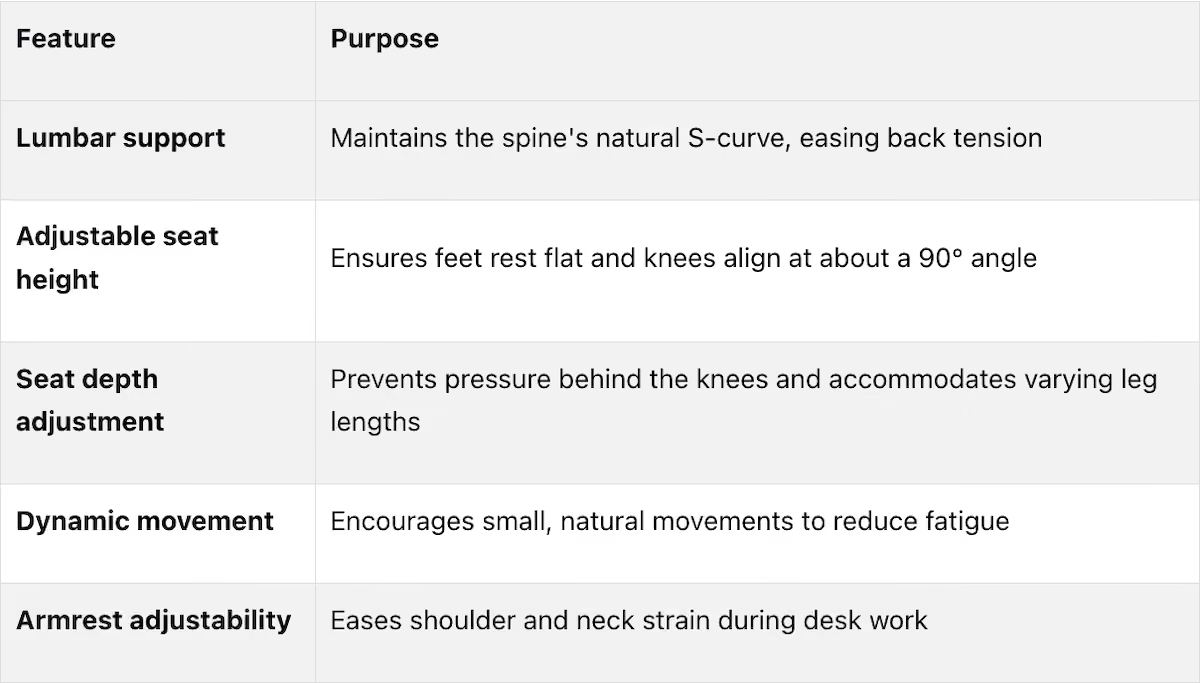
Research published in the International Journal of Environmental Research and Public Health underscores the importance of dynamic movement in chairs. It found that dynamic chairs promote subtle shifts in posture and activate trunk muscles more effectively than static designs [3].
"The increase in the path length of the chair center of the dynamic chair indicates changes in the chair motion compared to those of the static chair." - C. Nüesch, International Journal of Environmental Research and Public Health [3]
This adaptability in design isn’t just a gimmick - it has measurable benefits for those who sit for long stretches.
Who Benefits from Ergonomic Office Chairs?
Research shows that ergonomic chairs aren’t just about comfort - they can lead to tangible health improvements. For example, a November 2021 study revealed that participants using chairs with dynamic seat pan designs reported less pain and reduced calf swelling during prolonged sitting compared to those using standard chairs [2]. This reduction in calf swelling points to better circulation, something traditional chairs often fail to address.
And the benefits go beyond office workers. Whether you’re working from home, in a hybrid setup, or even spending hours gaming or studying, an ergonomic chair can make a noticeable difference in how your body feels after long periods of sitting. It’s not just about luxury - it’s about long-term well-being.
How Ergonomic Chairs Reduce Physical Strain
How Lumbar Support Reduces Back Pain
The spine naturally follows an S-shaped curve, but many standard chairs push the pelvis backward, flattening this curve and creating uneven pressure on the spinal discs. Lumbar support works to preserve the spine's natural arch - called lumbar lordosis - which helps distribute weight more evenly and reduces strain.
"Correct sitting posture involves maintaining the spine's natural S-shaped curve, with the lumbar region slightly arched forward (lumbar lordosis), the pelvis rotated anteriorly, and the body weight evenly distributed across the ischial tuberosities." - Seongwoo Park et al., Applied Sciences [1]
Using forward-tilting seat pans can further improve posture. They reduce pressure on the intervertebral discs and engage the internal oblique muscles, which stabilize the pelvis and help you maintain an upright position throughout the day [4].
Why Adjustability Matters for Comfort
Not all bodies are built the same, so adjustability is key to ensuring a chair fits you properly. When the seat height and depth are set correctly, your feet should rest flat on the floor, your knees should form a 90° angle, and there should be no pressure behind your knees. This alignment reduces lower back strain and accommodates different leg lengths. Chairs with flexible, multi-segmented seat pans allow the pelvis to move freely, and studies have shown that such adjustability helps reduce muscle fatigue and overall strain [1].
This tailored fit not only boosts comfort but also prepares your body for small, natural movements that improve circulation.
Dynamic Movement and Blood Circulation
Dynamic seating doesn’t just support spinal health - it also promotes better blood flow, helping you stay focused and comfortable during long work sessions. Sitting in one position for too long restricts circulation and increases pressure in the lower limbs, often leading to heavy or swollen legs by the end of the day.
Chairs designed for dynamic movement help combat these issues. In one study lasting two hours, participants using a dynamic seat pan reported significantly less pain (p = 0.031) and a noticeable reduction in calf swelling (p < 0.001) compared to those using a standard chair [2].
"Reducing the static nature of sitting, with small postural movements of the spine such as fidgets and shifts, appears to play a role in modulating perceived pain." - D. De Carvalho, Researcher [2]
These small movements also vary the load on the spine, creating a pumping action within the intervertebral discs. This process is crucial for keeping the discs nourished and ensuring long-term spinal health [6].
Ergonomic Seating, Comfort, and Work Performance
How Physical Comfort Affects Focus and Output
When you're physically uncomfortable, it’s tough to stay focused or get much done. Studies reveal that employees who use adjustable workstations and receive ergonomic training experience far less discomfort and perform better than those with limited training [8].
In a typical office, workers switch tasks up to 140 times an hour [3]. Dynamic chairs, which encourage small adjustments, help keep discomfort at bay. This not only makes work less physically taxing but also improves productivity by preventing distractions caused by discomfort.
"Dynamic sitting may mitigate low back pain during prolonged seated work... without negatively impacting productivity during seated computer work." - Applied Ergonomics [5]
Ergonomic Seating and Workplace Efficiency
Ergonomic chairs do more than just make you feel better in the moment - they contribute to long-term workplace efficiency. A staggering 40% to 80% of computer users report musculoskeletal issues [8]. Ergonomic seating helps combat this by reducing strain on spinal muscles and redistributing pressure away from sensitive areas like the sit bones. This means less muscle fatigue, sharper focus, and more consistent performance. One study summed it up perfectly:
"The provision of control over the work environment through adjustability and knowledge may enhance worker effectiveness as well as health." - Robertson and Huang [8][9]
Reduced Absenteeism and Improved Well-Being
Low back pain (LBP) is a major reason people miss work. In the U.S. alone, it leads to about 100 million lost workdays every year and costs businesses $28 billion in productivity losses [7]. It’s also the top cause of disability for adults under 50. Workers who sit for long periods are particularly vulnerable, facing a 3.2 times higher risk of developing LBP within their first year on the job [7].
What Makes a Chair Really Good for Your Back?
Chair Design Features Backed by Research
Building on the earlier discussion of ergonomic benefits, this section delves into research findings that highlight specific chair design features and their impact on comfort and health.
Lumbar Support and Spinal Health
Prolonged sitting puts a lot of strain on the lower back. The natural S-shaped curve of the lumbar spine, known as lumbar lordosis, helps absorb and distribute weight efficiently. When this curve flattens due to poor posture, the stress on the spine skyrockets. Research shows that slumped sitting can increase L3 cortical bone stress by as much as 487% during rotational movements compared to standing [10]. Proper lumbar support helps counteract these effects by reducing disc pressure and calming overactive back muscles.
An "off-loading" posture - achieved through enhanced lumbar support and reduced pressure on the ischial area - has been shown to lower lumbar paraspinal muscle activity by 13% to 24% in healthy individuals [7]. This reduction in spinal stress not only enhances comfort but also supports better productivity.
"Maintaining an erect sitting position with increased lumbar lordosis during seated activities can effectively reduce intradiscal pressure and cortical bone stress associated with degenerative disc diseases and spinal deformities." - MDPI Bioengineering [10]
Additionally, using a backrest can significantly reduce pressure on the back, with a 35% decrease in peak pressure and a 20% drop in average pressure [11].
Seat Height, Depth, and Adjustability
The height and depth of a chair’s seat are critical to maintaining proper posture and ensuring good circulation. Research-backed guidelines suggest that your feet should rest flat on the floor, thighs should be parallel to the ground, and knees should form about a 90° angle [3][1]. Deviating from these principles can lead to a backward tilt of the pelvis, flattening the lumbar curve and increasing pressure on the spinal discs.
Seat depth is equally important. A seat that’s too deep can press against the back of your knees, restricting blood flow to the lower legs. Experts recommend leaving a small gap - about the width of two to three fingers - between the edge of the seat and the back of your knees [1].
In a 2025 study, researchers found that a flexible seat pan design reduced muscle fatigue indicators at lower frequencies (0–20 Hz) by 47% compared to traditional flat-seat chairs. It also increased higher-frequency muscle activity by 34%, indicating healthier, less fatigued muscles [1]. Adjustability, including features like recline and tilt functions, isn’t just a convenience; it’s essential for promoting dynamic, healthy sitting.
Recline and Tilt Features for Long-Term Comfort
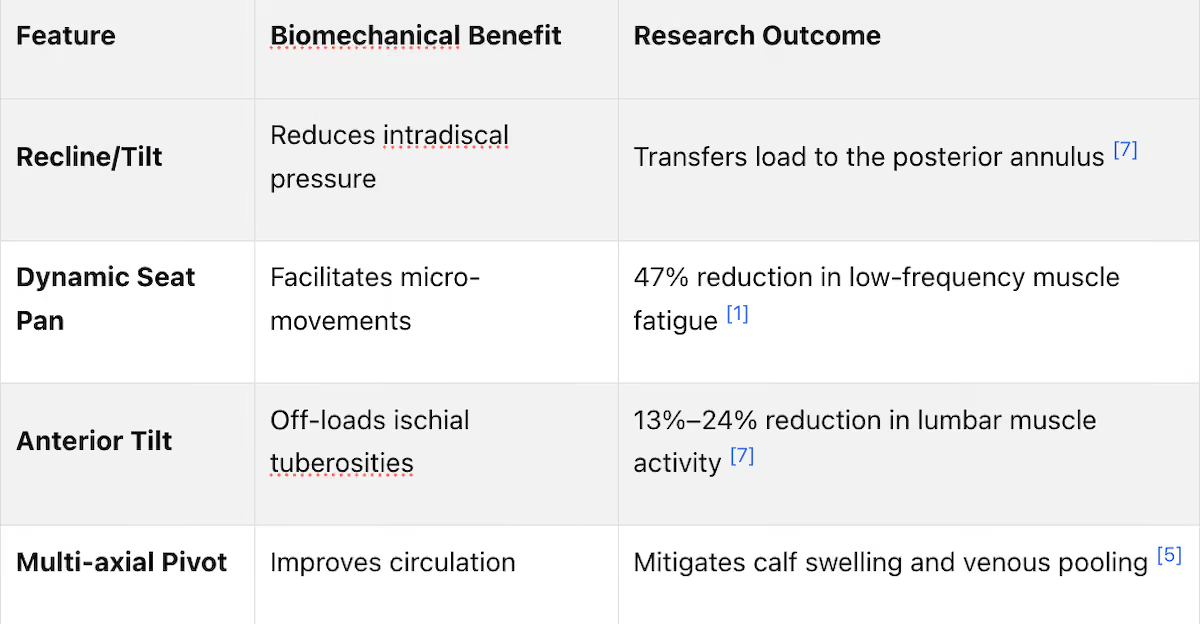
Recline and tilt mechanisms are essential for encouraging movement while seated, which helps reduce pressure and muscle fatigue. These features work hand-in-hand with other adjustable elements to create a comprehensive ergonomic experience. For instance, a 20° anterior tilt can reduce lumbar muscle activity by up to 24% [7], while multi-axial seat designs help improve circulation and reduce calf swelling [5].
"Dynamic chair designs that facilitate movement while seated may be an ideal alternative for those that do not leave their chair frequently." - Applied Ergonomics [5]
The table below highlights the key benefits of recline and tilt features based on research:
Putting the Research to Work in Real Offices
Ergonomic research only makes a difference when it’s applied where it counts - at actual workstations. Knowing that lumbar support reduces disc pressure is helpful, but it’s meaningless unless it translates into a properly adjusted chair for someone at their desk.
Assessing Your Workstation Setup
Before buying new chairs, take a walk through your office and observe how people are sitting. A quick look can uncover common problems like feet dangling off the floor, monitors positioned too high or low, or seat edges pressing into legs [14].
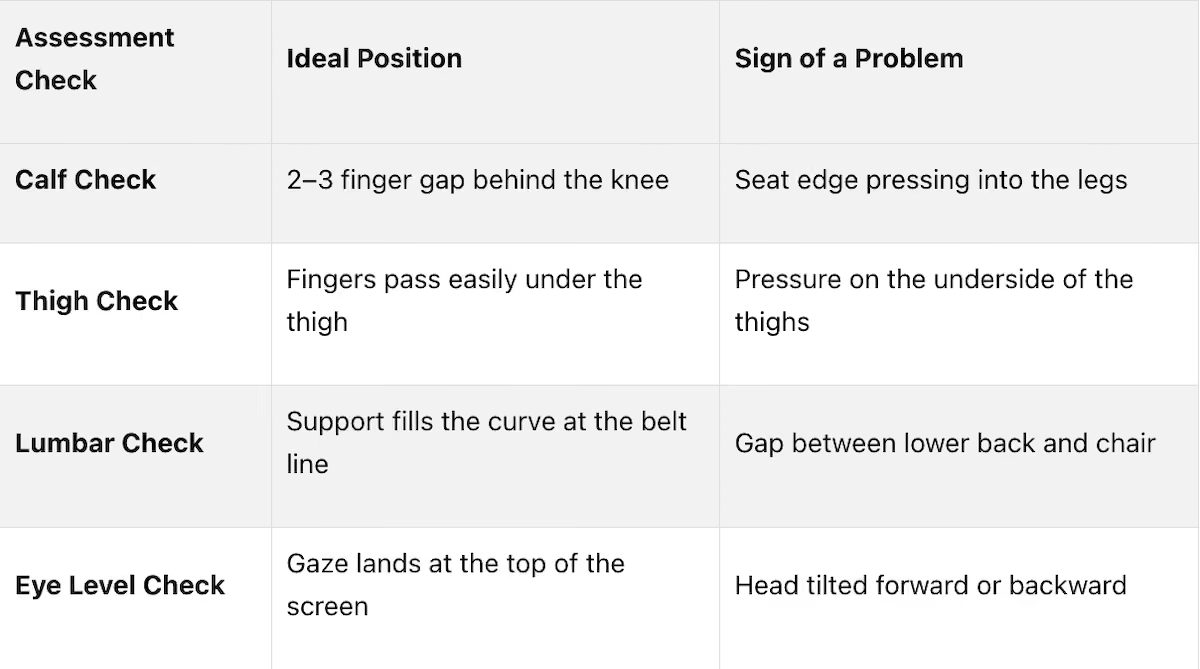
Simple checks can identify these issues. For example, make sure there’s a 2–3 finger gap between the seat edge and the back of the knees, that fingers can slide easily under the thighs, and that lumbar support fits snugly against the natural curve of the lower back [15].
It’s also worth noting employees who move around often - known as active sitters. These individuals might benefit from chairs with dynamic backrests or self-adjusting features rather than traditional models [13]. Since body types vary widely, standard chairs often fall short in meeting the diverse needs of a workforce, particularly when it comes to seat depth and height adjustments [12][13].
This kind of assessment is crucial for tailoring training and adjustments to optimize workstations.
Teaching Employees How to Adjust Their Chairs
Once you’ve identified workstation issues, the next step is teaching employees how to properly adjust their chairs. Simply buying ergonomic chairs without providing adjustment training is a mistake that wastes time and money.
"A chair purchase without adjustment, workstation review, and implementation support is not an ergonomic intervention. It is a furniture purchase." - SIHOO Australia [14]
The training doesn’t have to be overly complex. A 30-minute hands-on session on the day the chairs are delivered can make a huge difference. A trained assessor can guide each employee through adjustments in this order: seat height, seat depth, lumbar support, armrests, and recline tension [16][12][17]. Posting a simple adjustment guide at each desk is another helpful touch, ensuring employees can reset their chairs without needing to dig up a manual [14].
Encourage employees to avoid sitting in one position for too long. Even in a perfectly adjusted chair, staying static for extended periods isn’t ideal. Research shows that deep trunk muscles start to fatigue after just 15–25 minutes of sitting still [14]. The takeaway?
"The best posture is the next posture." - Cochrane [17]
How Office Gallery International Supports Ergonomic Workspaces

Turning ergonomic research into actionable solutions, Office Gallery International offers hands-on support to help businesses implement these principles. Their process kicks off with an on-site consultation to evaluate existing workstation setups, assess employee needs, and recommend chairs tailored to different body types and work habits [19].
Using advanced 3D space planning software, they can design layouts that ensure optimal functionality before any furniture is purchased or moved. This includes verifying circulation zones, with recommended clearance behind workstations ranging from 47 to 59 inches [21]. After installation, they provide on-site training to ensure employees know how to adjust their chairs from day one [18].
"Our team provides on-site consultations... to evaluate your current workspace, understand your goals, and recommend customized office furniture solutions that balance functionality, layout efficiency, and budget." - Office Gallery International [19]
Their Norwood, MA showroom spans 2,500 square feet, allowing clients to test seating options in person before committing to a full-office rollout [19][20]. For businesses unsure about making a large-scale purchase, running a pilot program with 5–10% of staff over 6–8 weeks is a smart way to confirm the best chair choices for their workforce [21].
Conclusion: Why Ergonomic Office Chairs Are Worth the Investment
Studies confirm that ergonomic office chairs aren't just about comfort - they're about improving health, efficiency, and overall workplace well-being. These chairs promote better spinal alignment, enhance circulation, reduce fatigue, and even boost productivity.
Consider the numbers: ergonomic programs can reduce musculoskeletal injuries by up to 59% and cut absenteeism by as much as 67% [18]. Employees are 24% more satisfied after ergonomic improvements, and businesses report 48% lower turnover rates [18]. Even financially, the investment makes sense - every $1 spent on ergonomics typically yields $3 to $6 in returns through productivity gains and cost reductions [18]. Over a 12-year period, replacing a standard $150 chair every few years, combined with the hidden costs of back pain and lost productivity, can amount to approximately $33,300 per employee. A premium ergonomic chair with a long-term warranty? That cost drops to about $7,800.
The financial benefits are clear:
"The premium chair saves you over $2,000 per year - and that is not even counting improved sleep, reduced stress, and better quality of life." - SitBetterLab [22]
But the advantages extend beyond dollars and cents. As Hilary Troia, President of Office Gallery International, explains:
"By practicing proper posture or taking advantage of the ergonomic chairs available, a sore back and stiff legs can be eliminated from the drawback list." [18]
Investing in ergonomic seating is more than a business decision - it's a commitment to the health and productivity of your team. When paired with proper adjustments and consistent use, these chairs create a ripple effect: fewer injuries, better focus, reduced absenteeism, and a healthier, more engaged workforce. The results speak for themselves.
FAQs
How do I adjust an ergonomic chair to fit my body?
Getting your ergonomic chair set up correctly can make a big difference in your comfort and posture. Here's how to fine-tune the key adjustments:
- Seat height: Adjust so your feet rest flat on the floor, your knees are bent at a 90–110° angle, and your hips are slightly higher than your knees.
- Seat depth: Make sure there's enough space - about a 2–3 finger gap - between the edge of the seat and the back of your knees.
- Lumbar support: Position the support to match the natural curve of your lower back.
- Armrests: Rest your arms so your shoulders stay relaxed, and your elbows form a 90° angle.
- Recline/tilt tension: For desk work, aim for a slight recline of 100–110° to keep things ergonomic.
If you're near Boston, MA, Office Gallery International offers custom office furniture and workspace solutions to help you create the perfect setup.
What makes a chair truly ergonomic (not just the label)?
An ergonomic chair is designed with human biomechanics in mind, ensuring it adapts to the natural movements and posture of the body. Key features to look for include:
- Adjustable seat height and depth: This allows the chair to accommodate different body sizes and leg lengths.
- Lumbar support: Proper lumbar support helps maintain the spine’s natural S-curve, reducing strain and promoting better posture.
- Encouragement of movement: A good chair lets you shift positions easily, helping to prevent fatigue from sitting too long.
- Even weight distribution: By reducing pressure points, an ergonomic chair improves comfort and minimizes discomfort during extended use.
As Office Gallery International points out, tailoring your chair to fit your specific tasks and workspace is essential for both comfort and productivity.
How often should I change posture or move while sitting?
Frequent changes in posture can play a big role in reducing discomfort and fatigue. Research indicates that healthy individuals naturally adjust their posture 8–19 times per hour. However, increasing this to around 30 shifts per hour can make a noticeable difference in easing neck, shoulder, and back pain. Additionally, alternating between sitting and standing every 30 minutes has been shown to reduce lower back pain and fatigue - all without impacting productivity. To support these healthier habits, Office Gallery International offers ergonomic office solutions designed to encourage more active and comfortable work environments.
•••
Ready to transform your workspace? Contact us today to explore how our expert team can design a tailor-made solution that aligns with your brand and enhances productivity. From design inspiration to project management, we'll guide you through every step of the process to create an office space that fosters creativity, collaboration, and success. Let's embark on a journey to redefine your workspace together.
Key Points
What does peer-reviewed ergonomic research reveal about chair design features and their measurable impact on spinal health?
- 47% reduction in low-frequency muscle fatigue from flexible seat pan designs — a 2025 study comparing flexible and traditional flat-seat chairs found that the flexible design reduced muscle fatigue indicators at 0 to 20 Hz by nearly half, while simultaneously increasing higher-frequency muscle activity by 34% — indicating healthier, more engaged rather than fatigued muscles
- 487% increase in L3 cortical bone stress during slumped sitting versus standing — this dramatic amplification of spinal load from postural collapse establishes that poor sitting posture is not a minor comfort issue but a significant biomechanical stressor accumulating across every hour of daily seated work
- 35% decrease in peak back pressure and 20% reduction in average pressure from proper backrests — these pressure reductions are achieved through correct lumbar support positioning alone, without requiring any chair movement or active engagement from the user
- 13 to 24% reduction in lumbar paraspinal muscle activity from off-loading posture — achieved through enhanced lumbar support and reduced ischial pressure, this reduction in constant muscle activation is what prevents the end-of-day lower back fatigue that workers using standard chairs experience as normal
- Dynamic seat pan designs showing significantly less pain at p = 0.031 and reduced calf swelling at p < 0.001 — these statistical significance levels establish that the pain and circulation benefits of dynamic seating are not marginal or subjective but measurable and reproducible across study populations
- Deep trunk muscles beginning to fatigue after just 15 to 25 minutes of static sitting — this finding establishes that static ergonomic chairs, however well-adjusted, cannot prevent fatigue accumulation during sustained seated work; dynamic movement features are a functional requirement for prolonged sitting, not a premium add-on
How do lumbar support design and seat geometry work together to maintain spinal health during prolonged sitting?
- Lumbar lordosis preservation as the primary lumbar support function — the natural S-curve of the spine with the lumbar region arched forward distributes sitting weight evenly across the ischial tuberosities; chairs that flatten this curve by pushing the pelvis backward concentrate disc pressure in ways that accumulate into chronic lower back pain
- Anterior tilt reducing lumbar muscle activity by up to 24% — a 20-degree forward seat tilt engages the internal oblique muscles that stabilize the pelvis and offloads the ischial tuberosities, reducing the sustained muscular effort that maintaining upright posture in a horizontal seat requires
- Intervertebral disc nourishment through dynamic movement pumping action — the discs between vertebrae are avascular and depend on mechanical compression and decompression cycles for nutrient delivery; the small postural movements that dynamic chairs encourage create this pumping action; static sitting eliminates it
- 2 to 3 finger seat depth gap as the circulation protection specification — seats too deep compress the popliteal area behind the knees, restricting blood flow to the lower legs and producing the heaviness and swelling that workers commonly attribute to long days rather than to incorrect seat depth; this gap is the measurable standard for correct seat depth calibration
- Forward-tilting seat pans reducing intervertebral disc pressure and engaging stabilizing muscles — this design feature produces the postural improvement that lumbar support alone cannot achieve; combined, forward tilt and lumbar support address both the muscular and structural dimensions of spinal health during sustained sitting
- Slumped sitting increasing disc pressure to levels that accelerate degenerative disc disease — maintaining lumbar lordosis through chair design is not a comfort preference but a structural protection mechanism against the disc degeneration that chronically elevated intradiscal pressure produces over years of daily seated work
Why do dynamic movement features in chair design produce measurably better health outcomes than static ergonomic designs?
- Small postural movements modulating perceived pain during prolonged sitting — researcher D. De Carvalho's finding that fidgets and shifts play a role in modulating perceived pain establishes that the micro-movements dynamic chairs facilitate are physiologically meaningful, not merely psychological
- Trunk muscle activation more effective in dynamic chairs than static designs — the International Journal of Environmental Research and Public Health research showing greater trunk muscle activation in dynamic chairs means that dynamic seating maintains muscle engagement that static designs allow to switch off — the difference between muscles working correctly and muscles fatiguing through disuse
- Multi-axial pivot designs mitigating calf swelling and venous pooling — improved circulation through dynamic movement prevents the venous pooling in lower limbs that prolonged static sitting produces; reducing calf swelling is a measurable circulation outcome with direct implications for long-term cardiovascular health in desk workers
- Dynamic sitting not negatively impacting productivity while reducing low back pain — Applied Ergonomics research establishing that dynamic sitting mitigates low back pain during prolonged computer work without productivity loss directly addresses the objection that movement-promoting features distract from focused work
- Workers switching tasks up to 140 times per hour in typical offices — this natural cognitive variability already interrupts sustained focus; dynamic chairs that accommodate the small physical movements accompanying cognitive task switching reduce the discomfort that builds when physical position cannot shift with mental attention
- "The best posture is the next posture" — the Cochrane review principle that no single sitting position is optimal for sustained periods encapsulates the rationale for dynamic chair design; variety in posture is the ergonomic goal, and static chairs structurally prevent it
How should organizations assess existing workstations and implement ergonomic chair adjustments for maximum health impact?
- Observational walk-through before any purchasing decisions — watching how employees actually sit reveals the practical problems — feet dangling, monitors misaligned, seat edges pressing into legs — that specification-sheet comparisons of chair features cannot surface; the assessment precedes the solution
- Four-point assessment framework identifying the most common postural failures — the calf check for 2 to 3 finger gap behind the knee, the thigh check for fingers passing easily under the thigh, the lumbar check for support filling the curve at the belt line, and the eye level check for gaze landing at the top of the screen together identify the adjustments that produce the greatest postural improvement per unit of effort
- Active sitter identification directing dynamic chair recommendations — employees who move frequently benefit from chairs with dynamic backrests or self-adjusting features rather than traditional models; applying a single chair specification uniformly across a workforce with diverse movement patterns and body types underserves both ends of the physical activity spectrum
- 30-minute hands-on adjustment training on delivery day preventing wasted investment — a chair purchase without adjustment training is a furniture purchase rather than an ergonomic intervention; the training investment of 30 minutes per employee on delivery day determines whether the chair's ergonomic features are utilized or ignored
- Adjustment order: seat height, seat depth, lumbar support, armrests, recline tension — this sequence ensures that each subsequent adjustment builds on a correctly established foundation rather than compensating for an earlier setting that was not optimally configured
- Posting adjustment guides at each desk enabling self-correction without manual retrieval — employees who cannot remember adjustment procedures revert to default positions; a visible reference at the workstation converts the training investment into a persistent behavioral reminder that maintains correct posture between formal reassessments
What is the full financial and operational case for ergonomic chair investment and how do the 12-year cost calculations compare?
- $33,300 per employee over 12 years for the standard chair replacement and hidden cost model — this calculation combines recurring replacement costs for low-durability chairs with the productivity losses, absenteeism costs, and injury expenses that standard chairs accumulate; presented as a per-employee figure it makes the cost of inaction concrete and comparable
- $7,800 per employee over 12 years for a premium ergonomic chair with long-term warranty — the cost differential of over $25,000 per employee over 12 years dwarfs the upfront price premium of an ergonomic chair; the financial case for ergonomic investment is not a marginal efficiency argument but a significant total cost of ownership advantage
- $28 billion in annual U.S. business productivity losses from low back pain alone — 100 million lost workdays annually from a single musculoskeletal condition establishes the scale of the problem that ergonomic seating addresses; businesses that treat back pain as an individual health matter rather than an organizational cost are systematically underestimating its financial impact
- 3.2 times higher risk of low back pain for workers who sit for long periods within their first year — this elevated risk profile for desk workers is not a long-term accumulation but an early-onset exposure; the financial and health consequences begin accruing from the first year of employment, making early ergonomic investment the most cost-effective timing
- 59% musculoskeletal injury reduction and 67% absenteeism reduction from ergonomic programs — these are program-level outcomes, not chair-level outcomes; the full benefit requires correct chair selection, proper workstation assessment, and adjustment training — the complete intervention that a chair purchase alone does not constitute
- 48% lower turnover rates and 24% higher employee satisfaction following ergonomic improvements — turnover costs typically range from 50 to 200% of annual salary per departing employee; a 48% reduction in turnover represents a financial return that makes ergonomic investment competitive with almost any other workplace improvement initiative on pure ROI grounds
How does Office Gallery International's approach to ergonomic seating go beyond furniture sales to deliver the full ergonomic intervention that research supports?
- On-site consultation evaluating actual workstation setups rather than specifying from floor plans — assessing how employees currently sit, identifying the specific postural failures present in the existing setup, and recommending chairs matched to actual body type and work habit diversity is the assessment process that converts ergonomic research into correctly specified furniture
- 3D space planning software verifying circulation zones before installation — the recommended 47 to 59 inch workstation clearance behind chairs is a functional requirement that floor plan review alone cannot reliably confirm; spatial modeling prevents the post-installation discovery that the specified furniture does not fit the actual space as planned
- On-site adjustment training on delivery day converting furniture purchase into ergonomic intervention — without this training step, even correctly specified ergonomic chairs are adjusted by intuition rather than by ergonomic principle; the training is what closes the gap between the chair's designed performance and its actual performance in daily use
- 2,500 square foot Norwood showroom enabling in-person testing before full-office commitment — sitting in a chair for 15 to 20 minutes to assess lumbar support positioning, seat depth comfort, armrest range, and dynamic movement feel cannot be replicated from product descriptions or photographs; in-person testing is the standard evaluation method that prevents the specification mismatches that online and catalog purchasing produces
- Pilot programs with 5 to 10% of staff over 6 to 8 weeks confirming optimal chair selection — workforce populations vary in body dimension, work habit, and physical sensitivity; a pilot deployment across a representative sample confirms which chair specifications perform best for a specific workforce before full-scale investment is committed
- In addition to servicing Beverly, Marlborough, Plymouth, Quincy, Waltham, and Greater Boston, Office Gallery attends to all of Southern New England — local service capability means that post-installation adjustment support, warranty management, and reconfiguration assistance are available on-site rather than managed remotely; the ongoing support relationship is what sustains the ergonomic intervention beyond the delivery day