How to Choose Ergonomic Furniture for Private Offices
Sit-stand desks reduce back and neck pain by 54% and boost productivity by 15% — but only when matched to your body, tasks, and space. This guide covers every step of setting up an ergonomic private office: desk and chair selection, accessories, storage, cable management, and finish coordination, with professional consultation available across Greater Boston.
Post Summary
Office workers spend approximately 1,700 hours per year in their chairs, and the cumulative physical effect of poorly matched furniture is both predictable and costly. Ergonomic setups reduce physical discomfort by 22%, boost productivity by 15%, and prevent musculoskeletal injuries that cost $20,000 to $60,000 per incident when they occur. Sit-stand desks specifically reduce back and neck pain by 54%. ANSI/BIFMA-certified chairs that pass tilt mechanism testing to 120,000 cycles maintain their ergonomic performance over years of daily use, while uncertified chairs lose comfort within 18 months through foam compression and mechanical slack. The case for ergonomic investment in a private office is both a health argument and a direct financial one.
Furniture decisions should begin with task analysis, not product browsing. Task intensity — whether work demands deep focus or frequent multitasking — determines desk surface area requirements. Communication style — private calls, solo work, or in-office meetings — determines acoustic and layout priorities. Physical tools — monitors, printers, binders, and equipment — determine desk depth, surface capacity, and power access needs. Spatial measurement must document square footage, ceiling height, window positions, power outlets, and network ports. Chair clearance of 36 to 42 inches behind the desk and traffic flow clearance of 60 to 96 inches must be maintained. Sit-stand desk installations require 63 to 79 inches of circulation space behind the workstation on both sides of an aisle. Desks should be positioned perpendicular to windows to capture natural light without screen glare.
BIFMA G1-2013 guidelines recommend a height range of 22 to 48 inches to accommodate the full range of users from seated to standing. Even a 1 centimeter misalignment from the correct working height increases muscle fatigue by 10 to 15% over an eight-hour workday. Electric models with programmable memory settings eliminate the friction that causes manual crank models to fall out of use within two weeks. Dual-motor systems handle uneven loads better and provide smoother height transitions. Noise level should be under 50 dB during adjustment. Desktop depth should be at least 30 inches for monitors larger than 32 inches, ensuring a proper viewing distance of 20 to 28 inches. The 80% Capacity Rule — keeping total load below 80% of rated lifting capacity — protects the motor and ensures long-term smooth operation. GREENGUARD Gold certification indicates low VOC emissions for better indoor air quality.
Adjustable lumbar support in both height and depth is the most critical chair feature — it maintains the natural S-curve of the spine at the L3–L4 vertebrae where fixed supports consistently fall short. Seat depth should leave a 2 to 4 finger gap between the seat edge and the back of the knees when seated fully back, preventing circulation restriction while maintaining lower back support. 4D armrests adjustable in height, width, depth, and pivot keep elbows at 90 to 110 degrees without shoulder strain. A synchro-tilt mechanism with a 2:1 recline ratio allows leaning back comfortably while keeping feet flat on the floor. Zoned suspension mesh distributes weight evenly and prevents the heat buildup that foam produces over long sessions. ANSI/BIFMA X5.1 certification confirms the chair has passed rigorous durability testing. Once adjusted, the 20-8-2 Rule — 20 minutes sitting, 8 minutes standing, 2 minutes moving — reduces accumulated strain even in a well-fitted chair.
A monitor arm positions the screen 20 to 26 inches from the eyes with the top at or just below eye level, reducing neck strain and tension headaches. An under-desk keyboard tray keeps forearms parallel to the floor and wrists neutral following the 90-degree rule — without one, reaching up to a desk-height keyboard strains shoulders and wrists cumulatively over a workday. Wall-mounted shelves at 8 to 10 inch depth keep frequently used items at eye level without consuming floor space. A credenza behind or beside the desk provides hidden storage and an additional work surface. Rolling pedestals work for under-desk storage provided they do not restrict legroom. For sit-stand desks, a flexible ladder-style PET cable pouch expands and contracts with desk movement, paired with an under-desk outlet strip so power moves with the desk. Pop-up power grommets on the desktop surface provide accessible power and USB without adding visual clutter.
When setting up a private office, ergonomic furniture is key to improving comfort, health, and productivity. Here's what you need to know:
- Why It Matters: Ergonomic setups help reduce musculoskeletal disorders (MSDs), boost productivity by 15%, and lower workplace injury costs, which can range from $20,000 to $60,000 per incident.
- Desks: Sit-stand desks are ideal for alternating between sitting and standing, reducing back pain by 54%. Look for electric models with memory settings and a height range of 22–48 inches.
- Chairs: Choose chairs with adjustable lumbar support, seat depth, and 4D armrests to support proper posture. Look for certifications like ANSI/BIFMA for durability.
- Accessories: Add monitor arms, keyboard trays, and proper cable management to maintain an efficient and comfortable workspace.
- Storage: Keep frequently used items within arm’s reach and use wall-mounted shelves or rolling pedestals to save space.
- Aesthetics: Select finishes like matte laminates for desks and breathable mesh for chairs to balance style and functionality.
Investing in ergonomic furniture not only improves daily comfort but also prevents long-term health issues. Start by assessing your work habits, measuring your space, and choosing furniture tailored to your needs.
Set Up Your Desk Like a Pro (Step-by-Step Ergonomics Guide)
Assessing Work Habits and Space Requirements
To create an ergonomic workspace that truly works for you, it’s essential to take a close look at both your work habits and the physical space you have. The right setup isn’t one-size-fits-all - it’s tailored to what you do every day.
Understanding Work Tasks and Functional Needs
Your daily responsibilities should be the foundation for every furniture choice. Think about it: a lawyer who spends hours on confidential calls might prioritize acoustic panels and a chair designed for long phone sessions, while an executive reviewing large documents may need a desk with extra surface area. A designer juggling dual monitors? They’ll need a deeper desk and easy access to power outlets.
Three key factors influence your furniture needs:
- Task intensity: Does your work demand deep focus or frequent multitasking?
- Communication style: Are you hosting private meetings, collaborating with others, or working solo?
- Physical tools: What equipment do you rely on - monitors, printers, binders, or other items?
Consider this: office workers spend around 1,700 hours each year in their chairs [4]. That’s why matching your furniture to your specific tasks isn’t just a nice-to-have - it’s crucial for long-term comfort and productivity.
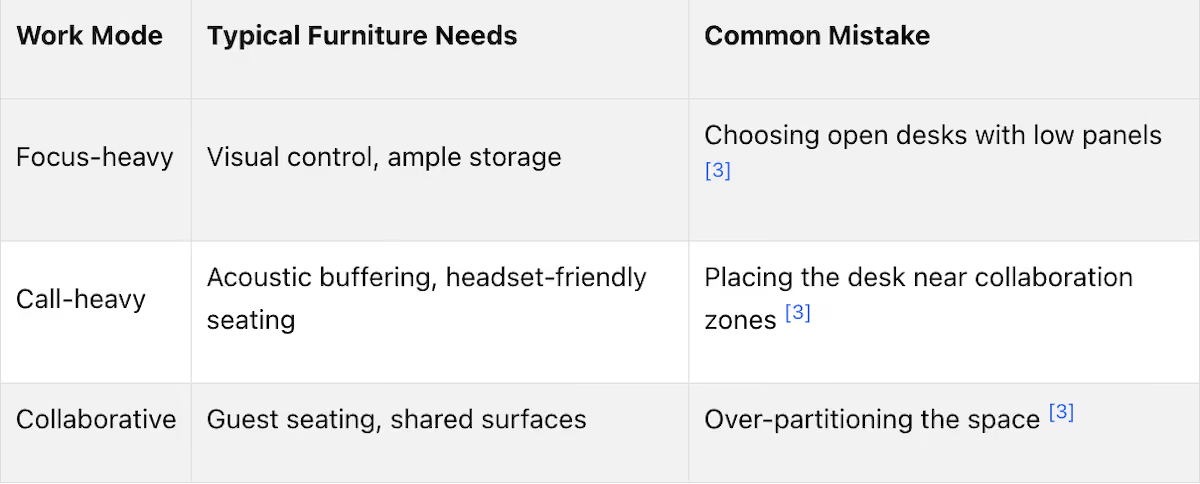
Here’s a quick breakdown of common work modes and their furniture needs:
Measuring and Planning the Space
Once you’ve nailed down your work habits, it’s time to measure your space. This step is all about precision. Take note of everything: square footage, ceiling height, windows, power outlets, and network ports. Walls and window sills might not align perfectly with your floor plan, so double-check those measurements.
When planning, leave 36–42 inches of clearance behind chairs and 60–96 inches for traffic flow [1]. If you’re using a sit-stand desk, you’ll need even more circulation space - 63–79 inches behind the workstation on both sides of an aisle [1]. And for natural light without the glare? Position your desk perpendicular to windows rather than directly facing them.
Working with a Professional Space Planner
Even with careful planning, creating the perfect layout can be tricky. That’s where a professional space planner comes in. They can help you balance ergonomics, aesthetics, and technical needs, ensuring every piece of furniture fits seamlessly into your space.
For businesses in Boston and nearby areas like Beverly, Marlborough, Plymouth, Quincy, and Waltham, Office Gallery International offers on-site consultations and space planning services [5]. Their team can even provide 3D visualizations of your layout, helping you see how everything - from sit-stand desks to storage walls - will work together before you make any purchases. It’s a smart way to avoid surprises and create a workspace that supports both your workflow and your comfort.
Choosing an Ergonomic Desk for Your Private Office
After assessing your space and work habits, the next step is selecting the right desk. This choice is pivotal because the desk serves as the cornerstone of your workstation.
Fixed-Height vs. Sit-Stand Desks
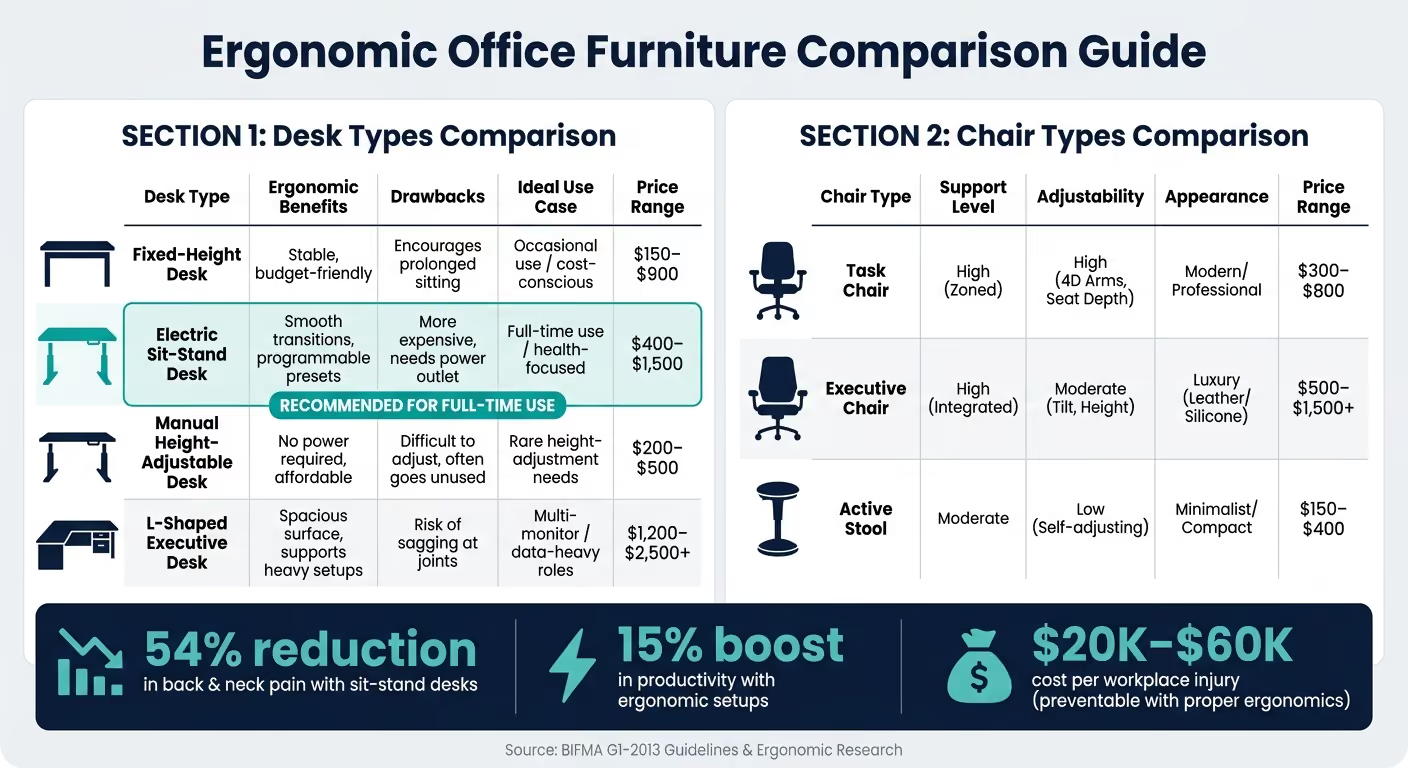
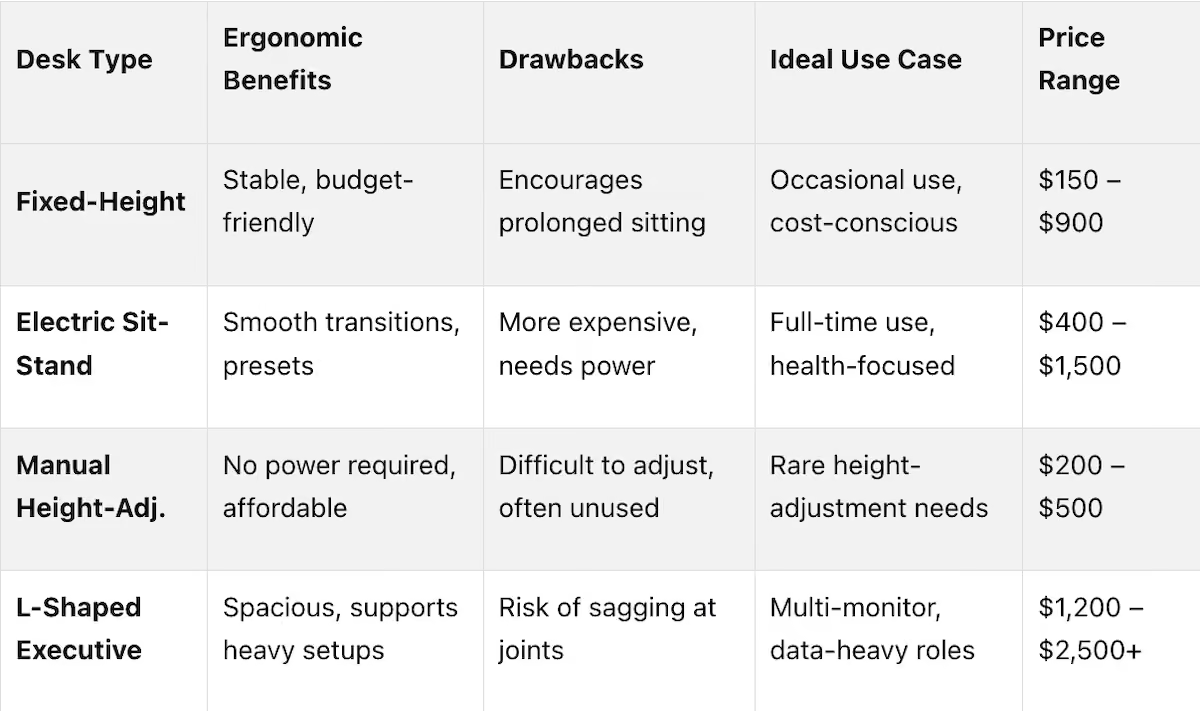
Fixed-height desks are a straightforward option. They’re stable, easy on the budget, and suited for lighter workloads. Prices typically range from $150 to $900. However, they come with a major drawback: you’re stuck sitting all day. Considering that office workers already spend over 75% of their time seated [4], this doesn’t help in breaking sedentary habits.
Sit-stand desks, on the other hand, offer a solution by allowing you to alternate between sitting and standing. These desks can reduce back and neck pain by 54% and even boost productivity by 15% [1][10]. But not all sit-stand desks are created equal. Manual crank models, for instance, often fall out of favor within two weeks because the effort to adjust them becomes a hassle [8]. Electric models with programmable memory settings, however, eliminate this friction, making height adjustments simple.
"Height-adjustable desks... are not just a trend now, but for the foreseeable future, too. Any facility manager looking to 'future proof' their office environments... need to invest in these more versatile desks." – Global Industrial [4]
Key Features to Look for in an Ergonomic Desk
When it comes to ergonomic desks, height range is the most important factor. BIFMA G1-2013 guidelines recommend a range between 22 and 48 inches to suit a variety of users [6]. Even a small misalignment of just 1 cm can increase muscle fatigue by 10–15% over an eight-hour workday [6].
Desktop depth is another key consideration, especially for larger monitors. For screens over 32 inches, a depth of at least 30 inches ensures a proper viewing distance of 20–28 inches [7][8]. Additionally, if your setup includes multiple monitors or heavy equipment, make sure the desk can support at least 355 lbs. To protect the motor and ensure smooth operation, follow the 80% Capacity Rule: keep the total load under 80% of the desk’s rated lifting capacity [6].
For electric sit-stand desks, prioritize dual-motor systems, which handle uneven loads better and provide smoother adjustments. Noise levels are also important - look for desks that operate under 50 dB during height changes [6]. For example, the UPLIFT V3 desk adjusts at 2 inches per second, stays below 48 dB, and includes a 15-year warranty, making it a strong benchmark for quality [9]. Lastly, desks with GREENGUARD Gold certification ensure low VOC emissions, promoting better indoor air quality [6].
Desk Types Comparison Table
Selecting an Ergonomic Office Chair
Once you've set up an ergonomic desk, the next step is choosing an office chair that complements it. This decision is critical because, let’s face it, you’ll spend more time in that chair than on any other piece of office furniture. To keep your posture in check and stay comfortable throughout the day, focus on features that prioritize adjustability and support.
Key Features of an Ergonomic Chair
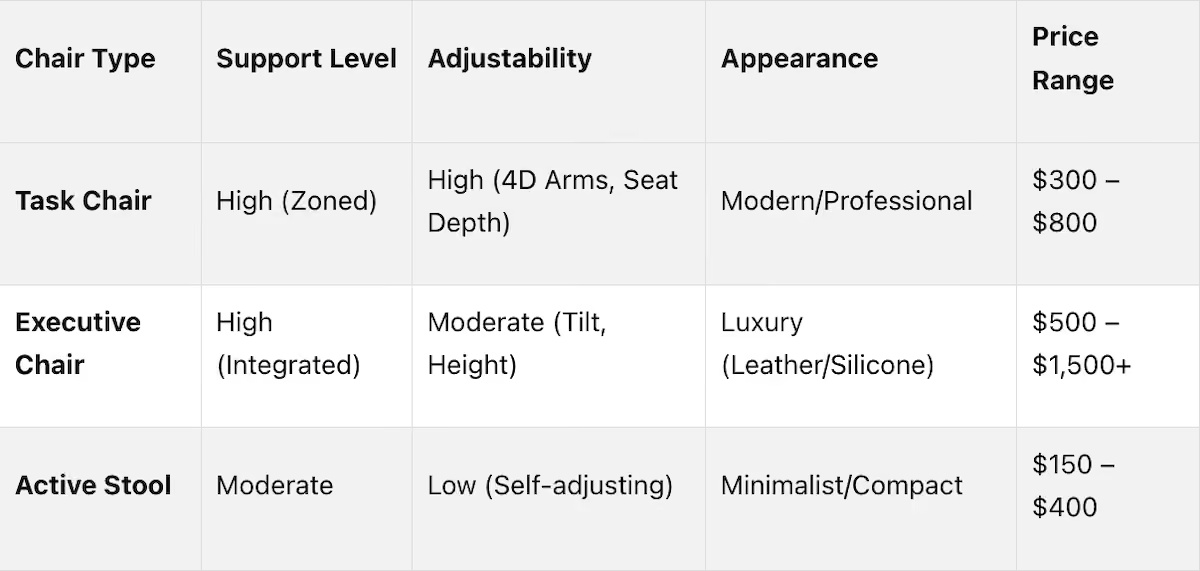
The most important feature to look for is adjustable lumbar support. Ideally, this should allow adjustments in both height and depth to maintain the natural S-curve of your spine. Chairs with fixed lumbar supports often fall short in providing lasting comfort. Another crucial aspect is seat depth. When seated fully back, aim for a 2–4 finger gap between the seat’s edge and the back of your knees. If the gap is too small, it can restrict circulation, while too much space leaves your lower back unsupported.
4D armrests - which adjust in height, width, depth, and pivot - are another must-have. These armrests help keep your elbows at a 90–110° angle without putting unnecessary strain on your shoulders. For the backrest, look for a synchro-tilt mechanism with a 2:1 recline ratio. This design allows you to lean back comfortably while keeping your feet flat on the floor, avoiding the awkward sliding forward that happens with less advanced tilt systems. For all-day comfort, zoned suspension mesh is a great choice. Unlike foam, which compresses and traps heat over time, mesh evenly distributes weight and keeps you cool [2][13].
"Real ergonomics is about adjustability, fit, and support that matches YOUR body - not a one‑size‑fits‑all solution." – SitBetterLab [12]
Durability is equally important. Look for chairs with ANSI/BIFMA X5.1 certification, which ensures the chair has passed rigorous durability tests, including a tilt mechanism test of 120,000 cycles [11]. Without this certification, a chair that feels perfect on day one might lose its comfort within 18 months due to foam compression or mechanical slack [11].
How to Test and Adjust an Office Chair
Before committing to a chair, sit in it for 15–20 minutes to spot any discomfort or pressure points. Once you're satisfied, follow these steps to fine-tune it for your body:
- Seat height and depth: Adjust the seat so your feet are flat on the floor, your knees are at a 90° angle, and there’s a 2–4 finger gap between the seat’s edge and the back of your knees.
- Lumbar support: Position the lumbar support to align with the natural curve of your lower back, typically around your belt line.
- Armrests: Set the armrests so your elbows form a 90° angle, keeping your shoulders relaxed and your forearms parallel to the floor [12][14].
Once the chair is properly adjusted, use the 20-8-2 Rule: sit for 20 minutes, stand for 8 minutes, and move or stretch for 2 minutes. This routine helps reduce the strain that can build up, even in a well-fitted chair [11].
Chair Types Comparison Table
Adding Ergonomic Tools and Storage
A solid desk and chair are just the starting point for a productive workspace. The right accessories and storage solutions ensure your setup stays efficient and comfortable throughout the day.
Ergonomic Workstation Tools
A couple of key tools can transform your workspace: a monitor arm and an under-desk keyboard tray. A monitor arm helps position your screen at an ideal distance - 20–26 inches from your eyes - with the top of the screen at or just below eye level. This setup minimizes neck strain and can reduce tension headaches. For heavier monitors (up to 25 lbs), the Ergotron LX (priced around $150–$200) is a dependable option. Its Constant Force spring technology allows for smooth, one-handed adjustments.
A keyboard tray is another game-changer. It ensures your forearms stay parallel to the ground and your wrists remain neutral, following the 90-degree rule. Without one, you might unknowingly strain your shoulders and wrists by reaching too high to type. Choose a tray with both height and tilt adjustments to fine-tune it to your desk and chair.
"Ergonomics is a system problem. Your desk height determines your elbow angle. Your chair height affects your hip position. Your monitor placement dictates your neck posture." – Matt Jachera, Founder, WorkstationSetup.com [9]
Once your tools are in place, focus on storage solutions that complement your ergonomic setup.
Ergonomic Storage Placement
The placement of storage is just as important as the tools on your desk. The primary reach zone is a helpful guideline: keep frequently used items - like your phone, notebook, or documents - within easy reach to avoid unnecessary twisting or leaning. Items you use less often can be stored farther away.
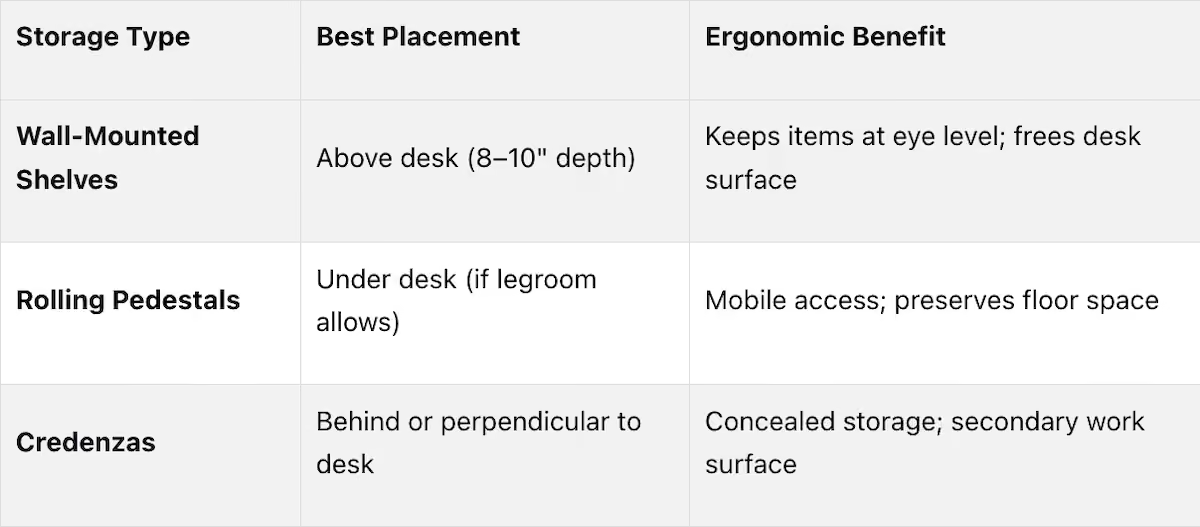
Wall-mounted shelves with a depth of 8–10 inches work well above your desk, keeping the floor clear and items at eye level. A credenza positioned behind or next to your desk offers hidden storage and can double as an extra work surface. If you prefer mobile storage, rolling pedestals are a great option for under-desk use, provided they don’t cramp your legroom. Always measure your space carefully before adding tall storage to ensure it doesn’t obstruct natural light or require awkward overhead reaching.
Cable Management and Workspace Organization
No workspace is complete without proper cable management. Tangled cords not only create a cluttered look but can also pose tripping hazards and limit your ability to rearrange your setup. This is especially critical for a sit-stand desk, where cables need to move freely as the desk height changes.
A flexible ladder-style PET cable pouch is a great solution - it expands and contracts with the desk’s movement. Pair it with an under-desk outlet strip so your power source moves with the desk instead of staying fixed to the wall. For added convenience, install pop-up power grommets on your desktop for easy access to power and USB ports without adding to the clutter. These small adjustments can make your workspace cleaner and more adaptable, whether you’re sitting or standing.
Balancing Ergonomics and Office Aesthetics
After setting up your ergonomic tools and storage, it’s time to ensure your workspace reflects your professional style while maintaining ergonomic functionality. A well-designed office should balance comfort and aesthetics, avoiding a clinical or mismatched feel. It should support your daily needs while showcasing your professional identity.
Choosing the Right Finishes and Materials
The finishes and materials you choose for your office impact both its appearance and functionality. For example, matte finishes on desks help reduce glare, which can ease eye strain under bright lighting. High-pressure laminate (HPL) is a practical option for most private offices: it’s durable, resists scratches and stains, and is easy to clean. Plus, it comes in a variety of wood-look and solid-color designs. If you’re aiming for a more executive feel, wood veneer or solid hardwoods like oak, maple, or cherry add a touch of sophistication - though it’s worth noting that upgrading from laminate to veneer can double the cost for certain pieces.
When it comes to chairs, breathable mesh backs paired with fabric or leather seats strike a balance between comfort and style. For client-facing spaces, leather or faux leather upholstery projects a polished, professional image while being easy to maintain. Regardless of material, choose commercial-grade fabrics rated at 30,000+ double rubs (Wyzenbeek test) to ensure your chair maintains its look and durability over time.
Once you’ve selected functional materials, focus on harmonizing your furniture for a cohesive look.
Coordinating Furniture Styles
Creating a unified office aesthetic doesn’t have to be complicated. A good rule of thumb is to stick to two or three finishes - for example, a warm walnut laminate for your desk and credenza, black powder-coated metal for chair bases and desk legs, and neutral upholstery for seating. Keeping hardware and leg designs consistent across pieces can tie the room together, even if your furniture comes from different manufacturers.
"Your office furniture isn't just functional - it's a visual representation of your brand." – Office Gallery International [4]
By carefully selecting finishes and styles, you can build on your ergonomic foundation to create a workspace that’s both practical and visually appealing.
Design Support from Office Gallery International
When you need to blend style with functionality, professional design support can make all the difference. Expert consultants simplify the process of planning and executing your office design, ensuring ergonomic principles are reflected in every choice. Office Gallery International offers on-site consultations and full project management services, helping businesses across Greater Boston - including Beverly, Marlborough, Plymouth, Quincy, and Waltham - achieve a seamless balance between comfort and aesthetics, from material selection to final installation.
Conclusion
Setting up an ergonomic office is all about following a thoughtful, step-by-step process. Start by evaluating your work habits - how long you’re at your desk, the tasks you handle, and any discomfort you feel. Measure your space carefully, considering factors like door swings, window positions, and ensuring there’s at least 36 inches of clearance. Choose a desk with enough surface depth and, if possible, one with sit-stand functionality to break up long sitting periods. Pair it with a chair that offers adjustable features, including seat height, lumbar support, armrests, and recline tension. To fine-tune your setup, consider accessories like a monitor arm, keyboard tray, footrest, and task lighting. Finally, bring it all together with finishes and materials that create a cohesive and professional look.
Investing in ergonomic furniture isn’t just about comfort - it delivers measurable benefits. Studies show it can reduce physical discomfort by 22%, boost productivity by 15%, and potentially prevent costly workplace injuries, which can range from $20,000 to $60,000 per incident [1]. Even small upgrades, like adjusting your monitor height or switching to a better chair, can make a noticeable difference during a long workday.
If you’re revamping a private office in Greater Boston, Office Gallery International offers on-site consultations, space planning, and full project management. They work with businesses in areas like Beverly, Marlborough, Plymouth, Quincy, and Waltham to deliver ergonomic solutions that match your style and functional needs.
"Our goal is to simplify what can traditionally be a complicated process." – Office Gallery International [15]
FAQs
How do I choose the right desk height for my body?
To determine the ideal desk height, start by adjusting your chair. Make sure your feet are flat on the floor, and your knees are bent at a 90-degree angle. Keep your shoulders relaxed and position your elbows so they’re also bent at 90 degrees. Then, measure the distance from the floor to the underside of your forearms while maintaining this posture. This measurement helps ensure your desk height promotes a neutral position, reducing wrist strain and preventing shoulder tension.
What chair adjustments matter most for back pain?
To ease back pain, it’s essential to fine-tune your chair settings. Start with lumbar support - make sure it aligns with the natural curve of your lower back. This helps maintain proper posture and reduces stress on your spine.
Next, check the seat height. Your feet should rest flat on the floor, and your knees should form a 90-degree angle to promote good circulation and comfort. For seat depth, leave a small gap - about 2–3 fingers wide - between the edge of the seat and the back of your knees to avoid pressure on your legs.
Lastly, adjust the armrests so your arms rest slightly above shoulder level. This minimizes strain on your shoulders and back, making long hours of sitting much more manageable.
What’s the best way to set up dual monitors ergonomically?
To arrange dual monitors for comfort and efficiency, position your main screen directly in front of you, with the secondary screen slightly off to the side. Keep both monitors at an arm's length (about 20–30 inches away) and tilt them inward at a 15–30-degree angle. The top third of each screen should align with or sit just below your eye level. Using a dual monitor arm can make height adjustments easier and free up desk space.
•••
Ready to transform your workspace? Contact us today to explore how our expert team can design a tailor-made solution that aligns with your brand and enhances productivity. From design inspiration to project management, we'll guide you through every step of the process to create an office space that fosters creativity, collaboration, and success. Let's embark on a journey to redefine your workspace together.
Key Points
How should work habits and spatial constraints be assessed to inform private office furniture selection?
- Task analysis as the foundation of every furniture decision — a lawyer prioritizing confidential calls has different desk, chair, and acoustic requirements than a designer managing dual monitors or an executive reviewing large-format documents; furniture selected without task analysis optimizes for a generic user rather than the actual one
- Task intensity determining desk surface area and storage proximity — deep-focus work requiring sustained concentration benefits from minimal desk surface visual clutter and primary storage within reach; frequent multitasking requires more surface area and faster access to multiple tool categories simultaneously
- Communication style determining acoustic and layout priorities — private calls and confidential meetings require acoustic consideration that open-plan furniture selection does not address; a private office serving client meetings has different seating, layout, and visual impression requirements than one used exclusively for solo work
- Physical tools defining desk depth, surface capacity, and power access needs — monitors larger than 32 inches require at least 30 inches of desk depth for proper viewing distance; heavy equipment including multiple monitors requires confirmation that the desk can support at least 355 lbs before purchase
- 36 to 42 inch chair clearance and 60 to 96 inch traffic flow clearance as spatial minimums — these are not aesthetic recommendations but functional requirements; sit-stand desk installations additionally require 63 to 79 inches of circulation space on both sides of the workstation aisle
- Desk perpendicular to windows eliminating glare while capturing natural light — direct window facing produces screen glare that causes eye strain; perpendicular positioning maintains daylight benefit without the visual impairment that facing the light source directly produces
What makes a sit-stand desk genuinely ergonomic versus simply adjustable and what specifications separate quality from marketing?
- BIFMA G1-2013 22 to 48 inch height range accommodating the full user spectrum — desks that max out below 48 inches exclude meaningful portions of the standing-height user population; the range specification is not arbitrary but based on the anthropometric data of the intended user population
- 1 centimeter height misalignment increasing muscle fatigue by 10 to 15% over eight hours — the precision required in desk height setting is greater than most users appreciate; programmable memory presets remove the daily approximation error that manual height estimation produces
- Electric models with memory settings versus manual crank models that fall out of use within two weeks — the friction of manual adjustment is sufficient to eliminate the behavior the desk is designed to encourage; ease of adjustment is not a convenience feature but the mechanism through which sit-stand health benefits are actually realized
- Dual-motor systems handling uneven loads and providing smoother transitions — single-motor systems can allow surface tipping under asymmetric monitor and equipment configurations; dual-motor systems distribute torque evenly regardless of load distribution
- Under 50 dB noise level during adjustment as the operational quality benchmark — desks that operate above this threshold produce distraction in private office environments where calls and concentration work are ongoing; noise specification is a quality differentiator that purchase decisions frequently overlook
- 80% Capacity Rule protecting motor longevity — operating consistently at or near rated maximum load degrades motor performance over time; the 80% rule is a manufacturer-informed usage guideline that extends desk operational life and maintains smooth adjustment performance
What chair features produce the greatest ergonomic benefit in a private office and why do certifications matter?
- Adjustable lumbar support in height and depth as the single most important chair feature — the L3–L4 vertebrae require support positioned precisely at the individual's lumbar curve; fixed lumbar pads that cannot be repositioned serve the average user's anatomy and nobody else's with consistency
- 2 to 4 finger seat depth gap preventing circulation restriction while maintaining lower back support — too small a gap creates pressure behind the knees that restricts blood flow; too large a gap leaves the lower back unsupported by the seat pan; this measurement is the seat depth calibration standard
- 4D armrests at 90 to 110 degree elbow angle eliminating shoulder elevation — fixed armrests that cannot be repositioned force users to elevate their shoulders to clear the armrest or drop them to reach the work surface; both positions accumulate into upper back and neck discomfort over a workday
- Synchro-tilt 2:1 recline ratio keeping feet flat through full recline — basic tilt mechanisms rotate the seat pan forward as the user leans back, shifting weight onto the thighs and pulling the user out of optimal lumbar position; synchro-tilt maintains seat and back relationship throughout recline
- Zoned suspension mesh preventing the heat buildup and compression that foam produces over long sessions — foam compresses throughout a workday and loses its support properties; mesh distributes weight continuously without compression and allows airflow that foam cannot
- ANSI/BIFMA X5.1 certification confirming 120,000-cycle tilt mechanism durability — chairs without this certification may feel identical at purchase but lose ergonomic performance through mechanical slack within 18 months; the certification is a durability commitment, not a marketing distinction
How should ergonomic accessories and storage be integrated into a private office setup to maximize function without creating clutter?
- Monitor arm positioning screen 20 to 26 inches from eyes with top at or below eye level — this positioning eliminates the neck flexion that monitors placed directly on desk surfaces produce and reduces the tension headaches that accumulate from sustained upward or downward gaze
- Keyboard tray with height and tilt adjustment as the wrist and shoulder protection mechanism — without a keyboard tray, the desk surface height forces forearms above the parallel-to-floor position that neutral wrist posture requires; shoulder and wrist strain that accumulates from this position is preventable through tray installation rather than chair adjustment alone
- Primary reach zone discipline keeping frequently used items within arm's reach — unnecessary twisting and leaning to reach regularly used items accumulates into the musculoskeletal strain that ergonomic furniture is designed to prevent; storage placement is as much an ergonomic decision as chair selection
- Wall-mounted shelves at 8 to 10 inch depth maintaining eye-level access without floor space consumption — shelf depth beyond 10 inches at head height creates overhead reaching requirements; depth within this range keeps items accessible without requiring posture changes to retrieve them
- Flexible ladder-style PET cable pouch for sit-stand desk cable management — cables that cannot move with the desk constrain height adjustment range and create tangle hazards; a cable management solution that expands and contracts with desk movement is a functional requirement for sit-stand setups, not an optional accessory
- Pop-up power grommets providing desktop power access without visual clutter — under-desk outlet strips move power access off the wall and with the desk, while desktop grommets eliminate the surface-level cord sprawl that fixed wall outlet setups produce in sit-stand configurations
How should finishes, materials, and furniture styles be coordinated to achieve a professional private office aesthetic without sacrificing ergonomic function?
- Matte desk surfaces reducing glare under direct lighting — high-gloss finishes reflect overhead and task lighting onto the work surface in ways that produce eye strain during sustained desk work; matte finishes eliminate this reflection without affecting surface durability
- High-pressure laminate as the practical standard for most private office applications — durable, scratch and stain resistant, cleanable with commercial products, and available in wood-look and solid-color designs that span traditional to contemporary aesthetics; laminate's ergonomic performance is equivalent to veneer at a fraction of the cost for most applications
- Wood veneer and solid hardwoods for executive aesthetic at double the laminate cost — the visual and tactile distinction of solid oak, maple, or cherry delivers a specific professional impression appropriate for client-facing executive environments; the cost differential is justified by aesthetic function rather than ergonomic performance
- Commercial-grade fabrics at 30,000-plus double rubs maintaining appearance over years of use — residential-grade upholstery degrades visibly under commercial-level daily use; the Wyzenbeek test rating is the durability specification that distinguishes commercial from residential-grade seating at purchase
- Two to three finish coordination across all pieces creating cohesion across multiple manufacturers — consistent hardware, leg design, and two to three surface finishes tie together furniture from different sources without requiring single-manufacturer specification; finish coordination is the practical path to a unified aesthetic in a budget-conscious setup
- Ergonomic features always taking priority over aesthetic preferences when the two conflict — a chair that looks appropriate but lacks adjustable lumbar support, proper seat depth range, or synchro-tilt recline will produce discomfort across 1,700 annual hours of use regardless of how well it coordinates with the desk finish
What does Office Gallery International provide for private office ergonomic setups in Greater Boston and why does professional consultation matter for this category of purchase?
- On-site space assessment identifying the constraints that remote specification misses — door swing radius, window orientation, outlet placement, natural light direction, and column positions all affect desk placement, chair clearance, and storage configuration in ways that floor plan review alone does not capture
- 3D visualization of complete layouts before any purchase commitments — seeing how a sit-stand desk, task chair, credenza, and wall storage interact in the actual room dimensions prevents the spatial mismatches that occur when furniture is specified from dimensions alone
- Full project management from product selection through delivery, installation, and post-installation adjustment — coordinating manufacturer lead times, building access, and installation sequencing is a project management function that self-managed furniture procurement consistently underestimates in complexity
- Showroom access at 151 Carnegie Row, Norwood for in-person chair and desk testing — comfort is highly individual and cannot be reliably assessed from specification sheets; sitting in a chair for 15 to 20 minutes to identify pressure points and adjustment feel is the standard evaluation method that online and catalog purchasing cannot replicate
- Service across Beverly, Marlborough, Plymouth, Quincy, Waltham, and surrounding Greater Boston communities — local knowledge of building stock, delivery logistics, and regional material performance under New England climate conditions informs recommendations that non-local providers cannot match
- Professional consultation preventing the $20,000 to $60,000 per-incident cost of workplace injuries — the financial case for professional ergonomic setup is not theoretical; injuries that proper ergonomic consultation and installation prevent carry a cost that dwarfs the consultation investment and that ergonomic furniture alone — without proper setup — does not reliably avoid