5 Common Hybrid Workspace Challenges and Furniture Solutions
Hybrid work creates real friction — space conflicts, unproductive office days, and meeting rooms not built for split attendance. Discover five common hybrid workspace challenges and the practical furniture solutions that solve them, tailored for Boston-area businesses.
Post Summary
Space conflicts, poorly equipped home and office setups, unproductive office days, reduced team interaction, and technology gaps in meeting rooms are the five most common challenges hybrid workplaces face.
Hot-desking systems, modular seating, folding desks, and acoustic pods allow offices to adapt to unpredictable attendance patterns — optimizing space on busy days and eliminating waste on quiet ones.
Ergonomic mobility kits, height-adjustable desks, rolling storage pedestals, monitor arms, and tech-integrated desks with built-in cable management help employees stay comfortable and productive in both environments.
Purpose-built zones — quiet areas with acoustic treatment, private phone booths, huddle rooms for impromptu collaboration, and hybrid-ready meeting rooms — help employees focus and connect more effectively on in-office days.
Intentional gathering spaces with modular lounge seating, communal tables near coffee stations, mobile whiteboards, and storage benches placed in high-traffic areas bring back the spontaneous interactions hybrid work has reduced.
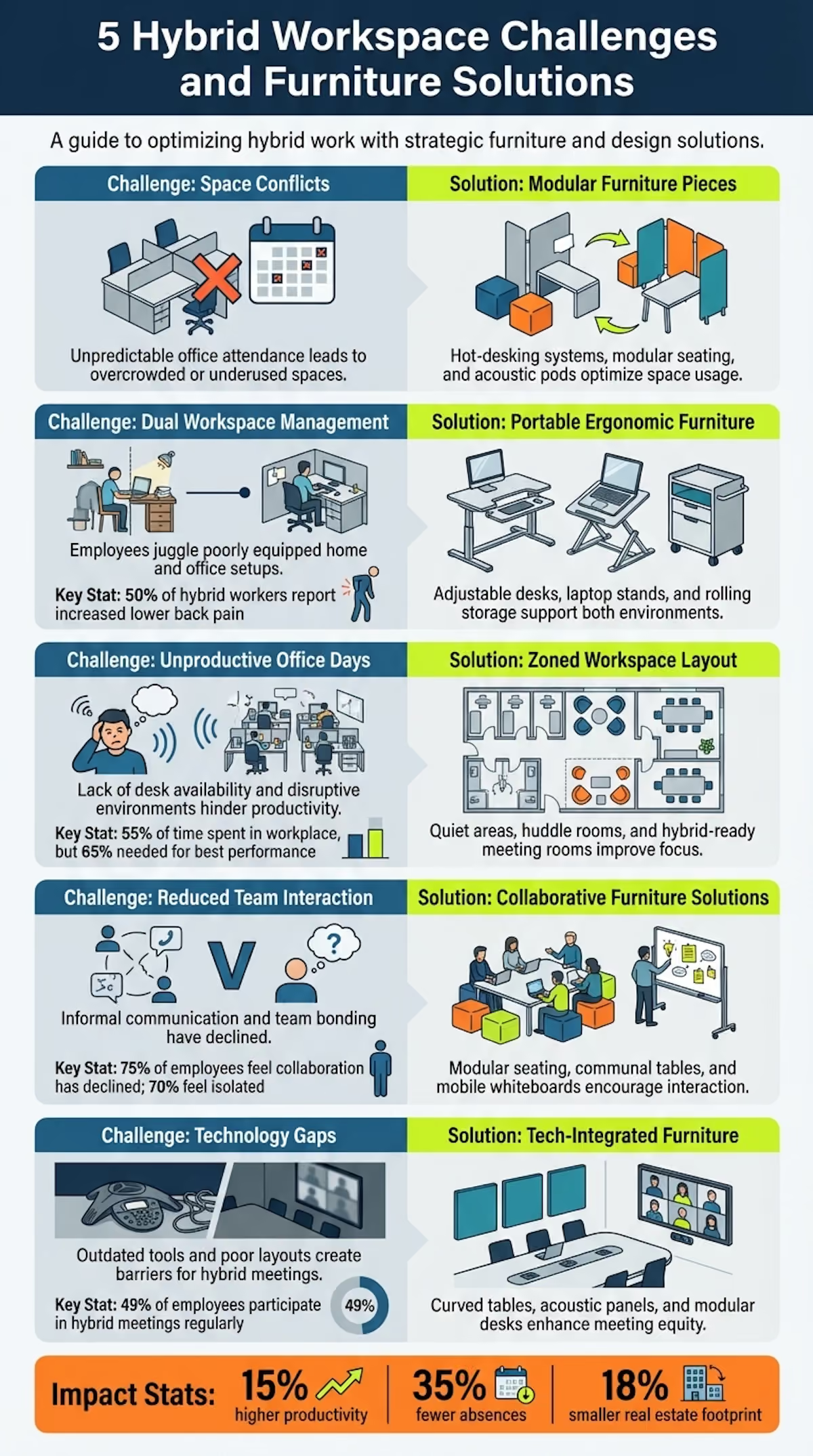
Hybrid work is here to stay, but it comes with challenges that affect productivity, collaboration, and employee well-being. The way offices are designed - and the furniture used - plays a big role in solving these issues. Here are five key hybrid workspace challenges and practical furniture solutions to address them:
- Space Conflicts: Hybrid schedules create unpredictable office attendance, leading to overcrowded or underused spaces. Solution: Flexible furniture like hot-desking systems, modular seating, and acoustic pods can optimize space usage.
- Dual Workspace Management: Employees juggle poorly equipped home and office setups, causing discomfort and inefficiency. Solution: Portable and ergonomic furniture, such as adjustable desks, laptop stands, and rolling storage, supports both environments.
- Unproductive Office Days: Lack of desk availability, poor meeting room setups, and disruptive environments hinder productivity. Solution: Purpose-built zones like quiet areas, huddle rooms, and hybrid-ready meeting rooms improve focus and collaboration.
- Reduced Team Interaction: Informal communication and team bonding have declined with hybrid work. Solution: Social spaces with modular seating, communal tables, and mobile whiteboards encourage casual interactions.
- Technology Gaps in Meeting Rooms: Outdated tools and poor layouts create barriers for hybrid meetings. Solution: Tech-integrated furniture like curved tables, acoustic panels, and modular desks enhance meeting equity and efficiency.
Hybrid workspace design isn’t just about furniture - it’s about creating a balance between flexibility, comfort, and functionality. Companies like Office Gallery International offer tailored solutions to help businesses in Boston and surrounding areas rethink their spaces for hybrid work success.
Challenge 1: Space Conflicts and Wasted Resources
Hybrid work schedules often bring unpredictability to office spaces. Some days, the office feels deserted, with empty desks stretching across floors. Other days - especially midweek, like Tuesdays and Wednesdays - workstations are in high demand, and meeting rooms are overbooked [5]. Traditional assigned seating no longer aligns with how offices are used, especially when desks sit vacant half the time. Yet, companies continue to pay for the rent and utilities tied to this underutilized space [11].
This creates a frustrating scenario. Employees who make the effort to commute expect a reliable workspace, but without a booking system, they’re often stuck hunting for available desks in the morning. Nearly half end up staying at their desks for video calls, simply because they can’t find nearby private spots [5] [12]. Meanwhile, large conference rooms may sit empty due to last-minute cancellations, while smaller huddle rooms are overbooked and unavailable.
The impact of this inefficiency isn’t just inconvenience - it’s financial. Over 57% of enterprises now use IoT devices to track real-time occupancy, and smarter space management could shrink real estate footprints by up to 18% [9]. The real challenge isn’t just about having enough desks; it’s about providing the right mix of spaces at the right times. Addressing this mismatch requires a flexible and thoughtful approach.
Solution: Flexible and Modular Furniture Systems
Flexible furniture offers a practical way to tackle these space issues. Hot-desking systems combined with modular furniture make assigned seating obsolete, allowing offices to operate efficiently with a 0.6:1 desk ratio - six desks for every ten employees. This frees up room for collaborative and social areas [10]. Folding desks and stackable chairs can be brought out on busy days and stored away when attendance drops, ensuring no floor space goes to waste [2].
Mobile storage units, rolling carts, and modular shelving make it easy for employees to move supplies between stations, keeping shared spaces organized [2]. Acoustic pods and privacy booths address the growing demand for quiet zones, offering instant solutions for focused work or private calls [12]. Modular sofas and sectional seating can be rearranged to suit different group sizes, turning underused areas into vibrant collaboration zones [2].
For businesses in Boston and nearby areas like Beverly, Marlborough, Plymouth, Quincy, and Waltham, Office Gallery International provides space planning and design services. They specialize in transforming traditional offices into adaptable environments, equipped with these flexible furniture solutions.
Challenge 2: Managing Home and Office Setups
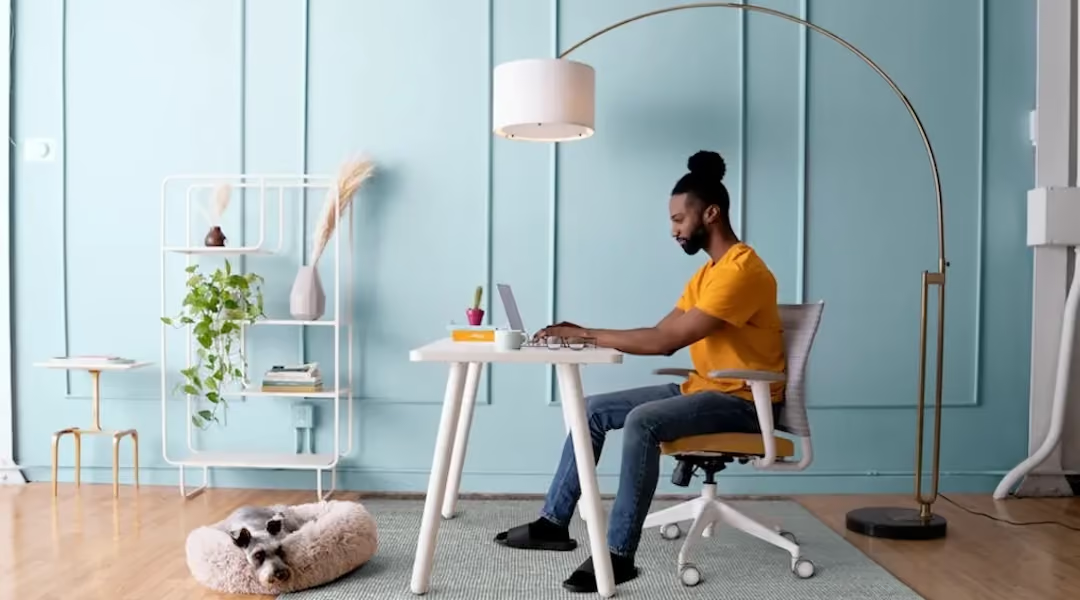
Hybrid employees face a unique challenge: juggling two workspaces. Unlike traditional office setups, many home environments aren't designed for professional use. Dining chairs and kitchen counters often replace ergonomic furniture, leading to discomfort and even injury. In fact, 50% of hybrid workers have reported increased lower back pain, shoulder pain, and eye strain since transitioning to home-based work [8]. Poor ergonomic setups are a major issue, accounting for 33% of all workplace injury and illness cases in the U.S. [7].
Setting up two fully equipped workspaces - one at home and one at the office - can be expensive and impractical. Employees are hesitant to duplicate purchases for occasional office use, while employers struggle to define their financial responsibilities for workers who split time unevenly between home and office [8][13].
Adding to the complexity, many homes lack dedicated workspaces. Furniture often has to serve multiple purposes or be folded away, which disrupts productivity as employees repeatedly reconfigure their setups [7][15]. These challenges highlight the need for smarter solutions that can seamlessly adapt between home and office environments.
Solution: Ergonomic and Portable Furniture
Ergonomic and portable furniture is one way to tackle the demands of hybrid work. These solutions provide consistency and make transitions between home and office smoother. For instance, Mobility Kits help maintain proper posture and alignment wherever you work. These kits typically include a lightweight laptop stand, compact keyboard and mouse, a multiport adapter, and a cable pouch [17]. Though small and portable, they ensure ergonomic support whether you're at a corporate desk or a dining table.
For home setups, vertical solutions can make the most of limited space. Monitor arms, for example, lift screens off desks, freeing up room for other essentials like notebooks or docking stations [16]. Adjustable laptop stands can also help by raising screens to eye level, preventing slouching. The key is to follow ergonomic basics: the top edge of the monitor should align with your eyes, and your elbows should rest at a 90-degree angle with straight wrists [17].
Rolling storage options like mobile pedestals and filing cabinets on casters are another practical solution. These units make it easy to move supplies between home and office without the hassle of daily packing and unpacking [2][17]. Compact enough to fit under desks, they keep spaces organized while offering secure storage for important documents [18].
For those tight on space, folding desks and stackable chairs can work wonders. These pieces can be easily stored away, allowing living spaces to return to their primary purpose after work hours [2]. For businesses in areas like Boston, Beverly, and Quincy, companies like Office Gallery International offer on-site consultations to help identify furniture that works well in both home and office settings. Their space planning services ensure that ergonomic investments deliver value across both environments.
Lastly, tech-integrated furniture can simplify transitions. Desks with built-in power outlets and cable management systems reduce the clutter and time wasted on setting up equipment [7][14]. Clamp-on power bars are another flexible option, offering repositionable charging without the need for costly electrical modifications [17]. Research shows that ergonomic designs can boost productivity by 15% and cut employee absences by 35% [9]. These benefits make ergonomic furniture a worthwhile investment for both employers and employees.
Challenge 3: Unproductive In-Office Days
Imagine commuting to the office, ready to tackle the day, only to spend valuable time wandering around looking for a desk or a meeting room. This happens all too often when offices lack proper booking systems, leaving employees frustrated and unproductive [5][12]. Even worse, many workers find themselves stuck on video calls all day - a trend dubbed the "digital commute" [4][6].
Steelcase research reveals that half of employees remain at their desks for video calls simply because private spaces are unavailable [12]. Open collaboration zones, without proper soundproofing, amplify conversations, creating an environment that’s disruptive for those trying to focus [19]. These challenges peak midweek when offices, designed for average occupancy, suddenly fall short on desks, lockers, and meeting spaces [12].
On top of that, physical discomfort - stuffy air, poor lighting, and inconsistent temperatures - further hampers productivity [12][3]. When employees face these obstacles, they begin to question the point of coming into the office [6]. While office workers spend roughly 55% of their week in the workplace, many say they’d need to be there 65% of the time to perform at their best [19]. Clearly, addressing these issues means rethinking how office spaces are designed.
Solution: Purpose-Built Collaboration Zones
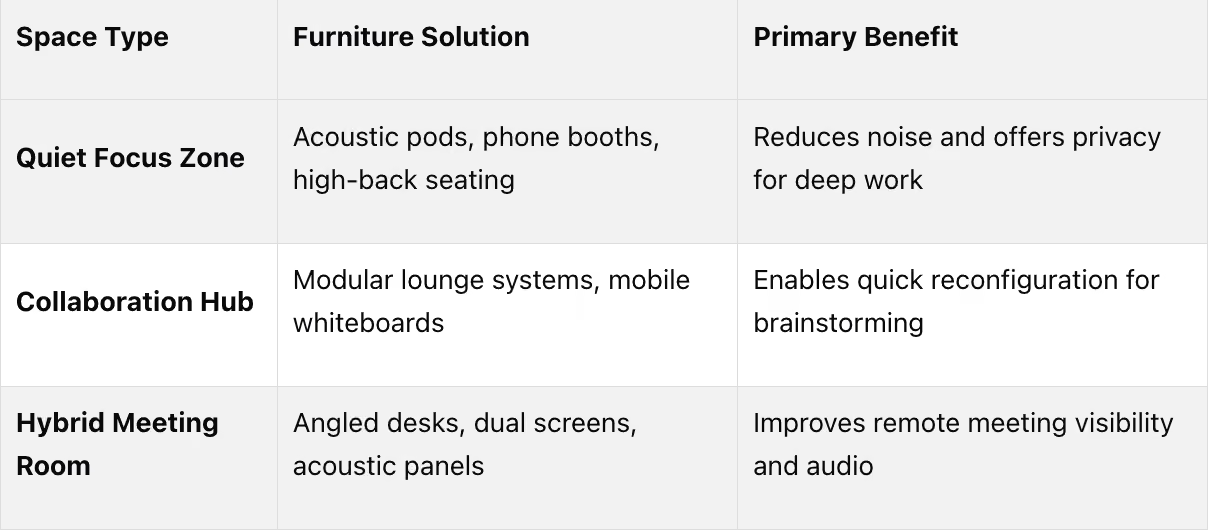
The key to solving these problems lies in creating workspaces tailored to specific tasks. Offices should include distinct areas like quiet zones with acoustic treatments for focused work, phone booths for private calls, and huddle rooms for impromptu brainstorming sessions [8][20][19]. This is especially important since three out of four employees report that collaboration has suffered under hybrid work models [8].
Acoustic isolation plays a huge role here. Soundproof pods and phone booths give employees private spaces for calls without disrupting the open office environment [21][22]. Flexible furniture, such as high-back alcove seating and mobile partitions, can also create effective barriers between collaborative and focus areas [21][22]. Research from Leesman shows that flexible offices with varied work settings consistently outperform traditional open-plan layouts in employee satisfaction [22].
Comfort matters too. Adjustable chairs and sit-stand desks that rival home setups help reduce physical strain for employees returning to the office [14][7]. For hybrid meetings, swapping traditional conference tables for casual seating arrangements and equipping rooms with large screens can make remote participants feel as engaged as those in the room [8][21].
The impact of these changes is clear: 44% of firms report increased productivity after adopting smart office solutions, and well-designed hybrid environments can boost productivity by up to 5% [9][19]. For businesses in Boston and nearby areas, Office Gallery International offers on-site consultations to help transform underutilized spaces into efficient, collaborative zones with the right mix of acoustic furniture, modular systems, and ergonomic designs.
Challenge 4: Reduced Team Interaction and Informal Communication
Hybrid work has made spontaneous, in-person interactions - like casual hallway chats, impromptu brainstorming sessions, or quick problem-solving moments - a rarity. These seemingly small moments were once the glue of team bonding and a spark for creativity. Now, with time split between home and office, these informal exchanges have dwindled. Research highlights this shift: 75% of employees feel collaboration has declined under hybrid models, while 70% of remote workers report feeling isolated and disconnected [8]. Additionally, over 33% miss in-person meetings and office gatherings, and 65% express a desire for more face-to-face time with colleagues [5].
This decline in organic communication underscores the need for thoughtful office design. Traditional cubicle setups don’t foster the spontaneous interactions that make office visits meaningful.
Solution: Intentional Gathering Spaces
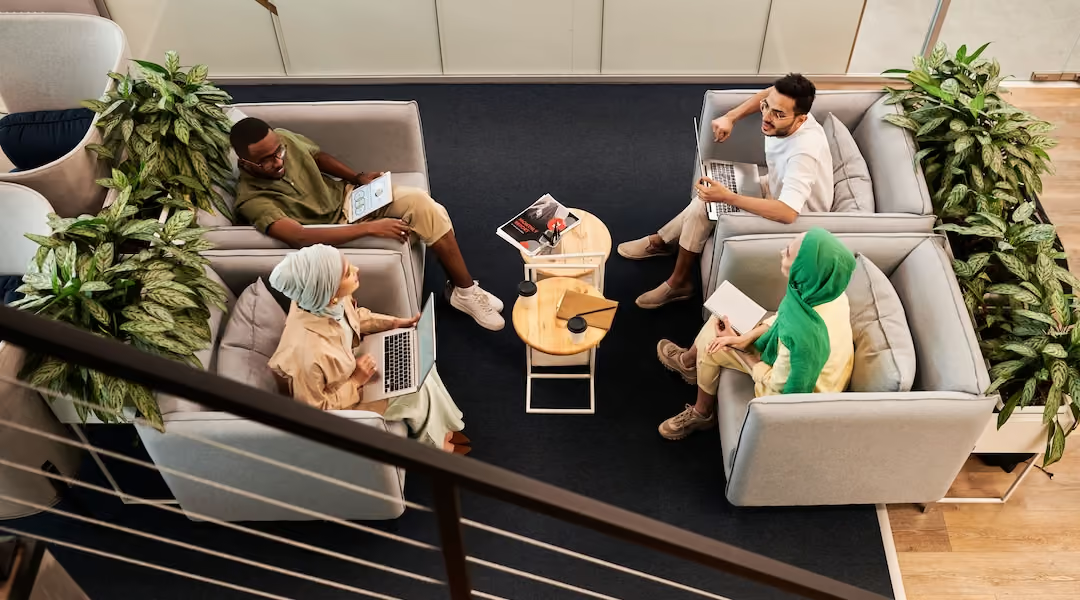
To counteract the loss of informal communication, workplaces can incorporate dedicated gathering spaces designed to encourage casual exchanges. These spaces, equipped with modular seating and communal tables, bring back the informal moments that hybrid work often lacks. Placing these areas near high-traffic spots - like coffee stations, pantries, or stairways - can naturally draw people together [19].
For example:
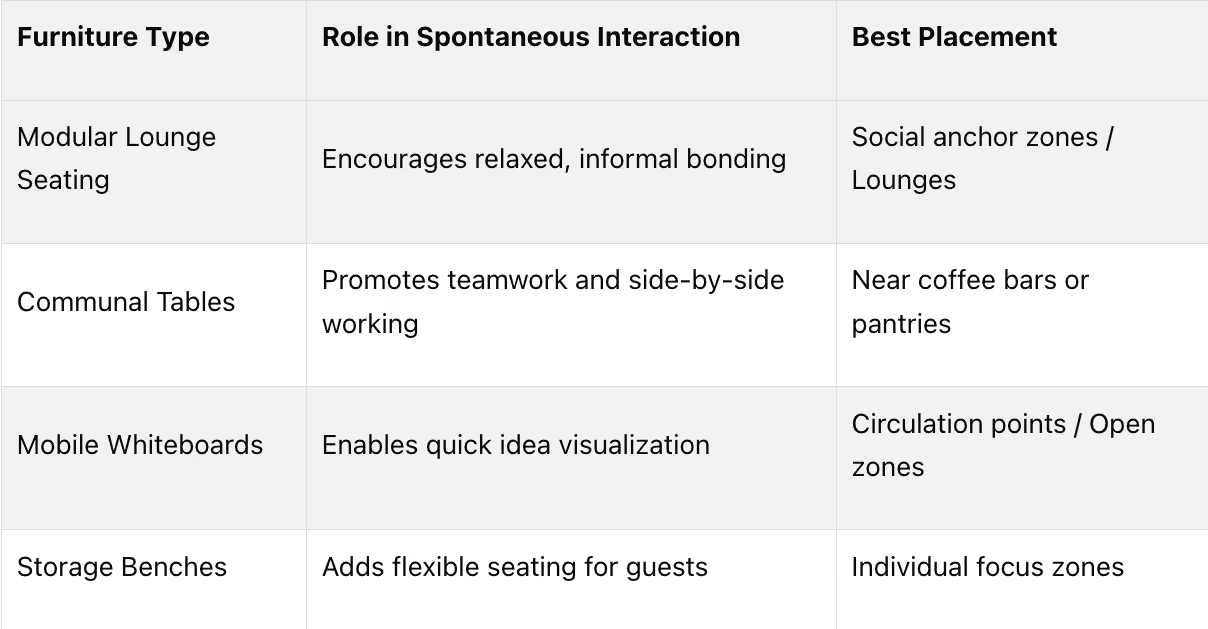
- Modular lounge seating offers a relaxed setting for quick chats and informal bonding in lounges or social hubs.
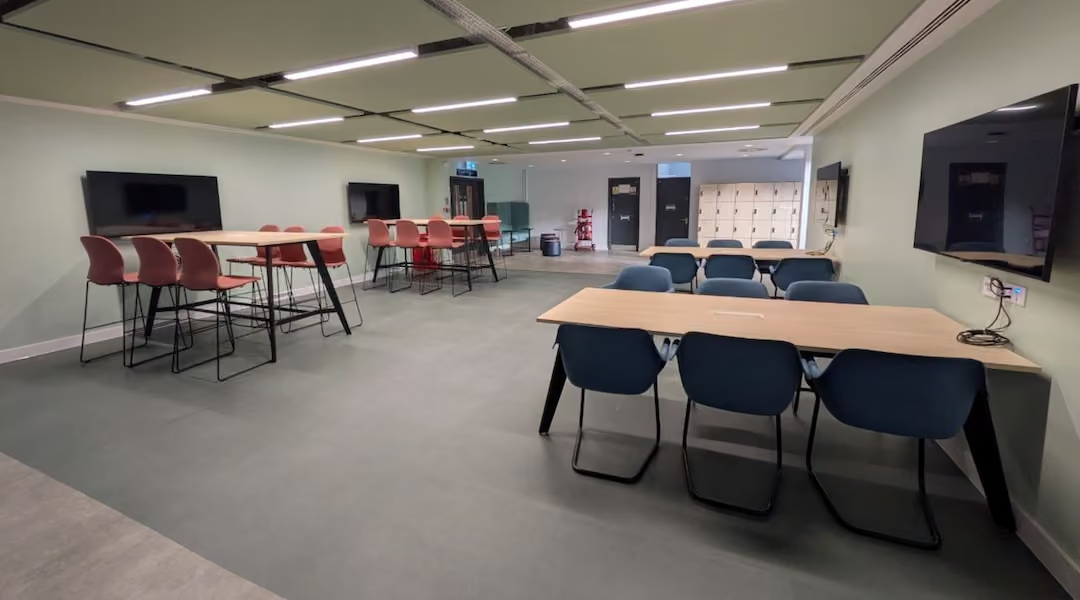
- Communal tables create opportunities for side-by-side collaboration, especially when placed near coffee bars or kitchen areas.
- Mobile whiteboards turn any space into a brainstorming zone, ideal for open areas or circulation points [18].
- Storage benches provide flexible seating solutions for impromptu conversations in individual focus zones.
Acoustic considerations are equally important. Adding soft furnishings and acoustic panels ensures these gathering zones don’t disrupt nearby focused work [19].
For businesses in cities like Boston, Beverly, Marlborough, Plymouth, Quincy, and Waltham, Office Gallery International provides space planning services to help pinpoint the ideal locations for gathering areas. They also assist in selecting furniture that blends comfort, functionality, and sound management seamlessly.
Challenge 5: Technology Gaps in Meeting Rooms
Hybrid meetings have become a staple of modern work life - 49% of employees participate regularly[27]. Yet, many meeting spaces still rely on outdated technology that pales in comparison to the setups employees use at home. This creates a frustrating disconnect: workers come into the office expecting better tools for collaboration, only to find that meeting rooms are under-equipped and hinder productivity[23].
The issue goes beyond just aging equipment. One major challenge is meeting inequity - remote participants often struggle to see or hear their in-room counterparts clearly. Many describe the experience as watching "silhouettes" from a distant, wide-angle camera shot[23]. Traditional rectangular tables make this worse, creating awkward camera angles that prevent natural eye contact with remote attendees[24]. On top of that, poor audio quality and subpar room acoustics further disrupt communication[23].
Another significant hurdle is technical friction. Switching between platforms like Teams, Zoom, or BYOD setups often causes delays and confusion[23]. Meanwhile, cluttered cabling and outdated power setups make meeting rooms disorganized and difficult to adapt. Adding to the frustration, "zombie meetings" - rooms reserved but left empty - waste valuable space due to scheduling systems that fail to reflect real-time usage[23].
To address these challenges, modern meeting rooms need furniture solutions designed to integrate seamlessly with today’s technology.
Solution: Hybrid-Ready Meeting Room Furniture
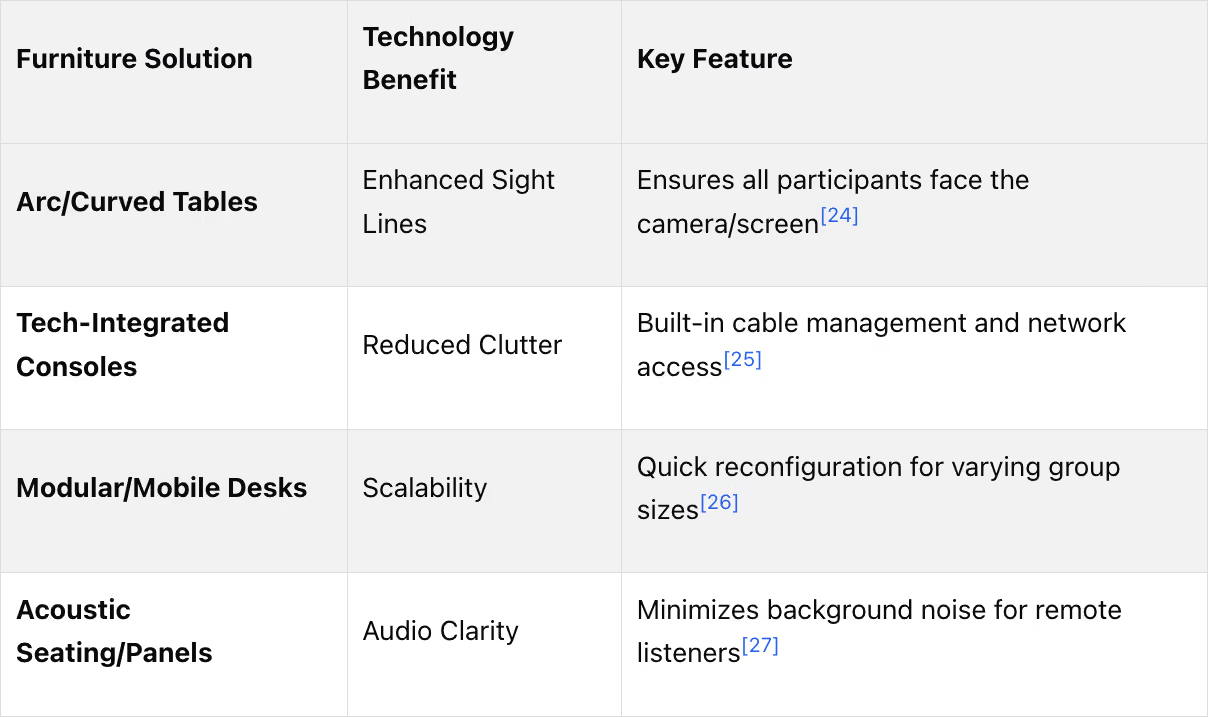
The right furniture can close these technology gaps and create a more seamless, inclusive meeting experience. For example, arc-shaped or curved tables, like the Steelcase Ocular, tackle sightline issues by ensuring all in-room participants face both the camera and the display simultaneously[24][28]. This setup gives remote attendees a clear, front-facing view of everyone in the room.
Furniture with integrated technology, such as tables with built-in cable management and easy access to network hardware, also reduces delays caused by tech setup issues[25][23]. These tables can house essential AV equipment like video bars, beamforming microphones, and large displays, ensuring optimal performance for hybrid meetings[26]. Some even feature silent ventilation systems to prevent overheating during extended use[25].
Modular and mobile furniture adds flexibility, allowing meeting rooms to be quickly reconfigured to accommodate fluctuating hybrid attendance[26][28]. Acoustic seating and panels help cut down on background noise, improving audio clarity for remote participants. Meanwhile, mobile whiteboards with interactive smart displays enable real-time brainstorming and collaboration on platforms like Miro or Mural[27][28].
Office Gallery International offers on-site consultations in areas like Boston, Beverly, Marlborough, Plymouth, Quincy, and Waltham. Their team specializes in optimizing meeting room layouts with technology-ready furniture, ensuring seamless hybrid collaboration. From design to installation, their end-to-end project management approach ensures your meeting rooms are equipped to meet the demands of modern hybrid work. This not only addresses the technology gaps but also supports the goal of fostering better collaboration in hybrid workspaces.
Integrated Approach: Unified Workspace Management
Addressing individual challenges in hybrid workspaces is a step in the right direction, but the real game-changer happens when furniture, space planning, and technology come together as a cohesive system. By combining IoT monitoring with strategic furniture placement, workspace management becomes much more efficient. Add professional space planning into the mix, and companies can cut real estate footprints by 18% while keeping employees happy[9]. This integration supports the creation of activity-based working zones, tailored to accommodate various work styles.
The transition from traditional office setups to activity-based working (ABW) zones showcases this concept beautifully. Instead of endless rows of identical desks, modern offices now feature clearly defined areas - quiet zones for focused tasks, communal spaces for collaboration, and relaxation areas for recharging. This design approach resonates with 70% of employees who prioritize flexible remote work options[5]. Businesses adopting these smart office designs report a 44% boost in productivity and a 58% improvement in energy efficiency[9]. By unifying design elements, companies create spaces that support seamless shifts between different work modes.
"Office space planning & redesigning services have shifted from company-centric to individual-centric that will allow for innovative solutions." - Office Gallery International[1]
This perspective underscores the importance of an integrated design strategy for hybrid workplaces.
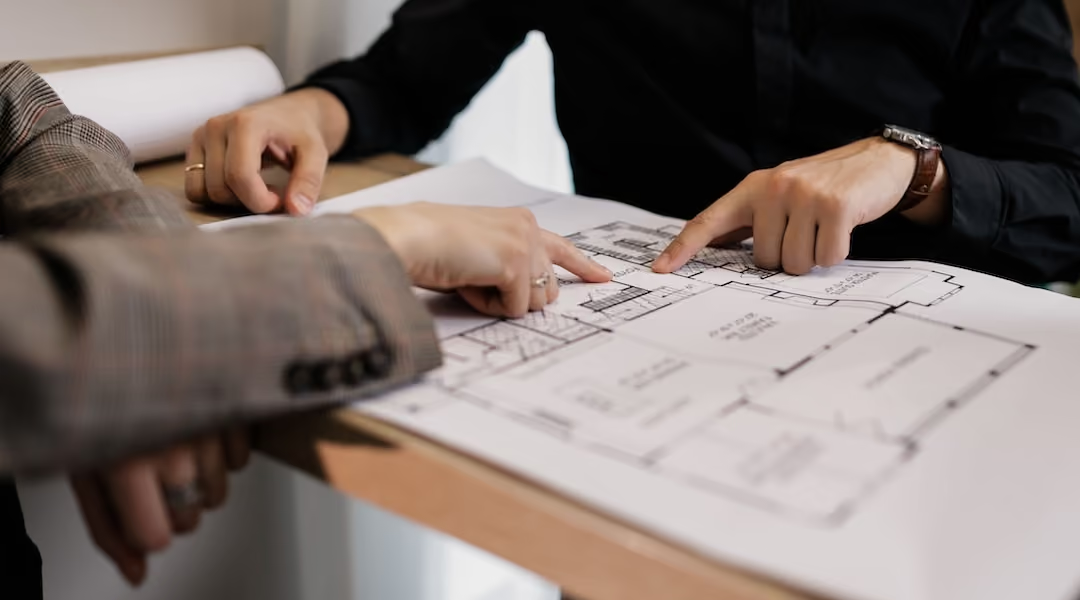
Professional space planning services go beyond aesthetics, incorporating ergonomics, workflow optimization, and sustainability into tailored layouts[3]. This includes thoughtful details like strategically placed power outlets, accessible shared equipment, and tech-enabled meeting spaces designed for hybrid collaboration. Office Gallery International provides on-site consultations and full project management across Boston and nearby areas such as Beverly, Marlborough, Plymouth, Quincy, and Waltham. Their approach ensures scalable furniture systems that adapt to emerging technologies and evolving team needs[9].
When furniture, space, and technology align, the benefits are clear: higher productivity, fewer absences, and a workspace that evolves from a collection of desks into a true hub for collaboration and innovation.
Conclusion
Hybrid work isn't just a passing trend - it's a permanent shift. In fact, 70% of employees want flexible remote options, while 65% still value in-person interaction [5]. The five challenges we've discussed - space conflicts, managing dual setups, unproductive office days, reduced team interaction, and technology gaps - highlight one key takeaway: these issues require thoughtful, intentional solutions, not quick fixes.
The right furniture can turn these challenges into opportunities. Modular systems help eliminate wasted space, ergonomic designs promote employee well-being, and collaboration-focused zones encourage people to return to the office. Companies that invest in hybrid-ready meeting room furniture and purpose-driven spaces often see real results, like 15% higher productivity and 35% fewer absences [9]. Every solution - whether it’s modular layouts or tech-equipped meeting furniture - directly addresses the hurdles of hybrid work.
"Workplace design has shifted from company-focused to individual employee needs, emphasizing adaptable spaces, ergonomic furniture, and hybrid meeting capabilities." - Office Gallery International [1]
This shift in workspace design reflects a broader evolution, where employee needs take center stage. To navigate this change effectively, expert guidance is essential. Providers like Office Gallery International bring together ergonomics, workflow efficiency, and cutting-edge technology to create cohesive, future-ready layouts. Serving the entire Boston Metro Area, they offer on-site consultations and comprehensive project management to ensure your workspace investment delivers measurable results.
FAQs
How do we know how many desks we actually need for hybrid work?
To figure out how many desks you need for a hybrid work setup, start by considering flexible space planning strategies. Look at the ideal desk-to-employee ratio that fits your team’s work patterns. Focus on using your office space efficiently and aligning it with how your hybrid model operates. This way, you can create a workspace that fits your team's needs without unnecessary waste.
What furniture helps employees stay ergonomic at both home and office?
Ergonomic chairs, height-adjustable desks, and furniture with integrated technology are key to supporting good posture and adaptability in hybrid work environments. These options ensure employees remain comfortable and productive, whether they're working remotely or in the office.
What meeting room layout makes hybrid meetings feel fair for remote people?
A well-designed hybrid meeting room includes dedicated video conferencing equipment that's appropriately sized for the group. This setup should be separate from individual workspaces to ensure that remote participants enjoy equal visibility, clear audio, and the ability to fully engage with those attending in person.
•••
Ready to transform your workspace? Contact us today to explore how our expert team can design a tailor-made solution that aligns with your brand and enhances productivity. From design inspiration to project management, we'll guide you through every step of the process to create an office space that fosters creativity, collaboration, and success. Let's embark on a journey to redefine your workspace together.
Key Points
What are the five most common hybrid workspace challenges and how does furniture address each one?
- Space conflicts from unpredictable attendance are solved by hot-desking systems and modular furniture that allow offices to operate efficiently at a 0.6:1 desk ratio, freeing up floor space for collaborative and social zones
- Dual home and office setup challenges are addressed with ergonomic mobility kits, height-adjustable desks, rolling storage, and tech-integrated furniture that maintain consistent comfort across both environments
- Unproductive in-office days are improved through purpose-built zones — quiet areas, acoustic phone booths, and huddle rooms — that give employees the right space for the right task when they come in
- Declining informal team interaction is countered by intentional gathering spaces near high-traffic areas, equipped with modular lounge seating, communal tables, and mobile whiteboards that invite spontaneous connection
- Technology gaps in meeting rooms are closed with arc-shaped tables, AV-integrated furniture, acoustic panels, and mobile smart displays that ensure remote participants are seen, heard, and engaged equally
How does flexible and modular office furniture improve space efficiency in a hybrid office?
- Hot-desking systems paired with modular furniture eliminate the need for assigned seating and can support a 0.6:1 desk-to-employee ratio, significantly reducing real estate costs
- Folding desks and stackable chairs can be deployed on high-attendance days and stored when traffic is light, ensuring no square footage goes unused
- Mobile storage units and rolling carts let employees move supplies between stations, keeping shared spaces organized without friction
- Acoustic pods and privacy booths meet growing demand for quiet zones without permanent construction, offering flexible, reconfigurable solutions for focused work or private calls
- Modular sofas and sectional seating can be rearranged quickly to suit different group sizes, activating underused corners as vibrant collaboration areas
What ergonomic furniture solutions help hybrid employees stay healthy and productive across both workspaces?
- Ergonomic mobility kits - including lightweight laptop stands, compact keyboards, multiport adapters, and cable pouches - maintain proper posture whether working from a corporate desk or a dining table
- Monitor arms and adjustable laptop stands raise screens to eye level, prevent slouching, and free up desk surface for other essentials, making a meaningful difference in smaller home setups
- Height-adjustable sit-stand desks allow employees to alternate positions throughout the day, reducing the physical strain associated with long sedentary periods at both home and office
- Rolling storage pedestals on casters simplify transitions between environments, eliminating the need to repack supplies daily while keeping both workspaces organized and secure
- Tech-integrated desks with built-in power outlets and cable management reduce setup friction, with research showing ergonomic designs can boost productivity by 15% and reduce employee absences by 35%
What makes a well-designed hybrid meeting room more equitable for remote participants?
- Arc-shaped or curved conference tables, like the Steelcase Ocular, ensure all in-room participants face both the camera and the display simultaneously, giving remote attendees a clear front-facing view of everyone present
- Furniture with integrated AV support - including built-in cable management, beamforming microphones, and dedicated video bar housing - reduces the technical friction that delays meeting starts and disrupts flow
- Acoustic seating and wall panels significantly improve audio clarity for remote participants by minimizing background noise and echo within the room
- Mobile smart whiteboards with interactive displays enable real-time collaborative brainstorming across platforms like Miro or Mural, keeping remote and in-person participants engaged on equal footing
- Modular and reconfigurable meeting furniture allows rooms to be quickly adapted for fluctuating hybrid attendance, from one-on-one video calls to larger cross-functional sessions
How do intentional gathering spaces help rebuild team culture in hybrid workplaces?
- Modular lounge seating in social hubs creates relaxed, low-pressure settings for the informal exchanges and quick chats that hybrid schedules have significantly reduced
- Communal tables positioned near coffee stations and kitchen areas naturally draw people together, recreating the side-by-side proximity that sparks collaboration and strengthens working relationships
- Mobile whiteboards placed in open areas and circulation points turn any available space into a spontaneous brainstorming zone, requiring no reservation or setup
- Storage benches serve double duty as flexible seating for impromptu conversations in individual focus zones, encouraging interaction without disrupting nearby work
- Acoustic panels and soft furnishings in gathering areas prevent social noise from bleeding into adjacent focus zones, making it possible to have both energy and quiet in the same footprint
What should Boston-area businesses consider when planning a hybrid workspace redesign?
- Professional space planning goes beyond aesthetics - it incorporates ergonomics, workflow optimization, and sustainability into layouts tailored to how teams actually work, not just how many people need desks
- IoT-informed occupancy data can guide smarter furniture placement and right-sizing decisions; research shows integrated space management strategies can reduce real estate footprints by up to 18%
- Activity-based working (ABW) zones - clearly defined areas for focused work, collaboration, and recharging - consistently outperform traditional open-plan layouts in employee satisfaction and productivity benchmarks
- Scalable, modular furniture systems future-proof the investment by adapting to evolving team sizes, hybrid policies, and emerging technology without requiring a full redesign
- On-site consultation with a local specialist like Office Gallery International - serving Boston, Beverly, Marlborough, Plymouth, Quincy, and Waltham - ensures solutions are matched to the specific constraints and culture of each business