How to Plan Your Office Layout for Maximum Productivity
To get a clearer picture of how your space is actually being used, conduct informal surveys. You might find that oversized boardrooms are underutilized, while smaller, private rooms for video calls are in high demand. Create a detailed list of all the activities your office needs to support - whether that’s training sessions, client presentations, focused work, or casual social interactions.
Post Summary
Start with a space audit - measure your office, identify underused areas, and define your productivity goals.
Private offices support focus, open plans encourage collaboration, and hybrid layouts offer flexibility for different work styles.
Very important - allocate 15–20% of your budget for ergonomic chairs, adjustable desks, and monitor arms to reduce strain and boost well-being.
Designate quiet zones for deep work and create flexible collaboration areas with movable furniture and tech tools.
Maximize natural light, control noise with acoustic panels, maintain comfortable temperatures, and add plants for air quality.
Want a workspace that boosts productivity? Your office layout can make or break employee focus, collaboration, and energy levels. Here's what you need to know:
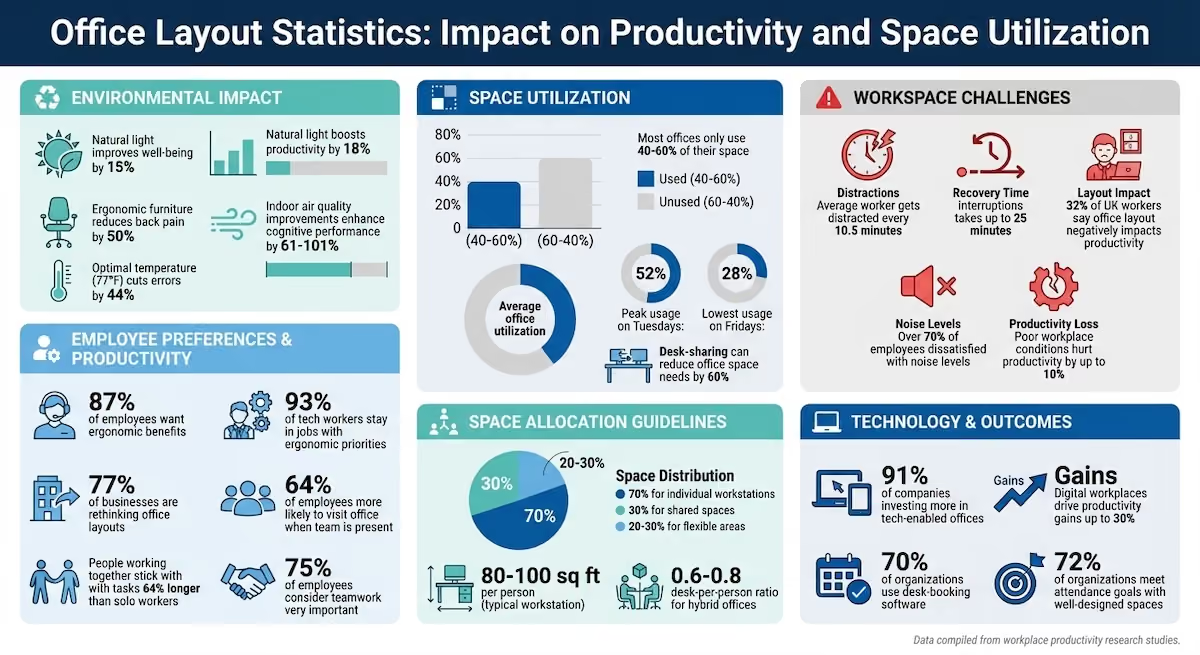
- Key Factors: Natural light improves well-being by 15% and productivity by 6%. Ergonomic furniture reduces back pain by 50%. The right temperature (77°F) can cut errors by 44%.
- Space Utilization: Most offices only use 40–60% of their space. Prioritize flexible zones for focus, teamwork, and growth.
- Layout Models: Choose from private setups for focus, open plans for collaboration, or hybrid designs combining both.
- Furniture & Tech: Use modular furniture, soundproofing, and tech tools like room booking systems to streamline work.
- Environmental Adjustments: Add plants, manage noise, and optimize lighting to create a comfortable, distraction-free environment.
The Good, the Bad, and the Ugly of Office Design | Amanda LeClair | TEDxNatick
Step 1: Assess Your Workspace Needs
To design an office that truly works for your team, start by understanding who uses the space and how they use it. Research shows that most companies only utilize 40–60% of their office space at any given time, often due to decisions based on assumptions rather than data [9].
Identify Employee Work Styles and Tasks
Employees generally fall into one of five work style categories: independent, supportive, detail-oriented, idea-oriented, and innovative. Each category comes with unique spatial needs [7][8].
"Behind every job is the person who does it – their needs, expectations and values." - Aleksandra Szeląg, Workplace Consultant, Nowy Styl [10]
Start by mapping out how departments interact. Which teams need to be close for collaboration? Which ones require separation for noise control or privacy? For roles that involve frequent client meetings, larger conference rooms might be a priority. On the other hand, teams focused on independent work may benefit more from private workstations or focus pods [6][9]. If your office operates on a hybrid model, calculate occupancy levels to determine an efficient 0.6–0.8 desk-per-person ratio [9].
Evaluate Space Requirements
A typical workstation occupies 80–100 square feet per person, which includes the desk, chair, and circulation space [9]. A good rule of thumb is to allocate 70% of your office for individual workstations and the remaining 30% for shared spaces like meeting rooms and lounges [6]. Circulation areas, such as hallways, usually take up 15–25% of the total office space [9].
To get a clearer picture of how your space is actually being used, conduct surveys [9][11]. You might find that oversized boardrooms are underutilized, while smaller, private rooms for video calls are in high demand [9]. Create a detailed list of all the activities your office needs to support - whether that’s training sessions, client presentations, focused work, or casual social interactions [9].
Once you’ve assessed current needs, you can begin planning for a workspace that’s flexible enough to grow and change over time.
Plan for Growth and Future Needs
Using your current space assessment as a foundation, consider solutions like modular furniture and movable partitions to allow for growth and evolving workflows [6][9]. Desk-sharing concepts can also help cut down on the amount of rented office space by nearly 60% [10]. In fact, 77% of businesses are rethinking their office layouts, emphasizing flexible designs that adapt without requiring major renovations [14].
"Space planning at its core is about understanding how employees and teams work, so the environment can help them do it better." - Dominic Dugan, Group Creative Director, Oktra [9]
Draft a preliminary floor plan to confirm that your headcount and functional requirements align with the available space [9]. Aim to dedicate 20–30% of your office to flexible areas that can easily be reconfigured as your needs change [12]. For expert guidance, consider consulting design professionals, like those at Office Gallery International, to create a workspace that evolves with your business.
Step 2: Choose the Right Office Layout Model
Picking the right office layout is all about matching the design to your team's specific work needs. A well-thought-out layout ensures your space supports how your team works best - whether that’s prioritizing privacy, encouraging collaboration, or offering a mix of both.
Traditional Layouts: Privacy and Focus
Traditional layouts, often referred to as "Perimeter" models, place private offices along the outer walls while grouping workstations in the center. This setup is ideal for industries like law or financial services, where confidentiality and focused work are key. It creates an environment with minimal distractions, making it easier to concentrate [2].
However, one downside is the lack of natural light for interior workstations, which can also limit spontaneous conversations [1]. While this model emphasizes privacy, many companies are shifting toward more open designs that encourage collaboration.
Open-Plan Layouts: Collaboration and Communication
Open-plan layouts eliminate walls and cubicles, creating a shared, transparent workspace. This design encourages interaction and collaboration, which can lead to better teamwork. In fact, research highlights that people working together can stick with tasks 64% longer compared to working alone [2].
That said, open layouts come with their own set of challenges. Noise and frequent interruptions can hurt productivity - 32% of UK workers reported that their office layout negatively impacted their efficiency for this very reason [3]. To counter these issues, consider adding sound-masking systems, modular office pods, or phone booths for quiet work. Placing workstations near windows can also help by providing natural light, which boosts morale and focus.
If neither a fully traditional nor completely open layout feels right, a hybrid approach might be the solution.
Hybrid and Activity-Based Layouts
Hybrid layouts combine elements of both traditional and open models. They include a mix of spaces - quiet pods for focused work, huddle rooms for small group discussions, and social areas for informal collaboration. This concept, often called Activity-Based Working (ABW), allows employees to choose spaces that suit their tasks [3].
These layouts balance individual focus with teamwork by reducing the number of assigned desks to a 0.6–0.8 ratio per person and creating shared, flexible zones [3]. Interestingly, 64% of employees are more likely to visit the office if they know their team will be there too [2]. By strategically grouping teams near the tools and resources they use most, hybrid layouts create a dynamic environment that supports both productivity and collaboration. This flexibility ensures your office can adapt as your business grows and evolves.
Step 3: Optimize Furniture and Ergonomics
Once your layout is set, it’s time to focus on furniture that enhances comfort, efficiency, and employee well-being. The furniture you choose isn’t just about looks - it plays a direct role in how your team feels and performs throughout the day.
Ergonomic Furniture: A Must for Employee Comfort
Ergonomic furniture, like adjustable chairs with lumbar support and sit-stand desks, can make a world of difference in reducing physical strain and fatigue. For instance, chairs with proper lumbar support help minimize back pain, while sit-stand desks allow employees to switch positions, keeping them energized and engaged throughout the day [15][4][16]. Monitor risers are another great addition, as they position screens at eye level, helping to prevent neck strain and improve focus [4].
Statistics underline the importance of ergonomics: 87% of employees want ergonomic benefits, and 93% of tech workers are likely to stay in jobs where these needs are prioritized [13]. When planning your budget, consider dedicating 15–20% of it to furniture [13].
"A well-designed office layout considers the physical wellbeing of employees as much as the visual appeal." - Rachel O'Brien, Codex [4]
While stylish chairs might catch the eye, avoid sacrificing support for aesthetics. Chairs without proper back support can lead to discomfort and hurt productivity over time [13].
For added flexibility, think about modular furniture that can adapt as your team or work dynamics evolve.
Modular Furniture: Adaptability for a Growing Team
Modular furniture gives you the freedom to reconfigure your office as your team grows or work styles shift. Unlike fixed installations that can take weeks to modify, modular systems can be rearranged in just a few hours. This is especially relevant now, as 90% of workplace leaders are planning to increase seat-sharing ratios to support hybrid work models [5].
Look for versatile options like moveable tables, mobile storage units, and acoustic pods that can be repositioned easily. Multi-functional pieces - like ottomans with hidden storage or adjustable tables for different group sizes - can help you get the most out of your space. Test modular layouts to identify and address workflow challenges early on.
Smart Storage for a Clutter-Free Workspace
A clutter-free workspace is more than just visually appealing - it’s essential for maintaining focus and productivity. Effective storage solutions keep desks clear and help employees stay organized. Personal lockers are particularly important in hot-desking setups, offering employees a secure spot for their belongings while keeping shared areas tidy.
Modular storage units are another flexible option, as they can be adjusted to meet changing needs. Mobile pedestals on wheels are ideal for collaborative projects, allowing storage to move with employees as needed.
"A lack of storage leads to clutter. As well as being visually unsightly, clutter can impact productivity and disturb mental clarity." - MPL Interiors [3]
Centralized storage areas can help keep individual desks free of distractions [16]. For offices with tricky corners or unused spaces, custom-built storage can turn these areas into functional assets. High-density storage units can even double as acoustic barriers, helping to manage noise levels in open-plan offices [15][18].
Step 4: Design Balanced Spaces for Focus and Collaboration
Creating an office that supports both concentrated work and team collaboration is key to productivity. Studies show that employees need to spend about 63% of their week in the office to achieve peak efficiency [2]. Thoughtful zoning can provide the right environment for each type of task.
Focus Areas for Deep Work
Quiet spaces are a must, but they shouldn’t feel isolating. The average worker gets distracted every 10.5 minutes, and recovering from these interruptions can take up to 25 minutes [20]. To reduce disruptions, locate focus areas away from busy spots like coffee stations or high-traffic hallways [20][22].
Consider using glass partitions or translucent doors. These provide sound privacy while maintaining an open feel [13][21]. A "broken plan" layout can also help - using subtle design elements like varied carpet textures, lower ceilings, or muted colors (blue is great for concentration) to signal a shift from collaborative zones to quiet spaces without erecting physical walls [13][20].
Acoustic solutions like pods can give employees immediate access to private work areas [4]. Pair these with ergonomic furniture to keep people comfortable during long stretches of focused work. Clear signage or creative naming (e.g., calling a space "The Library") can naturally set behavioral expectations for quiet use [20].
While quiet zones are essential for individual productivity, spaces designed for collaboration are equally important for team success.
Collaboration Zones for Teamwork
Collaboration zones are where teamwork thrives. Around 75% of employees consider teamwork very important, and studies show that people working together stick with tasks 64% longer than those working solo [3][2]. Equip these areas with movable whiteboards and modular seating that can be rearranged on the fly.
"Face-to-face interactions are by far the most important activity in an office; creating chance encounters between knowledge workers... improves performance." - The Robin Team, Robin [2]
Position these zones near "collision points" like coffee machines, kitchens, or lounge areas to encourage impromptu conversations across teams [24][25]. Dedicated "project war rooms" can also be a great addition. These spaces let teams leave their work visible on writable surfaces, making plans and progress tangible rather than abstract [19][25]. To prevent noise from spilling into nearby quiet zones, use acoustic panels or ceiling tiles.
Multi-Functional Spaces
Adaptable spaces can serve both focus work and collaboration needs. Large, flexible tables can double as social hubs or meeting areas [26][23]. Movable partitions or dividers allow open spaces to be reconfigured for privacy or group use as needed [23]. A clean, uncluttered design helps these spaces remain flexible for different tasks [23]. Adding user-controlled features like adjustable lighting and ventilation gives employees more control over their environment.
"Simplicity is the foundation of versatility. Yes, the most effective multipurpose spaces are those stripped to their essentials. Minimal, unembellished, and equipped only with key features." - Mateusz Barczyk, Senior Brand Manager, Hushoffice [23]
For organizations with a hybrid model, aim to start with a 60–70% focus on collaboration spaces and 30–40% on quiet zones. These ratios can be adjusted based on how your team actually uses the space [19]. While collaboration is gaining attention, it’s worth noting that 85% of employers still dedicate most office space to individual work. Striking the right balance is crucial [19].
This thoughtful approach ensures your office supports a variety of work styles and adapts to your team’s changing needs.
Step 5: Address Environmental Factors
The physical environment plays a huge role in how your team feels and performs daily. Factors like lighting, noise, and natural elements significantly influence comfort and productivity. Making thoughtful adjustments in these areas can lead to noticeable improvements.
Lighting and Natural Light
Natural light tops the list of most-requested office perks, and it’s easy to see why [35]. Studies show that access to natural light can boost productivity by 18% [27], while also improving mood, increasing energy, and reducing issues like eye strain and headaches.
To maximize natural light, position desks near windows to take advantage of daylight, but angle them to avoid glare. If your office lacks windows, swap out harsh fluorescent lights for bulbs with softer wavelengths to create a more visually comfortable environment [28].
"The right balance of natural and artificial lighting is crucial for employee productivity." – Julie Hattersley, Design Director, OP Group [27]
Smart lighting systems can further enhance the workspace by automatically adjusting artificial light based on occupancy and available daylight, which also helps cut energy costs. Installing glass partitions is another way to let natural light flow into interior spaces [35].
With lighting optimized, it’s time to tackle another common workplace challenge: noise.
Noise Control Solutions
Noise is a frequent complaint in open-plan offices, with over 70% of employees expressing dissatisfaction and more than half reporting difficulty concentrating due to excessive sound [29][30]. While the ideal noise level for productive work is 35–40 dB, many offices hit levels of 65 dB or more - similar to a bustling restaurant [30].
Start by addressing the ceiling. Acoustic baffles or tiles can help manage sound levels [30]. Adding face-level panels to cover 15–20% of wall surfaces is another effective way to absorb noise. For flooring, softer materials like carpet or vinyl reduce footstep and impact noise.
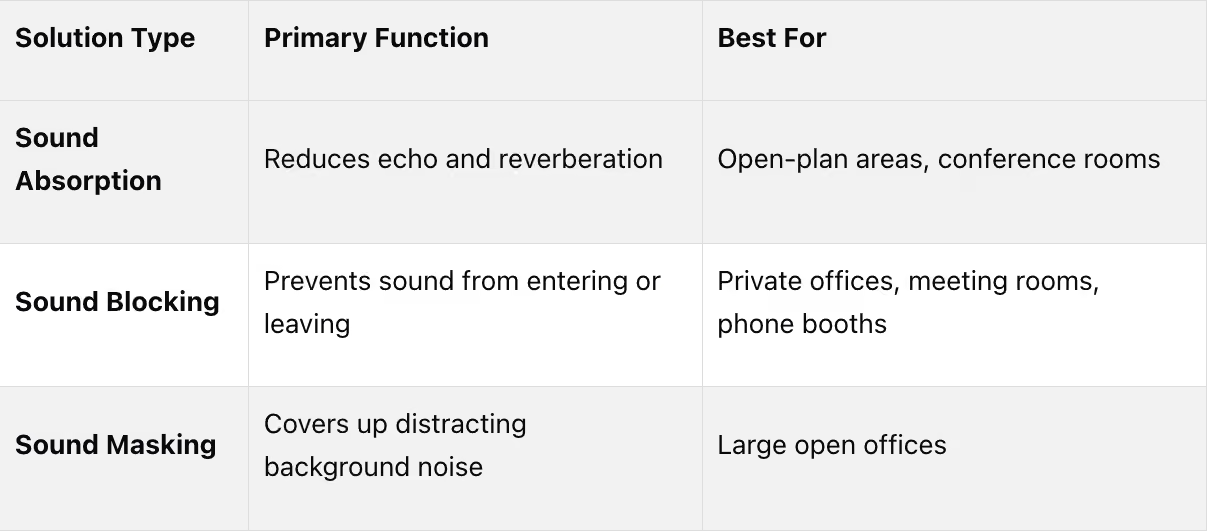
Acoustic zoning is another smart approach - keep louder areas like kitchens separate from quiet workspaces. This simple change can cut noise complaints by 25–30% [29]. For spaces where silence isn’t practical, sound masking systems can help cover up distant conversations.
Once lighting and noise are under control, bringing in natural elements can further transform the workspace.
Adding Natural Elements to Office Spaces
Bringing nature indoors isn’t just about aesthetics - it’s also a productivity booster. Studies show that employees in offices with plants are 15% more productive than those in sparse environments [31][33][34]. Plants improve air quality, filter out pollutants, and create a calming atmosphere that enhances focus and reduces mental fatigue.
Opt for low-maintenance plants like snake plants, pothos, or Chinese evergreens that thrive indoors with little upkeep [31]. Pair greenery with natural materials like reclaimed wood, bamboo, stone, or cork in furniture and finishes to create a deeper connection to nature [31].
The combination of natural light and greenery can lower absenteeism by 10% and reduce symptoms of depression by 58% [31]. Offices with these features also report a 51% reduction in eyestrain and a 63% drop in headaches [35]. For smaller focus areas, consider adding plants to mimic cozy, natural alcoves where employees can feel secure and concentrate better [31][32].
"Natural light is the #1 office perk according to employees." – Avanti Systems [35]
Step 6: Integrate Technology for Productivity
Once you've nailed the physical design of your office, the next step is weaving in technology to enhance productivity. The right tech tools can eliminate inefficiencies and make hybrid work feel natural. With 91% of companies ready to invest more in tech-enabled offices and digital workplaces driving productivity gains of up to 30% [5], integrating technology is no longer just a nice-to-have - it's a must.
Collaborative Technology Tools
Collaboration today demands tools that are both interactive and user-friendly. For instance, interactive touch monitors let multiple team members brainstorm, edit, and annotate together in real-time [38]. For hybrid teams, investing in video conferencing kits - complete with cameras, mic pods, and touch controllers - ensures seamless communication between remote and in-office employees [5][38].
The key is to match the tech to the room's size and purpose. A smaller huddle room for up to six people might only need a 55" monitor, while larger spaces benefit from dual 75" touch monitors and additional mic pods [38]. Standardizing the interfaces across your rooms - whether you use Teams or Zoom Rooms - can save time and reduce tech-related headaches [5].
Here's a real-world example: In 2025, Takenaka Corporation adopted Matterport digital twins at their Higashi Kanto Branch. This cut 360-degree photography time by 90% and saved thousands on scanning and travel costs [37].
"Matterport digital twins provide not only the high quality and precision to meet the needs of operations staff, but also allow overseas stakeholders to perform remote quality assurance verification, leading to significant reductions in travel and labor costs." – Yasutomo Matsuoka, Chief Researcher, Takenaka Corporation [37]
Cable Management and Wireless Solutions
Messy cables aren't just an eyesore - they can pose safety hazards too. Start by incorporating desk outlets and wireless charging stations to keep work surfaces tidy [39]. Mount power strips under desks using adhesive or screws to shorten cable runs and keep cords off the floor [39].
To further organize, install horizontal cable trays under desks to create a dedicated path for cables, avoiding loose loops that gather dust [39][41]. Use Velcro cable ties instead of plastic ones - they're reusable, adjustable, and won't damage wires [39]. Label both ends of cables with color-coded tags to simplify troubleshooting when swapping out equipment [39][41].
Switching to wireless peripherals - like mice, keyboards, and headphones - can eliminate cord clutter entirely [40]. In meeting rooms, wireless display systems and screen-sharing tools replace traditional HDMI and VGA cables, creating cleaner, more functional spaces [40][41]. When bundling cables, keep power and data lines separate to minimize electromagnetic interference [39].
Beyond managing physical wires, embracing wireless tech and digital tools can transform how your office operates.
Room Booking and Resource Management Systems
While hardware organization keeps things physically tidy, digital resource management systems ensure your spaces are used efficiently. Ghost bookings - where no one shows up - can waste valuable meeting rooms. Room booking systems with auto-release features free up these spaces if no one checks in within 10–15 minutes, making them available for others [42].
With 70% of organizations now using desk-booking software, and 64% of employees more likely to come to the office when they know their teammates will be there, these tools are a game-changer [2]. Look for systems that let employees search by amenities like whiteboards, video conferencing, or room capacity, so teams are equipped with the right tools before meetings even start [42].
Interactive floor plans can also save time - helping employees navigate hybrid layouts and cutting down the 10 minutes a day that 62% of workers spend searching for available spaces [2][5].
When choosing a pricing model, consider your team’s needs. For growing teams, a per-room pricing model might make sense, while smaller setups could benefit from per-user pricing [42][43]. Tools like Officely integrate with platforms like Slack or Microsoft Teams, letting users book spaces without leaving their workflow [42].
Finally, occupancy sensors provide real-time data to identify underused areas. For example, office utilization tends to peak at 52% on Tuesdays and drops to 28% on Fridays [5]. This data can guide decisions like converting oversized conference rooms into smaller huddle spaces or focus pods [36].
Conclusion
Key Takeaways
Creating an office layout that caters to your team's specific needs - whether for focused tasks, collaboration, or taking breaks - can make a big difference. A well-thought-out design includes deep-focus zones for concentration, collaboration areas for teamwork, and rejuvenation spaces for unwinding. The benefits are tangible: improving indoor air quality alone can enhance cognitive performance by 61% to 101% [17].
On the flip side, poor workplace conditions can hurt productivity by up to 10% [17]. In fact, 32% of workers in the UK say their office layout negatively impacts their output [3]. Addressing issues like noise levels, increasing natural light, and incorporating elements like greenery are all essential for creating a productive environment.
As more companies embrace activity-based working and hybrid models, flexibility is key. Globally, workplace utilization averages around 40%, with usage peaking at 52% on Tuesdays and dropping to 28% on Fridays [5]. Using tools like occupancy sensors and heat maps can help identify underused areas, allowing you to optimize your space before making major investments.
These insights offer a clear path toward designing a workspace that truly works.
Next Steps for Implementation
To bring your new office layout to life, start with a space audit to assess how your current setup is being used and to plan for growth over the next 3–5 years [3][17]. Gather feedback from your employees through surveys to understand their work styles and pinpoint layout challenges - this input is invaluable for making smarter decisions [3][13].
From there, create detailed technical plans that cover desk arrangements, electrical layouts, and fire safety measures to ensure compliance with local regulations [3]. When budgeting, allocate approximately:
- 40–50% for construction
- 15–20% for furniture
- 10–15% for technology
- 10–15% for contingencies [13]
Consider rolling out changes in phases to minimize disruptions and pilot test the new layout with small groups before scaling up [3][37]. After implementation, conduct post-occupancy surveys to measure the impact on productivity and attendance. Notably, 72% of organizations report meeting attendance goals after designing spaces employees actually enjoy using [37].
Navigating the complexities of ergonomics, sustainability certifications, and regulatory compliance can be overwhelming. Working with experienced professionals can simplify the process. A skilled partner brings expertise in space planning, material selection, and project management, ensuring your office is completed on time, within budget, and tailored to your needs. Office Gallery International offers decades of experience in delivering efficient, customized office solutions, making them a reliable choice for your workspace transformation.
FAQs
How do I choose between open, private, or hybrid layouts?
When deciding on an office layout, it’s all about what works best for your team’s needs - whether that’s collaboration, privacy, or a mix of both. Open layouts are great for fostering teamwork and open communication, making them a natural fit for creative or highly interactive workplaces. On the other hand, private layouts are better suited for tasks that require focus or confidentiality, offering quiet, enclosed spaces.
If your team needs a bit of both, a hybrid layout might be the way to go. These setups combine open areas for collaboration with private zones for more focused work, catering to a variety of work styles. Think about your team’s dynamics, how tasks flow, and the balance between interaction and privacy to create a space that boosts productivity.
How many desks do I need for a hybrid team?
The number of desks needed for a hybrid team depends on factors like your team size, office layout, and work schedules. Many companies opt for flexible arrangements, such as shared desks or hot-desking, to make the most of their space and cut down on costs. To figure out how many desks you’ll need, take a close look at your team’s in-office attendance patterns and plan accordingly.
What are the fastest layout changes that boost productivity?
Quick layout adjustments can help boost productivity. For instance, incorporating movable dividers and noise-canceling booths can make a big difference. These features let spaces effortlessly shift between open areas and private zones, accommodating various tasks and preferences throughout the day.
Key Points
How do you assess your current office space for productivity improvements?
- Conduct a space audit: Measure total square footage and identify underused or overcrowded areas.
- Analyze usage: Most offices only use 40–60% of space efficiently—look for opportunities to repurpose or reconfigure.
- Set clear goals: Define whether you need more collaboration, quiet zones, or room for growth before making changes.
What are the main office layout models and their benefits?
- Private offices:
- Ideal for roles requiring deep focus or confidentiality.
- Reduce distractions and support sensitive work.
- Open plan layouts:
- Encourage collaboration and communication.
- Best for teams that benefit from frequent interaction, but can be noisy.
- Hybrid layouts:
- Combine private and open spaces for maximum flexibility.
- Allow employees to choose the environment that suits their work style.
Why is ergonomic furniture essential in office design, and how should you budget for it?
- Ergonomics reduce physical strain: Quality chairs, adjustable desks, and monitor arms support posture and well-being.
- Boosts productivity and satisfaction: Comfortable employees are more focused and less likely to experience fatigue or injury.
- Budget recommendation: Allocate 15–20% of your office improvement budget to ergonomic furniture solutions.
How can you balance focus and collaboration in your office layout?
- Quiet zones:
- Use soundproofing, partitions, or dedicated rooms for focused work.
- Collaboration areas:
- Equip with movable whiteboards, modular seating, and technology for group work.
- Flexible zones:
- Design spaces that can shift between solo and team use as needed.
What environmental factors most impact office productivity, and how can you optimize them?
- Lighting:
- Maximize natural light and use adjustable LED fixtures to reduce eye strain.
- Temperature:
- Maintain a comfortable range (68–72°F) for optimal performance.
- Noise control:
- Install acoustic panels, carpets, and plants to absorb sound and reduce distractions.
- Biophilic design:
- Incorporate plants and natural elements to boost mood and air quality.
How do you integrate technology and plan for future growth in your office layout?
- Technology integration:
- Equip meeting rooms with video conferencing, smart boards, and wireless sharing tools.
- Use cable management systems to keep workspaces tidy.
- Implement room booking systems for efficient space use.
- Growth and flexibility:
- Choose modular furniture and partitions that can be reconfigured as your team grows.
- Leave space for new hires, tech upgrades, and evolving work styles.