
The Importance of an Ergonomic Mouse: Wrist Health, Carpal Tunnel Prevention, and Workplace Performance
Office workers make up to 5,000 mouse movements daily, standard design forces forearm pronation that compresses the median nerve for hours. Carpal tunnel costs $30,000 to $50,000 per employee. Ergonomic programs reduce upper extremity disorders by 40 to 60%. Office Gallery explains what an ergonomic mouse does differently.
Post Summary
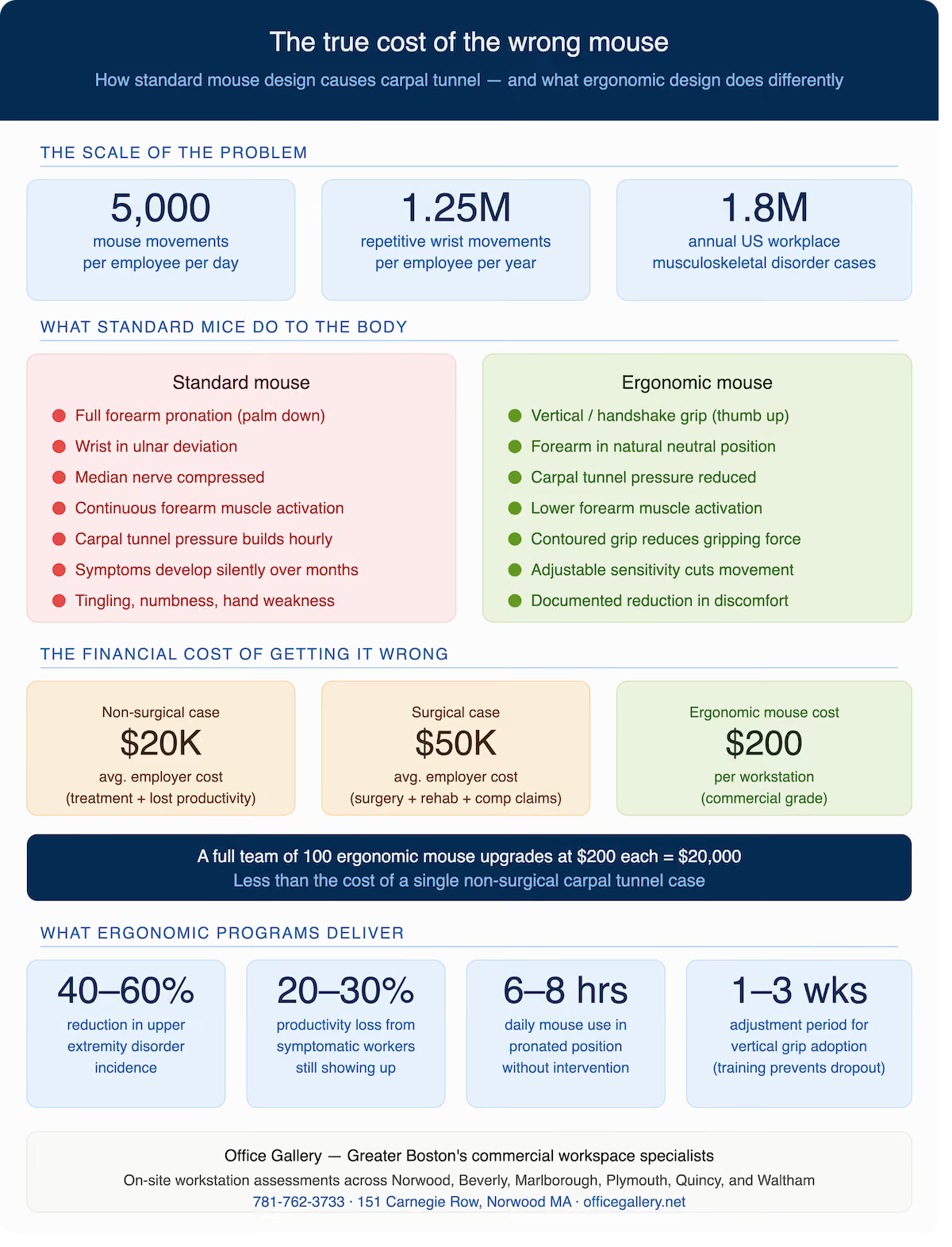
Standard mice require full forearm pronation — rotating the palm downward — which places the wrist in ulnar deviation and compresses the carpal tunnel against the underlying tendons and median nerve. Held across six to eight hours of daily use, this position creates the sustained mechanical stress that produces chronic inflammation and nerve compression. A typical office worker makes 3,000 to 5,000 clicking and scrolling movements per day, accumulating between 750,000 and 1.25 million repetitive hand and wrist movements annually from a biomechanically problematic position. Workers who grip the mouse firmly activate the forearm flexor muscles continuously, accelerating fatigue and inflammation. Minor discomfort that goes unaddressed gradually develops into clinical carpal tunnel syndrome, tendinitis, or tenosynovitis — conditions that by the time they are symptomatic have been developing for months and carry significant treatment and productivity costs.
An ergonomic mouse changes the position of the hand during use rather than simply making a standard mouse more comfortable. The primary design intervention is the handshake or vertical grip — positioning the hand with the thumb facing upward rather than the palm facing downward, eliminating the forearm pronation that standard mouse use requires. In the vertical position, the forearm rests in its natural neutral position, reducing rotational load on the forearm tendons, lowering compressive pressure within the carpal tunnel, and allowing the median nerve to function without sustained mechanical stress. Research comparing standard and vertical mouse use has documented reductions in forearm extensor and flexor muscle activity, reductions in peak carpal tunnel pressure, and user-reported reductions in wrist and forearm discomfort during and after extended use sessions.
A single carpal tunnel syndrome case that progresses to surgery carries an average total cost of $30,000 to $50,000 when medical treatment, rehabilitation, lost productivity during recovery, and workers' compensation are combined. Non-surgical cases managed through splinting and physical therapy typically cost $15,000 to $20,000 in direct and indirect costs. Against these figures, the $50 to $200 cost of a commercial-grade ergonomic mouse per workstation is straightforward to justify. Ergonomic programs combining proper workstation assessment with appropriate peripheral selection reduce upper extremity musculoskeletal disorder incidence by 40 to 60% in documented workplace studies. For Boston-area organizations with 50 or more employees performing sustained computer work, this reduction translates to a calculable reduction in workers' compensation exposure that substantially exceeds the peripheral upgrade investment.
Hand size is the most fundamental selection criterion — a mouse contoured for a large hand creates awkward finger extension stress for a small-handed user, while one sized for a small hand fails to provide the palm support a larger hand requires. Handedness matters because most ergonomic mice are designed for right-handed users; left-handed employees using right-handed ergonomic mice receive none of the ergonomic benefit. Work task influences optimal design — users performing sustained cursor movement across large screens benefit from high-sensitivity adjustable mice, while users performing primarily click-based work benefit from low-activation-force buttons. Wireless mice allow placement at the precise ergonomic position without cable constraint, making them particularly appropriate for hot desking environments where employees use different workstations across the week.
An ergonomic mouse delivers its full benefit only when the surrounding workstation is correctly configured. Desk height determines the elbow and wrist angle at which the mouse is used — the optimal position places the elbow at 90 to 110 degrees with the forearm approximately parallel to the floor, which standard-height desks achieve only for users of average height. A keyboard tray with an integrated mouse tray positions both devices at the correct height and lateral reach simultaneously, preventing the shoulder abduction that a mouse placed too far from the keyboard requires. Ergonomic chair armrests adjusted to elbow height provide the forearm support that allows the shoulder to relax during mouse use, reducing the secondary load that an unsupported forearm adds to the wrist and forearm stress of mouse operation. Monitor height affects mouse use indirectly through posture — a monitor placed too low causes forward lean that changes arm position and increases upper extremity muscular load throughout the session.
For most office professionals, the computer mouse is the most-used tool in the workplace — more than the keyboard, more than the phone, more than any piece of software. A typical office worker makes somewhere between 3,000 and 5,000 clicking and scrolling movements per day. Across a 250-day working year, that is between 750,000 and 1.25 million repetitive hand and wrist movements performed from a position that most standard mice were never designed to support.
The result is predictable. Musculoskeletal disorders of the hand, wrist, and forearm account for a significant portion of the 1.8 million work-related musculoskeletal disorder cases reported annually in the United States, and carpal tunnel syndrome alone costs employers an estimated $30,000 per affected employee when lost productivity, medical treatment, and workers' compensation claims are combined. For Boston-area organizations managing teams of 20, 50, or 200 employees, the cumulative cost of inadequate workstation ergonomics — including the peripheral choices that are most frequently overlooked — is not a minor operational detail. It is a measurable financial exposure.
The ergonomic mouse addresses one of the most specific and preventable contributors to this problem. It is not a luxury accessory or a wellness gesture. It is a clinical tool whose design is grounded in the biomechanics of the hand and wrist, and whose performance difference from a standard mouse is documented, measurable, and meaningful over the course of a working life.
Understanding Carpal Tunnel Syndrome and Why Office Work Causes It
Carpal tunnel syndrome occurs when the median nerve — which runs from the forearm through the wrist into the hand, providing sensation to the thumb, index finger, middle finger, and part of the ring finger — becomes compressed within the carpal tunnel, a narrow passageway formed by bones and ligaments at the base of the wrist. When this passageway narrows due to inflammation, repetitive stress, or sustained awkward positioning, the nerve is compressed and the characteristic symptoms begin: tingling and numbness in the fingers, wrist pain that frequently extends up the forearm, hand weakness, reduced grip strength, and in advanced cases the persistent burning sensation that makes sustained fine motor work impossible.
The connection between prolonged computer mouse use and carpal tunnel syndrome is well established in occupational health research. The mechanism is straightforward: a standard computer mouse requires the user to pronate the forearm — rotating it so the palm faces downward — to operate the device. This pronated position places the wrist in ulnar deviation, pressing the carpal tunnel against the underlying tendons and compressing the median nerve. Held for minutes, this position is uncomfortable. Held for six to eight hours per day across hundreds of working days, it creates the sustained mechanical stress that produces chronic inflammation, nerve compression, and eventually clinical carpal tunnel syndrome.
Carpal tunnel syndrome is not the only consequence of poor mouse ergonomics. Repetitive strain injuries including tendinitis, tenosynovitis, and trigger finger all share the same root cause: repetitive movement performed in a sustained awkward position without adequate recovery time. Workers who develop these conditions do not develop them acutely — they develop them over months or years of accumulated micro-stress that is entirely invisible until the point at which it becomes symptomatic, at which point the clinical and organizational costs of the condition are already fully in play.
How Standard Mouse Design Creates the Problem
The standard computer mouse was not designed with ergonomics as a primary consideration. It was designed to be compact, ambidextrous, and affordable — and in serving those goals it created a device that requires its user to adopt one of the most biomechanically problematic sustained hand positions in the office environment.
Operating a standard mouse requires full forearm pronation, placing the palm flat against the mouse surface and forcing the tendons of the forearm into a rotated position for the full duration of use. This rotation elevates pressure on the tendons that pass through the carpal tunnel and reduces the available space within the tunnel itself, increasing the compressive load on the median nerve with every hour of sustained use.
The gripping force required to control a standard mouse adds additional stress. Users who grip the mouse firmly, which most do, particularly under time pressure or concentration, activate the forearm flexor muscles continuously, creating the sustained muscular contraction that accelerates fatigue and inflammation. Combined with the repetitive fine motor movements of clicking and scrolling, the result is a sustained, high-repetition muscular and neural stress load that the forearm and wrist were not designed to sustain for six to eight hours without consequence.
Poor mouse positioning amplifies the problem further. A mouse placed too far from the body requires the user to extend the arm and elevate the shoulder to reach it, adding rotator cuff and shoulder stress to the wrist and forearm load. A mouse surface set at the wrong height forces wrist flexion or extension that changes the pressure geometry within the carpal tunnel. Most employees establish their mouse position based on desk geometry and habit rather than ergonomic principle, and most of those positions are suboptimal in ways that accumulate silently over years before producing symptoms.
What an Ergonomic Mouse Does Differently
An ergonomic mouse addresses the root biomechanical problem by changing the position of the hand during use rather than simply making a standard mouse slightly more comfortable. The primary design intervention is the handshake grip — positioning the hand in a vertical or semi-vertical orientation with the thumb facing upward rather than the palm facing downward, eliminating the forearm pronation that standard mouse use requires.
In the vertical grip position, the forearm rests in its natural neutral position — the position it adopts when the arm hangs relaxed at the side. This neutral position reduces the rotational load on the forearm tendons, lowers the compressive pressure within the carpal tunnel, and allows the median nerve to function without the mechanical stress that pronated positioning imposes. Research comparing standard and vertical mouse use has documented reductions in muscle activity in the forearm extensor and flexor muscle groups, reductions in peak pressure on the carpal tunnel, and user-reported reductions in wrist and forearm discomfort during and after sustained use.
Beyond the vertical grip, ergonomic mice incorporate several additional design features that address the secondary contributors to mouse-related strain. Contoured shapes that match the natural resting geometry of the hand reduce the gripping force users must apply to control the device — when the mouse fits the hand rather than requiring the hand to conform to the mouse, the sustained muscular contraction of active gripping is reduced. Adjustable sensitivity settings allow users to achieve the same cursor movement with less physical mouse movement, reducing the total repetitive motion load per session. Customizable button placement reduces the awkward finger stretching that reaching for non-ergonomic button positions requires over thousands of daily clicks.
Trackball ergonomic mice offer a further refinement — the cursor is controlled by rotating a ball with the thumb rather than by moving the entire mouse across the desk surface, eliminating the arm movement component of mouse use entirely and reducing the load on the shoulder and upper arm that repeated arm-level mouse movement produces over a full day.
The Business Case: What Ergonomic Mouse Investment Returns
The financial case for ergonomic mouse investment is not primarily about the cost of the mouse, it is about the cost of the condition that the wrong mouse produces.
A single carpal tunnel syndrome case that progresses to surgery carries an average total cost of $30,000 to $50,000 when medical treatment, surgical procedure, rehabilitation, lost productivity during recovery, and workers' compensation are combined. Non-surgical cases managed through splinting, physical therapy, and modified duty typically cost $15,000 to $20,000 in direct and indirect costs. Against these figures, the $50 to $200 cost of a commercial-grade ergonomic mouse per workstation is not a difficult investment to justify.
The productivity calculation adds further weight. Employees experiencing wrist pain, hand numbness, and finger tingling do not work at full capacity — they interrupt their work to shake out their hands, shift their grip, apply ice, or simply stop and rest. Research on musculoskeletal disorder presenteeism — working while symptomatic — documents productivity reductions of 20 to 30% among workers with active upper extremity symptoms, compared to symptomatic employees who report their condition. The productivity loss from an employee who is present but symptomatic frequently exceeds the cost of the accommodation that would have prevented the symptom.
Ergonomic programs that combine proper workstation assessment with appropriate peripheral selection, including ergonomic mice, keyboard trays, and monitor arms, reduce upper extremity musculoskeletal disorder incidence by 40 to 60% in documented workplace studies. For Boston-area organizations with 50 or more employees performing sustained computer work, this reduction translates to a calculable reduction in workers' compensation exposure, medical costs, and productivity loss that substantially exceeds the investment in ergonomic peripheral upgrades.
Building the Complete Ergonomic Workstation: Where the Mouse Fits
An ergonomic mouse is one component of a complete ergonomic workstation, and its performance is partly determined by how the rest of the workstation is configured around it.
The desk height and mouse surface height determine the elbow and wrist angle at which the mouse is used. The correct mouse surface height positions the elbow at approximately 90 to 110 degrees with the forearm approximately parallel to the floor — a position that most standard-height desks achieve for users of average height but that fails for shorter or taller users without height adjustment. Height-adjustable desks, available across the Office Gallery Quick Turnaround collection and full specification catalog, allow the desk surface to be set precisely at the height that achieves this elbow angle for each individual user rather than approximating it from a fixed-height standard.
The keyboard position relative to the mouse determines how far the user must reach laterally to transition between the two devices. A mouse placed too far from the keyboard, which occurs when keyboard trays are used without a mouse tray or when the keyboard is centered and the mouse is placed to the far right, requires the user to abduct the shoulder repeatedly throughout the day, adding rotator cuff load to an already stressed upper extremity. A keyboard tray with an integrated mouse tray positions both devices at the correct height and within appropriate lateral reach simultaneously.
The chair height and arm position determine whether the forearm is supported during mouse use or suspended in the air — an unsupported forearm activates the shoulder and neck muscles continuously to maintain position, adding a secondary load source that compounds the wrist and forearm stress of mouse operation. Ergonomic chairs with adjustable 4D armrests that can be positioned at elbow height provide the forearm support that allows the shoulder to relax during mouse use, reducing the total upper extremity load that a workstation produces per hour.
Monitor height and distance affect mouse use indirectly through posture, a monitor placed too low causes the user to lean forward and drop the head, which changes the shoulder and arm position during mouse use and increases the muscular load the upper extremity sustains to hold the working position. At Office Gallery, our on-site workstation assessments evaluate the full chain of postural relationships (monitor, chair, keyboard, mouse, and desk) as an integrated system rather than as individual components, because the ergonomic performance of each element depends on how the others are configured around it.
Selecting the Right Ergonomic Mouse for Your Team
Not every ergonomic mouse is appropriate for every user or every workstation context, and selecting the wrong ergonomic mouse can create new problems while failing to solve the existing ones.
Hand size is the most fundamental selection criterion. An ergonomic mouse contoured for a large hand forces a small-handed user to grip awkwardly to reach the primary button, creating a new source of finger extension stress; one sized for a small hand does not provide the palm support that a larger hand requires for neutral wrist positioning. Most ergonomic mouse manufacturers provide hand size guidance alongside their products — following this guidance rather than selecting based on aesthetics produces significantly better ergonomic outcomes.
Handedness matters for most ergonomic mice, which are typically designed for right-handed users in their default configuration. Left-handed employees using right-handed ergonomic mice receive none of the ergonomic benefit of the design, the contoured grip that supports a right hand creates an awkward, unsupported position for a left hand. Left-handed ergonomic mice are available from multiple manufacturers and should be specified for left-handed users rather than defaulting to the dominant-configuration product.
The work task influences the optimal design. Users performing sustained cursor movement across large screen areas, graphic designers, video editors, architects, benefit from high-sensitivity adjustable mice that allow precise cursor control with minimal physical movement. Users performing primarily click-based work, data entry, form processing, administrative tasks, benefit from mice with low-activation-force buttons that reduce the cumulative clicking stress per session. Users who alternate between precision work and navigation benefit from adjustable sensitivity that can be switched between modes during the same session.
Wireless versus wired connectivity affects the mouse placement flexibility available to the user. Wireless mice can be positioned at the precise distance and angle that achieves neutral wrist positioning without being constrained by cable routing; wired mice may need to be positioned closer to the cable outlet than the ergonomically optimal position. For hot desking environments where employees use different workstations on different days, wireless ergonomic mice that the employee carries personally ensure consistent ergonomic equipment regardless of which station is occupied.
Implementing Ergonomic Mouse Upgrades Across a Boston-Area Team
The most effective ergonomic peripheral upgrade programs address the full team rather than responding to individual complaints, because by the time an employee reports wrist pain, the condition has typically been developing for months and the ergonomic improvement prevents further progression rather than undoing existing damage.
A systematic approach begins with a workstation audit identifying the mouse and keyboard configuration currently in use at each position, the desk and chair height settings each employee is actually using, and the presence or absence of wrist support, keyboard trays, and monitor arms at each station. This audit frequently reveals that ergonomic equipment already purchased has not been properly adjusted, positioned, or used, a chair with 4D armrests whose armrests are set to the default factory position rather than adjusted to each employee's elbow height, or an ergonomic mouse purchased but unused because no one explained why the grip position it encourages is different from the standard mouse the employee is accustomed to.
Training accompanies equipment, an ergonomic mouse delivered without explanation of why the grip position it encourages is biomechanically correct frequently gets used like a standard mouse until the user abandons it as uncomfortable. A 15 to 20 minute workstation orientation covering grip position, mouse placement, desk and chair height alignment, and the expected adjustment period that vertical grip mice require produces significantly better adoption and outcome rates than equipment delivery alone.
Office Gallery's on-site consultation service provides workstation assessments for Boston-area businesses across Norwood, Beverly, Marlborough, Plymouth, Quincy, Waltham, and surrounding communities — evaluating the full workstation chain from chair and desk through monitor, keyboard, and mouse, identifying the specific configuration changes and peripheral upgrades that address each team's actual ergonomic risk profile rather than applying a generic equipment list. Contact the Office Gallery team at 781-762-3733 or visit the showroom at 151 Carnegie Row in Norwood to discuss a workstation assessment for your team.
The Ergonomic Mouse as Part of a Broader Organizational Commitment
The ergonomic mouse is one of the least expensive and most effective single investments an organization can make in employee physical wellbeing — but its greatest value is realized when it is treated as part of a broader commitment to ergonomic workstation design rather than as a standalone wellness gesture.
Organizations that combine ergonomic peripheral upgrades with height-adjustable desks, properly specified task seating, correct monitor placement, and regular movement encouragement create the comprehensive ergonomic environment that research consistently associates with the lowest rates of upper extremity musculoskeletal disorder incidence. Each element of the ergonomic workstation addresses a different dimension of the physical stress that sustained computer work produces, and the combined effect of all elements working together substantially exceeds the effect of any single intervention applied in isolation.
For Boston-area businesses whose teams spend the majority of their working hours at computer workstations, this investment is not a benefit program expense — it is a risk management decision with a calculable return in reduced workers' compensation exposure, lower absenteeism, higher sustained productivity, and the employee retention advantage of a workplace that demonstrably cares about the physical wellbeing of the people who work in it.
•••••
The right workplace design measurably improves employee performance, satisfaction, and retention. Office Gallery partners with businesses on that strategy, and welcomes architects and interior designers looking for a furniture and space-planning partner on their own projects. Contact the team at 781-762-3733, email info@officegallery.net, or visit the showroom at 151 Carnegie Row in Norwood.
Key Points
What is carpal tunnel syndrome, how does sustained mouse use cause it, and why does it develop silently before becoming symptomatic?
- Median nerve compression as the clinical mechanism -- carpal tunnel syndrome occurs when the median nerve, which runs from the forearm through a narrow bony and ligamentous passageway at the base of the wrist into the hand, is compressed within that passageway; the compression produces the characteristic tingling, numbness, hand weakness, and wrist pain that distinguish carpal tunnel syndrome from general forearm fatigue
- Ulnar deviation from pronated mouse grip as the sustained compressive mechanism -- standard mouse use requires the forearm to be pronated — palm facing down — which places the wrist in ulnar deviation and presses the carpal tunnel against the underlying tendons and ligaments; this position reduces the available space within the carpal tunnel and increases compressive load on the median nerve with every hour of sustained use
- 3,000 to 5,000 daily movements accumulating to over one million repetitions annually -- the repetition frequency of mouse use means that even small compressive loads per movement accumulate to significant total mechanical stress across a working year; the repetitive nature of the injury is precisely what makes it develop gradually and invisibly until the inflammatory response reaches the threshold of clinical symptoms
- Symptoms developing months or years before clinical diagnosis -- the gradual onset of carpal tunnel syndrome means that by the time an employee reports tingling or wrist pain, the condition has typically been developing for six to eighteen months; the absence of reported symptoms does not indicate the absence of developing pathology, which is why proactive ergonomic intervention outperforms reactive accommodation
- Additional conditions sharing the same root cause -- tendinitis, tenosynovitis, and trigger finger all develop through the same mechanism as carpal tunnel syndrome — repetitive movement in a sustained awkward position without adequate recovery; an ergonomic mouse that corrects the underlying position reduces the incidence of all these conditions, not only carpal tunnel syndrome specifically
- Musculoskeletal disorders accounting for 1.8 million annual cases in the United States -- this figure establishes the scale of the problem that correct peripheral ergonomics addresses; upper extremity disorders of the hand, wrist, and forearm represent a significant portion of this total and are disproportionately concentrated in office environments where sustained computer use is the primary work activity
What are the specific design features of ergonomic mice and what does the research show about their clinical effectiveness?
- Vertical grip eliminating forearm pronation as the primary design intervention -- the handshake or vertical grip positions the hand with the thumb facing upward rather than the palm facing downward, placing the forearm in its natural neutral position rather than the rotated pronated position that standard mouse use requires; this single design change addresses the root biomechanical cause of mouse-related wrist and forearm strain
- Documented reduction in forearm extensor and flexor muscle activity -- electromyographic research comparing standard and vertical mouse use has measured reductions in muscle activity in the forearm extensor and flexor muscle groups during vertical mouse use, confirming that the design change produces a physiological difference rather than simply a subjective comfort improvement
- Contoured shapes reducing gripping force requirements -- when the mouse fits the natural resting geometry of the hand, the user does not need to actively grip the device to maintain control; this reduction in gripping force reduces the sustained muscular contraction of the forearm flexors that standard mouse gripping requires and that contributes to tendon inflammation and fatigue
- Adjustable sensitivity reducing total physical movement per session -- ergonomic mice with adjustable sensitivity allow the same cursor movement to be achieved with less physical mouse movement; this reduction in total repetitive motion per session reduces the cumulative mechanical load on the wrist and forearm even when the grip position is otherwise identical
- Trackball designs eliminating arm movement as a separate load source -- trackball ergonomic mice, where cursor control is achieved by rotating a thumb-operated ball rather than moving the entire mouse across the desk, eliminate the arm-level movement component of mouse use entirely; for users with shoulder or upper arm involvement alongside wrist symptoms, trackball designs address a load source that vertical mice alone do not
- 40 to 60% reduction in upper extremity disorder incidence from comprehensive ergonomic programs -- this documented incidence reduction reflects the combined effect of correct peripheral selection, workstation configuration, and ergonomic training; it establishes that the effectiveness of ergonomic mouse investment is not theoretical but measured across workplace implementation studies
What does the complete financial picture of carpal tunnel syndrome look like for an employer and how does ergonomic investment compare?
- $30,000 to $50,000 total employer cost per surgical carpal tunnel case -- this figure combines direct medical costs, surgical procedure, rehabilitation, modified duty during recovery, workers' compensation premiums, and the productivity loss from a skilled employee performing reduced or alternative duties during a recovery period that typically spans six to twelve weeks
- $15,000 to $20,000 for non-surgical cases managed conservatively -- even cases managed without surgery through splinting, physical therapy, activity modification, and anti-inflammatory treatment carry significant direct and indirect costs; the lower surgical rate achieved through early ergonomic intervention does not eliminate cost but shifts the cost distribution toward the lower end of the range
- 20 to 30% productivity reduction from musculoskeletal presenteeism -- employees who are symptomatic but present and working perform at a documented 20 to 30% reduction from their baseline productivity; the financial cost of this presenteeism, calculated across the months during which symptoms are active but unreported and untreated, frequently exceeds the direct medical cost of the condition
- $50 to $200 per workstation for commercial-grade ergonomic mouse -- the investment comparison between a $100 ergonomic mouse per workstation and a $30,000 to $50,000 carpal tunnel case is not a difficult financial calculation; for an organization with 100 workstations, a full ergonomic mouse upgrade at $200 per position represents $20,000 — less than the conservative cost estimate for a single non-surgical carpal tunnel case
- Workers' compensation premium impact extending financial consequences beyond direct case costs -- organizations with elevated workers' compensation claim histories pay higher premiums across all subsequent policy years; the premium impact of recurring musculoskeletal disorder claims compounds the direct cost of each case with ongoing insurance cost increases that persist long after the individual cases are resolved
- ROI calculable before a single case is prevented -- for organizations that can document their current incidence rate of upper extremity musculoskeletal disorders, the expected case reduction from a 40 to 60% incidence reduction program provides a direct ROI calculation that positions ergonomic peripheral investment as a risk management expenditure with a specific expected return rather than a wellness expense with a diffuse benefit
How does ergonomic mouse performance depend on the surrounding workstation configuration and what workstation elements interact most directly with mouse ergonomics?
- Desk height as the foundational mouse position determinant -- the height of the desk surface on which the mouse rests determines the elbow and wrist angle at which the mouse is used regardless of the mouse's own ergonomic design; a correctly designed ergonomic mouse used at an incorrectly set desk height delivers a fraction of its intended ergonomic benefit because the wrist position the mouse is designed to support is negated by the workstation configuration surrounding it
- 90 to 110 degree elbow angle as the target desk and mouse surface height specification -- this elbow angle, with the forearm approximately parallel to the floor, is the position that minimizes the muscular load required to hold the arm in working position and achieves the neutral wrist orientation that ergonomic mouse design supports; height-adjustable desks allow this angle to be achieved precisely for each individual user rather than approximated from a fixed-height standard
- Keyboard tray with integrated mouse tray as the dual positioning solution -- a keyboard tray with an integrated mouse tray positions both devices at the correct height simultaneously and maintains consistent lateral spacing between keyboard and mouse; without a mouse tray, the mouse is frequently placed on the desk surface above the keyboard tray level, creating a height differential that forces the mouse wrist into extension and negates the tray's keyboard ergonomic benefit
- Chair armrest height providing forearm support that reduces secondary shoulder and neck load -- an unsupported forearm during mouse use requires the shoulder and neck muscles to actively hold the arm in the working position, creating a sustained postural load in the upper trapezius and rotator cuff that compounds the wrist and forearm stress of mouse operation; 4D adjustable armrests set at elbow height allow the forearm to rest supported during mouse use, eliminating this secondary load source
- Monitor height affecting posture and therefore upper extremity muscular load -- a monitor placed too low causes the user to lean forward and flex the cervical spine, which changes the shoulder and arm position during mouse use and increases the muscular effort required to hold the working arm position; correct monitor positioning at or slightly below eye level is an ergonomic prerequisite that affects peripheral performance indirectly but meaningfully
- The workstation chain requiring assessment as an integrated system -- the practical implication of these interdependencies is that ergonomic mouse selection and configuration cannot be separated from the assessment of the desk, chair, keyboard, and monitor surrounding it; a workstation audit that evaluates all elements together and addresses them as a system produces better ergonomic outcomes than peripheral upgrades implemented without workstation context
What are the specific selection criteria for ergonomic mouse specification and how should organizations approach team-wide peripheral decisions?
- Hand size as the non-negotiable primary selection criterion -- ergonomic mouse designs contoured for specific hand sizes deliver their ergonomic benefit only when the contour matches the hand that is using them; a mouse too large for the user's hand forces the fingers to hyperextend to reach the primary button, creating a new strain source; a mouse too small fails to support the palm and hypothenar region that neutral wrist positioning requires
- Handedness requiring explicit specification rather than default assumption -- the majority of commercial ergonomic mice are designed for right-handed use in their default configuration; left-handed employees assigned right-handed ergonomic mice receive no ergonomic benefit and may experience worse positioning than a standard symmetric mouse would provide; left-handed ergonomic mouse options must be explicitly specified rather than assumed to be available in default procurement
- Task type determining the sensitivity, button, and movement design appropriate for each role -- graphic designers, video editors, and architects performing precision cursor work across large screen areas have different optimal mouse specifications than data entry processors, administrative staff, or executives performing primarily navigational and click-based work; a single mouse specification applied uniformly across a team serves none of these task profiles optimally
- Wireless specification enabling ergonomic placement in hot desking and shared workstation environments -- wired mice constrain placement by cable routing, which frequently results in the mouse being positioned at the nearest convenient cable-accessible location rather than the ergonomically correct position; wireless mice can be placed at the precise distance and angle that achieves neutral wrist positioning regardless of desk cable access, making them the appropriate default specification for shared and hot desking environments
- Adjustment period expectation preventing premature product abandonment -- employees switching from a standard pronated grip mouse to a vertical grip ergonomic mouse typically experience an adaptation period of one to three weeks during which the new grip position feels unfamiliar and uncomfortable; without advance guidance that this adjustment period is normal and temporary, many employees abandon the ergonomic mouse and return to their standard mouse before the adaptation is complete, eliminating the ergonomic benefit the purchase was intended to deliver
- Team-wide systematic specification outperforming individual complaint-driven accommodation -- the most cost-effective ergonomic peripheral program specifies appropriate equipment across the full team at workstation audit rather than responding to individual reported symptoms; by the time symptoms are reported, the condition has typically been developing for months and prevention has given way to management; proactive specification eliminates the condition that complaint-driven accommodation can only treat
How should Boston-area organizations implement ergonomic mouse upgrades and what does Office Gallery provide to support the process?
- Workstation audit as the implementation starting point -- a systematic audit of each workstation identifies the current mouse and peripheral configuration, the desk and chair height settings each employee is actually using, the presence or absence of keyboard trays and monitor arms, and the specific ergonomic gaps that peripheral upgrades will address; without this audit, peripheral upgrades are applied without the workstation context that determines whether they deliver their intended benefit
- Audit frequently revealing incorrectly adjusted existing equipment -- workstation audits consistently discover that ergonomic equipment already purchased and delivered has not been adjusted from factory default settings; armrests at the wrong height, chairs at default positions regardless of occupant body dimensions, and monitor arms set to the installation position rather than the ergonomic position are common findings that require no additional equipment purchase — only correct adjustment and user training
- Training delivery on the same day as equipment -- ergonomic peripheral upgrades that are delivered without training on the same day have significantly lower adoption rates than those accompanied by a 15 to 20 minute workstation orientation; the orientation covers grip position and adjustment for ergonomic mice, desk and chair height alignment, and the expected adaptation period, converting a product delivery into an ergonomic intervention
- Phased implementation testing before team-wide commitment -- organizations uncertain about the right ergonomic mouse specification for their team benefit from piloting two or three models with a representative group before committing to team-wide procurement; the pilot group's feedback on grip comfort, sensitivity, and task suitability produces a more confident specification decision than product specification alone
- Office Gallery's on-site consultation service evaluating the full workstation chain -- the Office Gallery team provides on-site workstation assessments for Boston-area businesses that evaluate desk, chair, keyboard, mouse, and monitor configuration as an integrated system, identifying the specific peripheral upgrades and configuration changes that address the team's actual ergonomic risk profile rather than applying a generic equipment list; service is available across Norwood, Beverly, Marlborough, Plymouth, Quincy, Waltham, and surrounding communities
- Showroom access enabling peripheral testing before procurement commitment -- ergonomic mouse grip comfort and size fit are physical assessments that specification sheets cannot replicate; visiting the Office Gallery showroom at 151 Carnegie Row in Norwood enables hands-on evaluation of ergonomic mouse options before procurement, producing a selection decision based on actual fit and feel rather than product description; contact the team at 781-762-3733 or email info@officegallery.net to arrange a visit or discuss a workstation assessment for your organization