Standing Desks vs Traditional Desks: A Complete Comparison
Choosing between standing and traditional desks impacts your health, productivity, and budget. Standing desks ($300–$1,200+) offer flexibility and reduce back pain by 37% compared to traditional desks, while traditional desks ($100–$2,000+) provide stability for precision work. The optimal solution? Alternate every 30–60 minutes for maximum health benefits.
Post Summary
Standing desks adjust height for sitting or standing, while traditional desks are fixed-height and focus on stability and storage.
Standing desks: $300–$1,200+ (electric models). Traditional desks: $100–$2,000+ depending on materials and features.
Yes—studies show 37% less back pain, lower cholesterol, and a 6.5% productivity increase with standing desks, but alternating is best.
Every 30–60 minutes. Aim for 40 minutes sitting and 20 minutes standing per hour for optimal health and comfort.
Yes - standing desks need at least 50 inches vertical clearance and more space for movement and cable management.
Looking to choose between a standing desk and a traditional desk? Here’s a quick breakdown to help you decide:
- Standing desks let you switch between sitting and standing, which can reduce back pain and improve energy levels. They’re adjustable, with options ranging from manual cranks to electric motors, and typically cost $300–$1,200 or more.
- Traditional desks are fixed-height, stable, and often come with built-in storage. They’re great for precision tasks and can cost as little as $100 for basic models, going up to $2,000+ for premium options.
Key Takeaways:
- Sitting for long hours increases health risks like cardiovascular issues and back pain.
- Standing too long can cause leg fatigue and pressure on veins.
- The ideal solution? Alternate between sitting and standing every 30–60 minutes for better health and productivity.
Quick Comparison:
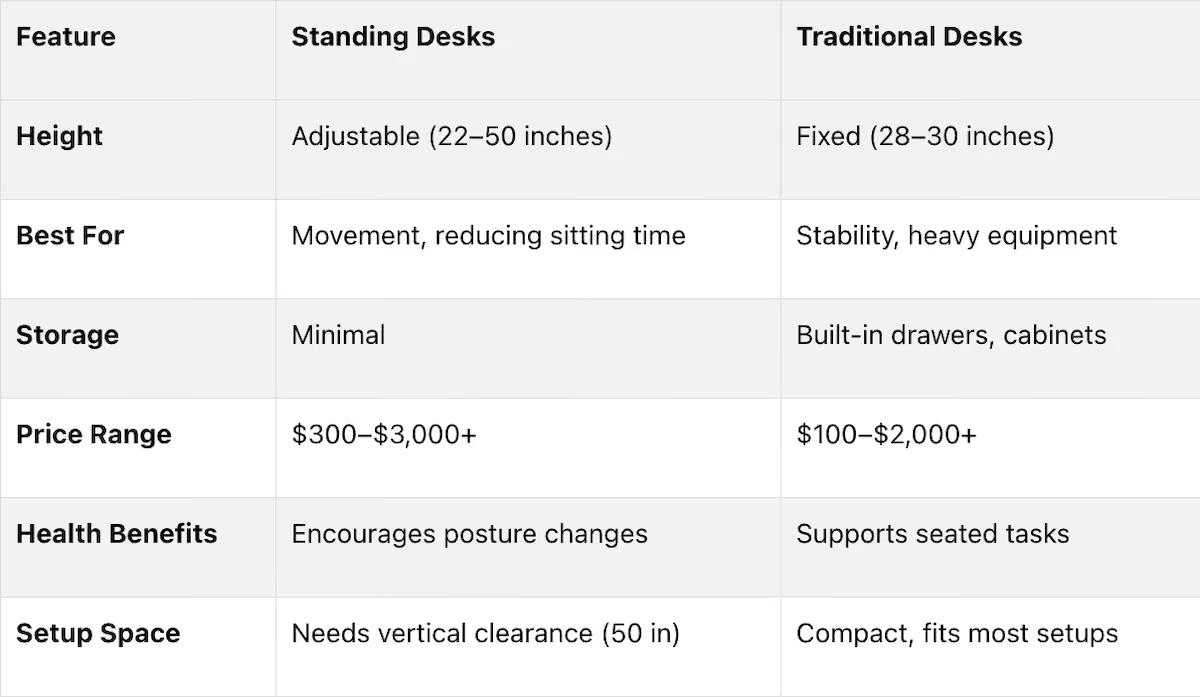
Bottom Line: If you want flexibility and health benefits, go for a standing desk. If you need stability and storage, stick with a traditional desk. For the best of both worlds, consider a sit-stand desk.

Standing Desk vs Sitting Desk Comparison 2026 | Health, Productivity & Ergonomics Guide
Design and Features Compared
Let’s take a closer look at the structural designs and standout features of traditional and standing desks. The differences between these two desk types extend well beyond height adjustments. Traditional desks are built with a fixed frame, typically set at 28–30 inches, prioritizing stability and organization [8]. They often include built-in drawers, pedestals, and file cabinets. While this fixed height works well for standard-sized users, it can pose challenges for shorter individuals [8][5].
On the other hand, standing desks focus on adjustability rather than storage. Most models allow height adjustments ranging from 22 to 50 inches, making them suitable for both sitting and standing positions [8]. They come in three main types: electric models with motorized controls and memory presets, pneumatic desks with gas springs for quick, cord-free adjustments, and manual crank desks that require physical effort to change height [3][7]. Electric models are especially popular in shared workspaces, where users can save their preferred heights for convenience [3][5].
Traditional Desks: Key Features
Traditional desks are designed with stability and storage in mind. Their sturdy, fixed frames can support heavy equipment like multiple monitors, printers, or drafting tools without wobbling. These desks typically require a footprint of about 4 feet in width and 2.5 feet in depth, with an additional 2–3 feet of space behind for easy chair movement [8].
Materials vary widely, from affordable laminate options priced at $100–$300 to mid-range wood desks costing $300–$800, and premium hardwood models that can exceed $2,000 [8]. However, these desks often lack built-in cable management, which can result in tangled cords [8][1]. While the added drawers and pedestals enhance functionality, they also increase the desk’s overall size and weight.
Now, let’s see how standing desks differ in their design and functionality.
Standing Desks: Key Features
Standing desks trade built-in storage for mechanical components that enable height adjustments. Many modern electric models come equipped with collision-avoidance sensors, which stop the desk’s movement if it encounters an obstacle, applying between 40–80 pounds of force [5]. Commercial-grade frames can handle up to 265 lbs or more, but stability varies - budget models may wobble at maximum height, whereas dual-motor systems with steel frames offer greater stability for tasks like typing [3][7].
"A standing desk is more than a motorized frame. The desktop acts as a structural beam. Its stiffness, thickness, and weight directly influence wobble, vibration, and how stable your monitors and keyboard feel when you type." - Eureka Ergonomic [9]
These desks require vertical clearance of at least 50 inches to accommodate their full height range. They also need longer power cables or specialized cable management systems to prevent wires from disconnecting during adjustments [8][2][4]. Accessories like anti-fatigue mats are often added for comfort during extended standing periods [3][2].
Pricing for standing desks varies significantly. Manual crank models cost between $250 and $900, single-motor electric desks range from $400 to $1,200, and dual-motor commercial-grade options can go from $600 to over $3,000 [2][3].
Health Effects: Sitting vs Standing
When comparing sitting and standing desks, it’s essential to consider how each impacts your health. Your posture during work can have lasting effects on your well-being. Prolonged sitting has been linked to an increased risk of cardiovascular disease, Type 2 diabetes, and certain cancers, including colon and endometrial cancers [2][6][11]. Sitting for 8–11 hours a day can raise your mortality risk by 15% compared to sitting less than 4 hours [11]. Over time, this habit contributes to spinal disc compression and degeneration [2].
However, standing all day isn’t a perfect alternative. Standing for more than 6 hours daily may double or even triple the risk of varicose veins and trigger pain in the legs, feet, and joints [13][2][6]. Prolonged standing also makes the heart work harder to pump blood back from the legs [2][6]. Experts suggest limiting standing to 40-minute intervals to reduce discomfort in muscles and joints [6].
The best approach? Dynamic working - switching between sitting and standing every 30 to 60 minutes. A study conducted by Liverpool John Moores University between October and December 2013 examined 47 office workers using sit-stand desks over eight weeks. Participants reduced their daily sitting time by 80.2 minutes and increased standing by 72.9 minutes per workday. The results showed improved vascular health, a 0.40 mmol/L drop in total cholesterol, and no increase in musculoskeletal pain [12].
Health Impact Comparison
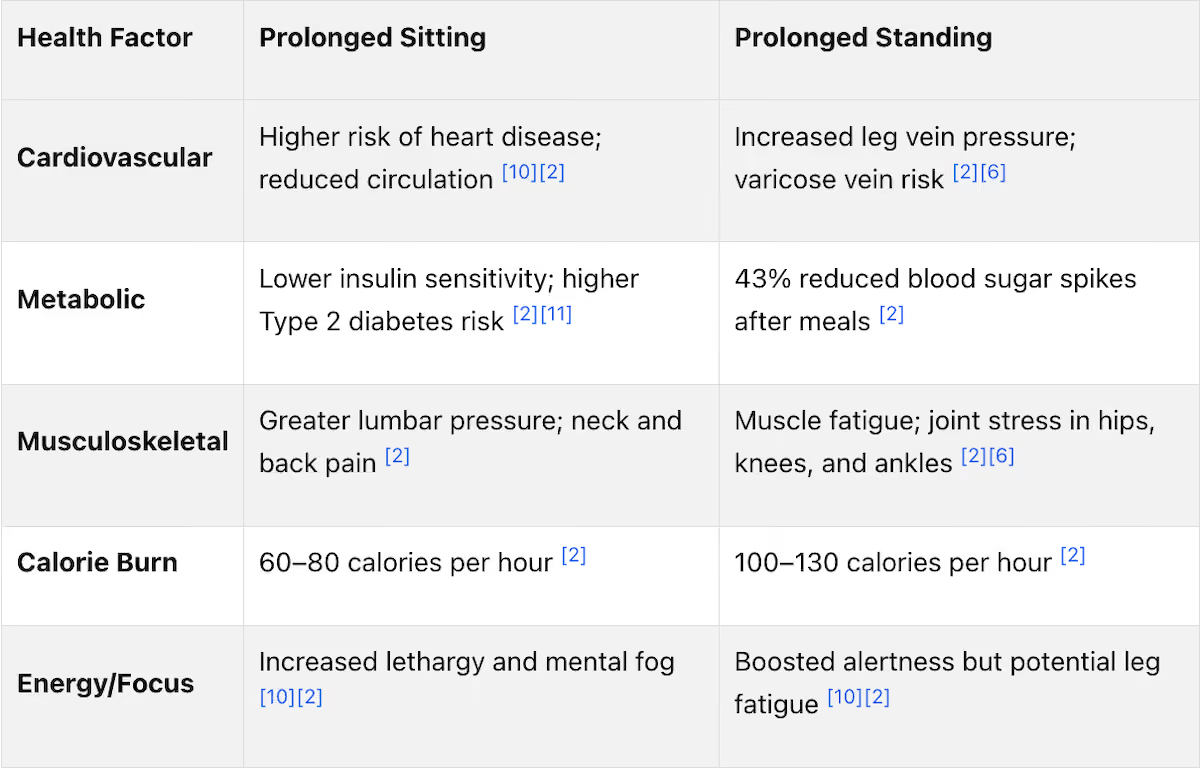
Proper posture is crucial to reducing health risks for both sitting and standing positions.
Posture Tips for Both Desk Types
Good alignment can make a big difference. Set your monitor so the top of the screen is at or slightly below eye level, keeping it about 20–40 inches away. Your elbows should stay close to your body, bent at a 90- to 110-degree angle, with wrists in a neutral position parallel to the floor [2]. For standing, distribute your weight evenly between both feet and keep your knees slightly bent to avoid joint strain.
"Just taking small breaks throughout the day to stand, stretch and walk around can have a significant impact on your health and comfort level." - Michael Milicia, Occupational Therapist, Cleveland Clinic [10]
If you’re new to standing, ease into it. Start with 15 minutes per hour in the first week, then aim for 20–25 minutes by the second week [2]. Use an anti-fatigue mat to reduce stress on your legs, and wear shoes with proper support - steer clear of high heels or completely flat soles [2][6]. Break up long sitting periods by standing or walking for two minutes every 20–30 minutes [6]. Ideally, aim for a 40-minute sitting and 20-minute standing ratio per hour [2].
Productivity and Ergonomics at Work
Task Suitability: Sitting vs. Standing
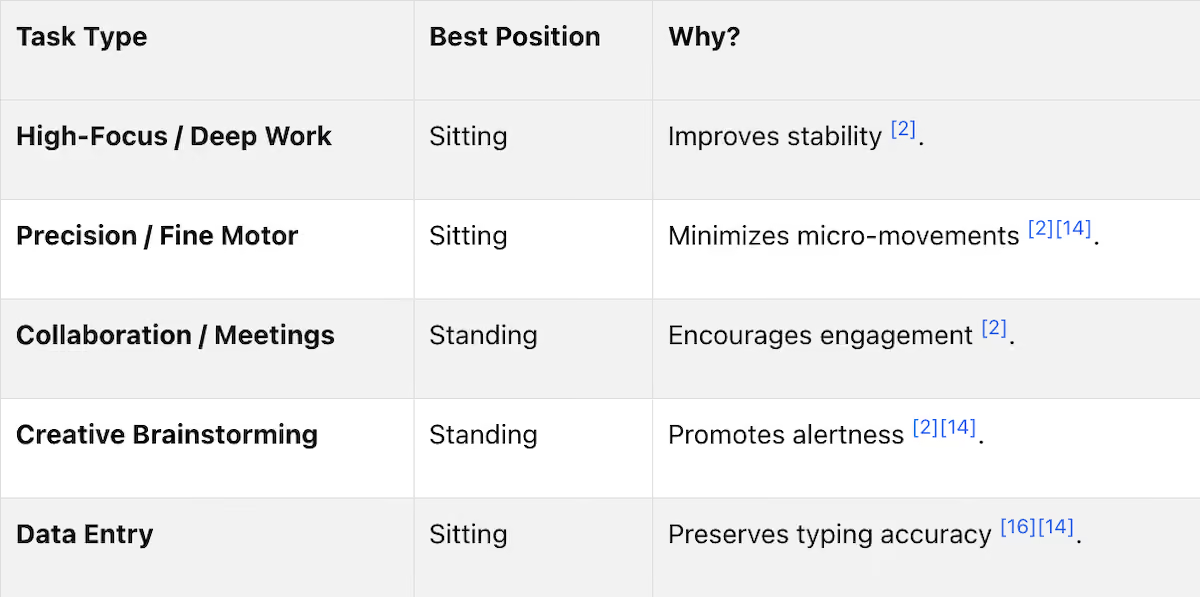
While standing can improve productivity during tasks like writing, it may also result in more typing errors compared to sitting [16]. Additionally, discomfort is a common issue: 80% of seated workers and 51.7% of stand-biased users reported experiencing lower back pain [16].
Sit-Stand Desk Options
Sit-stand desks offer the flexibility to alternate between sitting and standing, allowing you to adapt your posture to the task at hand. Many office workers choose to stand during energy dips throughout the day [15]. However, standing for more than 40 minutes at a time can lead to muscle fatigue [6].
"Sit-stand desks mitigate health risks while maintaining productivity." - Kaysey Aguilar, PhD, Texas A&M University School of Public Health [16]
The key is to align your posture with your work: sit for tasks requiring precision and stand for activities that benefit from movement and engagement. Companies like Office Gallery International even offer space planning consultations to help you select the right desk setup, ensuring your workspace supports both your workflow and ergonomic needs.
Cost, Space, and Practical Factors
Price Comparison
When it comes to desks, traditional models can start at around $100 for basic laminate options, while high-end hardwood versions can cost over $2,000[8]. On the other hand, standing desks typically start in the $300–$400 range for functional electric models. The price difference often comes down to the adjustment mechanisms. For a good balance of quality and price, electric standing desks in the $500–$700 range are a solid choice. These often include dual motors for smoother adjustments and better stability without the extra expense of luxury features[17]. Plus, they’re built to last - most high-quality electric standing desks have a lifespan of 8 to 15 years and cost less than $6.50 annually in energy consumption[3]. If you’re looking for tailored solutions, companies like Office Gallery International can design custom desks to match your workspace’s size and style.
Space and Setup Requirements
Cost aside, take a moment to think about how much room you have and how your desk will fit into that space. Standing desks, for instance, require at least 50 inches of vertical clearance to make full use of their height adjustment capabilities. It’s a good idea to check for nearby obstacles like window sills or wall-mounted shelves that could get in the way[18]. You’ll also need 36–42 inches of space behind the desk for comfortable chair access[18].
If space is tight, desk converters might be a practical alternative. These cost between $50 and $500 and can turn your existing desk into a sit-stand workstation without the need for a full replacement[2,4]. For smaller areas, compact desks measuring 36–48 inches wide are ideal for setups that focus mainly on digital tasks[18]. These considerations can help ensure your desk fits seamlessly into your workspace.
Choosing the Right Desk for Your Workspace
Finding the right desk means balancing cost, space, and functionality to meet your specific needs. Traditional desks are a great choice if you need stability for precision tasks like CAD work or photo editing[8]. They’re also perfect for setups that involve heavy equipment or tasks requiring minimal movement. On the flip side, standing desks offer flexibility, allowing you to switch between sitting and standing throughout the day - a great option for those who want to stay active while working.
For the best ergonomic setup, make sure your desk height allows your elbows to rest at a 90-degree angle, whether you’re sitting or standing. This is especially important given that over 60% of office workers use desks that don’t properly fit their equipment or body proportions[18]. If you’re unsure about what works best for your space, Office Gallery International offers consultations to help you design a workspace that supports both your workflow and comfort needs.
Conclusion
The ideal desk for your workspace depends on your work habits, health goals, and the tasks you handle daily. Traditional desks are great for stability and built-in storage, making them a solid choice for workstations involving lots of paperwork or heavy equipment. On the other hand, standing desks - especially sit-stand models - offer the flexibility to switch between sitting and standing, which can help reduce lumbar strain and even aid in managing blood sugar levels after meals [19].
Incorporating movement into your day is where the real benefits lie. Studies show that sit-stand desks can reduce sedentary time by 60–120 minutes [3]. As Remtek Workplace points out, "the benefit comes from movement, not simply standing more" [3]. Alternating between sitting and standing every 30 to 60 minutes helps strike the perfect balance, addressing risks like cardiovascular issues from prolonged sitting and leg fatigue from standing too long.
This approach doesn't just boost health - it also maximizes the lifespan and efficiency of your workspace. Investing in ergonomic furniture can pay off in the long run. High-quality electric standing desks, for instance, can last 8–15 years with minimal energy costs [3]. Proper ergonomic setups also help prevent musculoskeletal issues, which are a major cause of lost productivity for employers. Whether you choose a traditional desk paired with ergonomic seating or a sit-stand desk with memory presets, the key is to maintain a neutral spine, keep your elbows at a 90-degree angle, and position your monitor at eye level.
If you're thinking about upgrading your setup, Office Gallery International offers consultations to help you find furniture that meets both your functional needs and spatial constraints. A well-chosen desk isn’t just a piece of furniture - it’s an investment in your health and productivity.
FAQs
How do I choose the right desk height for my body?
To determine the ideal desk height, adjust it so your elbows rest at a comfortable 90-degree angle while keeping your shoulders relaxed. Your elbow height serves as a useful reference. Typically, sitting desks are about 28–30 inches high, while standing desks range from 38–46 inches. For more precision, you can use ergonomic calculators to fine-tune the height, helping to minimize strain and maintain comfort throughout your workday.
What accessories do I need for a standing desk setup?
When setting up a standing desk, a few accessories can make a big difference in comfort and usability. An anti-fatigue mat is a must-have to ease foot and leg strain during long hours of standing. To keep your screen at the perfect height, consider adding monitor arms or mounts. These not only improve posture but also free up desk space.
For a tidy workspace, cable management trays are great for organizing cords and keeping them out of the way. Other additions like ergonomic keyboard trays, footrests, and even balance boards can further enhance your setup, making it more comfortable and ergonomic for extended use.
Is a desk converter worth it instead of a sit-stand desk?
If you're seeking a cost-effective and space-efficient way to incorporate standing functionality into your existing desk, a desk converter might be just what you need. However, for those prioritizing long-term ergonomic support and greater stability, a full sit-stand desk could be the better choice. Think about how often you'll use the standing feature and the specific needs of your workspace to determine which option suits you best.
Key Points
What are the key health differences between standing desks and traditional desks?
- Prolonged sitting increases risks of cardiovascular disease, diabetes, and back pain.
- Standing desks reduce back pain by 37% and lower cholesterol by 0.40 mmol/L.
- Standing too long can cause leg fatigue and varicose veins; best to alternate positions.
- Dynamic working (switching every 30–60 minutes) improves vascular health and energy.
How do standing desk and traditional desk costs compare across different quality levels?
- Traditional desks: $100–$2,000+ (laminate to premium hardwood, with built-in storage).
- Standing desks: $300–$1,200+ (manual crank, pneumatic, or electric models).
- Desk converters: $50–$500 (add standing function to existing desk).
- Electric standing desks in the $500–$700 range offer the best value for most users.
Which desk type is better for productivity and different work tasks?
- Traditional desks: Best for precision work (CAD, editing, data entry) due to stability.
- Standing desks: Ideal for collaborative, creative, or high-energy tasks.
- Sit-stand desks: Allow you to adapt posture to the task, maximizing both focus and comfort.
- Study: Alternating to standing increased productivity by 6.5% in creative roles.
What are the space requirements and setup differences between desk types?
- Traditional desks: Require 4 ft width, 2.5 ft depth, plus 2–3 ft behind for chair movement.
- Standing desks: Need at least 50 inches vertical clearance and 36–42 inches behind for movement.
- Cable management: More complex for standing desks due to moving parts.
- Accessories: Anti-fatigue mats, monitor arms, and cable trays recommended for standing setups.
What are the ergonomic considerations and accessories needed for each desk type?
- Monitor height: Top of screen at or just below eye level, 20–40 inches away.
- Elbow angle: 90–110 degrees, wrists parallel to floor.
- Standing: Distribute weight evenly, knees slightly bent, use anti-fatigue mat.
- Accessories: Monitor arms, keyboard trays, footrests, and supportive shoes enhance comfort.
How should someone transition to using a standing desk, and what are the best practices?
- Start slow: Begin with 15 minutes standing per hour, increase gradually.
- Alternate: Aim for 40 minutes sitting, 20 minutes standing per hour.
- Use support: Anti-fatigue mats and supportive footwear reduce discomfort.
- Breaks: Take short walks or stretch every 30–60 minutes.
- Monitor comfort: Adjust as needed to avoid fatigue or pain.