
How to Choose Ergonomic Furniture for Small Spaces
Even a compact workspace can support comfort, posture, and productivity — but only when furniture is chosen deliberately. This guide covers space measurement, ergonomic chair and desk selection for small offices, vertical storage solutions, and how Office Gallery International supports setup from consultation through installation.
Post Summary
Start by sketching a top-down view of the room and measuring square footage, ceiling height, doorways, and hallways — then outline the desk footprint using painter's tape, simulate chair movement to confirm you have at least 36 inches of clearance from the desk's front edge to the nearest wall, and identify your daily tasks to determine whether you need dual monitor space, a sit-stand setup, or dedicated storage.
Prioritize adjustable seat height between 16 and 20 inches, seat depth adjustment maintaining a 2 to 3 finger gap behind the knees, lumbar support adjustable to the L3-L4 region of the spine, and 4D armrests that retract fully so the chair can tuck under the desk — with a base diameter under 27 inches to avoid interference with desk legs or walls in tight spaces.
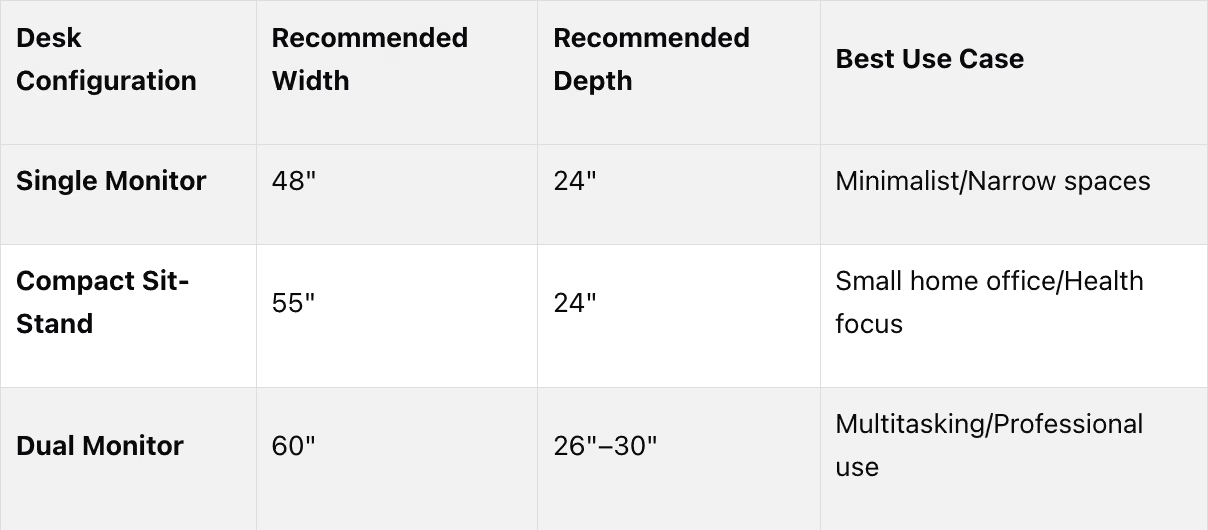
For single-monitor setups, aim for a desk at least 48 inches wide and 24 inches deep — increasing depth to 30 inches for larger monitors or a separate keyboard — while dual-monitor setups require at least 60 inches of width, and compact sit-stand desks around 55 inches wide and 24 inches deep allow alternating between sitting and standing without overcrowding the space.
Wall-mounted shelves should be no more than 8 to 10 inches deep with 4 to 6 inches of clearance below, pegboards and vertical organizers keep essentials within reach without consuming desk surface, and slim rolling filing pedestals that slide under the desk when not in use provide accessible storage without permanently consuming legroom — with built-in cable channels or hollow areas to manage wire clutter.
Developed by Cornell University's Ergonomics Web, the 20-8-2 rule recommends sitting for 20 minutes, standing for 8, and moving or stretching for 2 minutes during every 30-minute work period — applied in small offices through compact sit-stand desks around 55 inches wide that allow position changes without requiring additional floor space or restructuring the room layout.
Struggling to set up an ergonomic workspace in a small area? Here's the solution:
Compact spaces require smart furniture choices to maintain comfort, promote good posture, and reduce strain. Poorly designed setups can lead to back pain, muscle tension, and productivity loss. The key is selecting adjustable, space-saving furniture that supports your body and fits your daily tasks.
Quick Tips:
- Measure your space: Sketch your room, mark obstacles, and use painter's tape to plan furniture placement.
- Pick a supportive chair: Look for adjustable seat height, lumbar support, and compact designs under 27 inches wide.
- Choose the right desk: For single monitors, aim for 48" wide by 24" deep. Dual monitors? Go for 60" wide and 30" deep.
- Maximize vertical storage: Use wall-mounted shelves or pegboards to free up desk space.
- Consider sit-stand desks: Compact models (55" wide) let you alternate between sitting and standing.
By focusing on functionality and proper alignment, even a small workspace can become comfortable and efficient.
Assess Your Space and Needs
Measure Your Workspace
Start by sketching a simple top-down view of your room. Mark key features like walls, doors, windows, radiators, power outlets, and anything permanent that could affect furniture placement[5][3]. This rough drawing will act as your guide when planning your layout.
Next, measure the vertical distance from the floor to the ceiling. If you're considering a standing desk, leave 6–10 inches of clearance above the tallest monitor. Be mindful of any low-hanging lights, ceiling fans, or windowsills that might get in the way[4][5].
Don't forget to measure doorways, hallways, stairwells, and elevators to ensure your furniture can actually make it into the room. Allow at least 2–4 inches of clearance on each side of the shipping boxes[4][5].
Once you’ve got those details, outline your desk's footprint using painter's tape. Make sure doors and closets can open fully, and simulate chair movement to see how much space you’ll need. Ideally, you want 36 inches of clearance between the desk's front edge and the nearest wall or obstacle, giving you enough room to move comfortably. If space is tight, 24 inches is the absolute minimum desk depth to maintain a healthy distance from your monitor[5][6].
"Your monitor should be at least an arm's length away (typically 20-30 inches), and a desk depth of 24 to 30 inches is usually sufficient to achieve this." – Cornell University's Ergonomics Web[5]
With these measurements in hand, you’re ready to think about the specific tasks your workspace will need to support.
Identify Your Daily Tasks
Now that you’ve mapped your space, take a moment to evaluate your daily work habits. What kind of tasks do you perform most often? For example, do you need space for dual monitors, or do you work exclusively on a laptop? If video calls are a big part of your day, think about lighting and the backdrop visible on camera. If paperwork or specialized tools like printers are part of your routine, you’ll likely need extra surface area[3].
Organize your workspace into activity zones. Essential items like your keyboard, mouse, and phone should be within easy reach[8]. If natural light is available, position your desk to take advantage of it without causing screen glare. For those needing extra storage, an L-shaped or corner desk might work better than a floating shelf[3].
Consider how often you change positions throughout the day. If your work involves long periods of focus, a desk with sit-stand functionality might be a good fit. Experts suggest changing positions or stretching every 30 to 60 minutes to reduce strain on your muscles and joints[7]. If your tasks vary frequently, look for furniture that supports both sitting and standing.
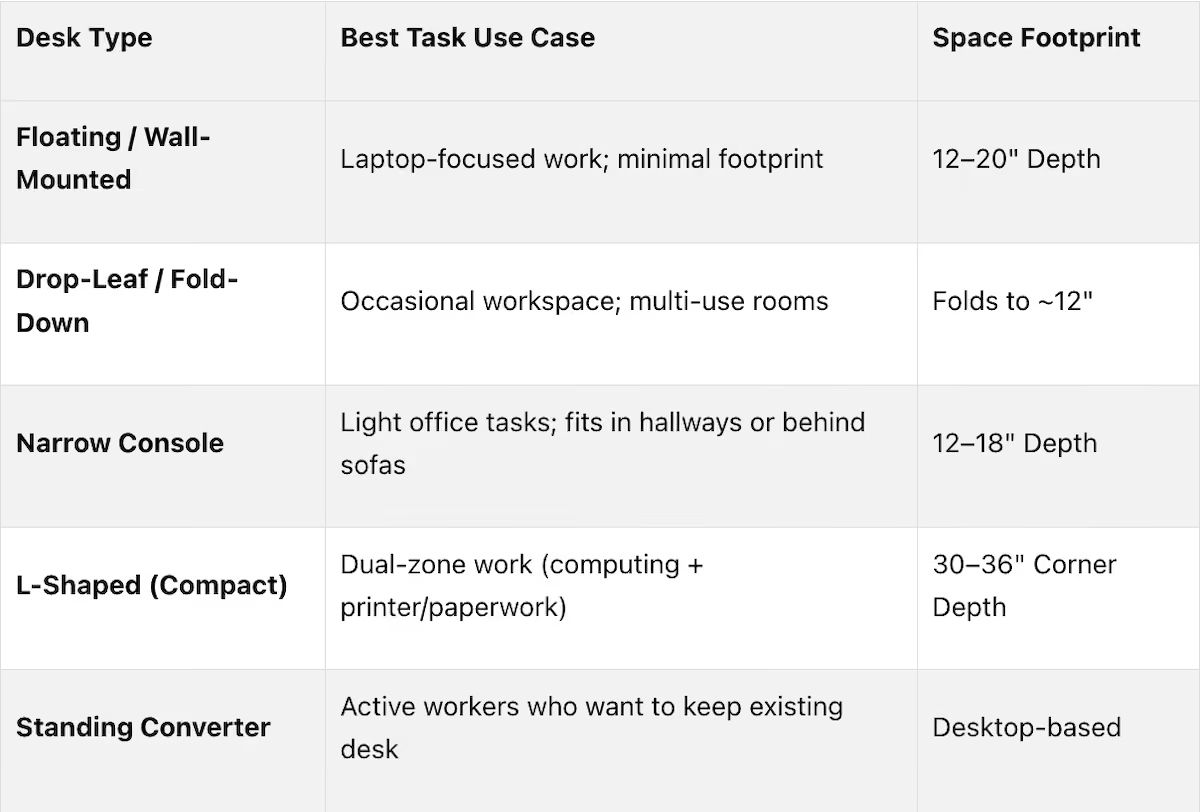
Here’s a quick guide to help match desk types with common work scenarios:
Before buying anything new, take stock of what you already own. Make a list of your current setup and note any areas that don’t meet your needs. For instance, maybe your desk doesn’t have enough room for dual monitors, or your chair isn’t supportive enough for long hours. This honest evaluation will help you focus on solving actual problems rather than adding unnecessary items to your workspace[9].
Choose an Ergonomic Chair for Small Spaces
When you're working in a tight home office, the right chair can make all the difference. It’s not just about comfort - it’s about maintaining proper posture and avoiding strain, all while making the most of your limited space.
Once you’ve planned your workspace and outlined your tasks, it’s time to find a chair that balances support with a compact design.
Prioritize Adjustability and Support
Start with seat height. Ideally, your feet should rest flat on the floor with your knees forming a 90-degree angle. For most people, this means a height range of about 16 to 20 inches. But if you’re on the shorter side (around 5'1"), look for a chair that can go as low as 15.7 inches. This prevents your feet from dangling, which can cut off circulation[2].
Seat depth adjustment is another must-have, especially in small spaces where you can’t shift around freely. When seated with your back firmly against the lumbar support, make sure there’s a gap of about two to three fingers between the seat edge and the back of your knees. This small detail helps maintain healthy blood flow and prevents you from leaning forward awkwardly to relieve leg pressure[2].
"When seated with your back firmly against the lumbar support, there should be approximately 2-3 fingers' width of space between the back of your knees and the seat edge. This ensures proper blood circulation and full back support." – Eureka Ergonomic[2]
Lumbar support is critical, too. Opt for a chair with adjustable lumbar support that aligns with the L3-L4 region of your spine - typically 6 to 12 inches above the seat. Without this, you’re more likely to slouch, which can lead to discomfort or long-term back issues[11].
Don’t overlook armrests. Chairs with 4D armrests (adjustable in height, width, depth, and pivot angle) are ideal. These let you lower or retract the armrests entirely, so you can tuck the chair under your desk when it’s not in use. This feature is especially valuable in small offices where every inch matters[2][10].
Once you’ve checked all the boxes for adjustability and support, focus on finding a chair that fits your space without compromising on functionality.
Look for Compact Designs
Standard office chairs often have bases that span 28 to 30 inches, which can feel oversized in a small room. For tighter spaces, aim for a base diameter under 27 inches. This ensures the chair won’t constantly bump into your desk or walls when you move around[2].
Consider chairs with mesh backrests. They not only keep you cool by dissipating heat but also have a sleek, airy look that works well in compact setups[2][10]. If space is extremely tight, an armless design might be the way to go. These chairs allow you to sit closer to your desk and use the desk itself for forearm support. Plus, they easily slide under narrow workstations[10][11].
"A chair that is too large prevents movement, reduces your ability to get close to your desk, and can be just as harmful as one with no support at all." – Eureka Ergonomic[11]
Finally, think about color. A bulky, dark chair can dominate a small room, making it feel even more cramped. Opt for lighter or neutral tones, especially in mesh designs, to create a more open and inviting workspace[10].
Select the Right Desk
When setting up your workspace, picking the right desk is key. It needs to fit your space, support your tasks, and encourage good posture - all without making the room feel cramped. The goal is to find a desk that’s big enough for your needs but not so large that it overwhelms your area.
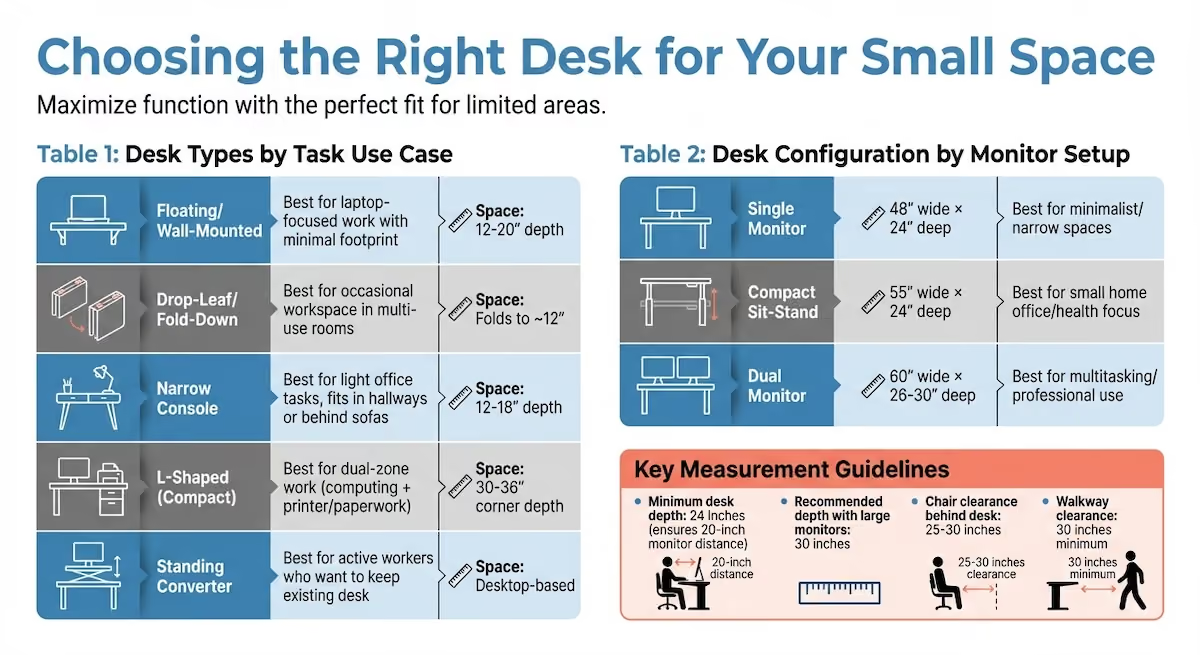
For a single-monitor setup, a desk about 48 inches wide works well. If you’re using dual monitors, aim for 60 inches. The desk depth should be at least 24 inches to ensure your monitor is positioned around 20 inches from your eyes. If you’re using larger monitors or a separate keyboard, consider increasing the depth to 30 inches.
"A desk should have a depth of at least 24 inches. If you work with large monitors or use a separate keyboard, a depth of 30 inches is even better." – Eureka Ergonomic
Before buying, map out the desk’s footprint with painter’s tape. This helps you visualize how it fits in your space, leaving room for door swings, nearby furniture, and movement. Allow 25–30 inches behind the desk for your chair and a clear 30-inch walkway to avoid tripping hazards. Once you’ve got the basics down, you can explore desk configurations that align with your work style.
Compact Sit-Stand Desks
Height-adjustable desks are a great option for small spaces, letting you switch between sitting and standing to stay active. Cornell University's Ergonomics Web suggests following the 20-8-2 rule: sit for 20 minutes, stand for 8, and move or stretch for 2 minutes during every 30-minute work period[12].
For a compact sit-stand setup, look for desks around 55 inches wide and 24 inches deep. These dimensions provide enough room for essentials without overcrowding your space. Manual crank models are budget-friendly and lightweight, while electric versions offer quicker adjustments but come at a higher price.
Before purchasing, measure the height from the floor to any overhead obstacles like shelves or windowsills. This ensures the desk won’t hit anything when fully raised. For stability, place the desk on a hard surface and distribute the weight evenly.
L-Shaped and Multifunctional Desks
If a height-adjustable desk isn’t on your list, other layouts can help you make the most of your space.
An L-shaped desk is perfect for unused corners, turning them into efficient work zones. This setup gives you two distinct areas - one for your computer and another for writing or printing - without taking up the center of the room. Compact L-shaped desks typically measure 48 to 60 inches wide and 30 to 36 inches deep on each side, making them ideal for small home offices. To keep your space feeling open, consider desks with slim frames, light colors, or open legs to reduce visual clutter.
For extremely tight spaces, wall-mounted or floating desks are excellent options. These desks eliminate floor footprints entirely, making them perfect for hallways, studios, or multi-purpose rooms. Wall-mounted desks generally range from 24 to 48 inches wide and 12 to 20 inches deep, with prices between $60 and $300. Another possibility is a narrow console desk, measuring 36 to 60 inches wide and 12 to 18 inches deep, which works well behind sofas or along narrow walls - ideal for laptop-focused tasks.
To maximize your desk’s surface, consider adding a monitor arm. This accessory frees up space by adjusting your screen height, ensuring the top of the display is at or slightly below eye level. It’s especially helpful for dual-monitor setups, even on desks as narrow as 48 to 55 inches.
Add Storage Without Crowding Your Space
Once you've set up your desk and chair for comfort, the next step is to keep your workspace clear and organized. A clutter-free environment improves focus, and the key to achieving this is using vertical space and choosing storage that serves multiple purposes.
Vertical and Wall-Mounted Storage
Wall-mounted storage can transform your workspace by freeing up precious floor space. Shelves and cabinets attached to the wall eliminate the need for bulky furniture legs, which is especially helpful in tight spaces like apartments or bedrooms [13].
Pegboards and vertical organizers are also great for keeping your essentials - like stationery and small tools - off your desk but still within arm’s reach [13]. If you’re adding shelves above your desk, stick to these dimensions for the best results:
- Depth: No more than 8–10 inches (about half the depth of a standard desk).
- Clearance: Leave 4–6 inches of space below the shelf for easy access [14].
"The solution isn't horizontal - it's vertical. Integrating a well-curated office desk shelf is the most effective way to reclaim your surface area while adding architectural interest to the room" [14].
When arranging items on vertical shelves, try the rule of thirds for a balanced look that’s both functional and visually appealing [14]. For durability, powder-coated steel is a smart choice for slim, high-capacity storage. If you’re working with a glass desk, avoid clamp-on shelves, as they could damage the surface. Instead, use freestanding risers with silicone or cork feet to protect the glass.
To tackle cable clutter, look for shelves with built-in channels or hollow areas to hide wires. Alternatively, bundle cables neatly with Velcro ties behind the riser legs [14].
Multifunctional Storage Units
Multifunctional storage is a game-changer for small workspaces. Slim filing pedestals or rolling carts fit neatly under most desks and can be pulled out as needed. When not in use, they slide back into place, leaving you with a clean and open area [15].
Desks with built-in storage - like drawers, cubbies, or lower shelves - help reduce the need for extra furniture [13]. Just make sure not to store items directly under your desk if it compromises your legroom or posture [1]. For items you use most often, keep them on the lowest shelf or a riser directly in front of you. Less frequently used items can go on higher shelves or in less accessible spots to avoid unnecessary reaching [14].
Wall-mounted rail systems are another flexible option. These systems can be adjusted for different tasks or users, making them ideal for shared spaces. They serve as both shelving and workstations, and fold-down Murphy units are perfect for saving space while maintaining functionality when closed [15].
When choosing materials for wall-mounted storage, go for solid wood or high-grade plywood to avoid sagging under heavy items like books or equipment [14]. To create an open and spacious feel, stick to light colors, slim profiles, and open-frame designs [13].
Work with Office Gallery International
On-Site Consultations and Space Planning
Designing an ergonomic workspace in a small area can feel overwhelming, but expert advice can turn the challenge into a practical solution. Office Gallery International (https://officegallery.net) provides personalized consultations for home offices in Boston, MA, and surrounding areas (including Beverly, Marlborough, Plymouth, Quincy, and Waltham), ensuring your setup fits your space and supports your needs.
Their space planning services are tailored to tackle the unique issues of tight quarters. For instance, they recommend chair bases under 27 inches to prevent interference with desk legs or walls [2]. They also assist in configuring modular furniture to fit your exact layout and maximize efficiency.
During an on-site consultation, their team evaluates your space, measurements, and needs to create a layout that promotes the "Neutral Position" - a posture that keeps your body aligned and comfortable throughout the day [2]. While accurate measurements and smart furniture choices lay the groundwork, these consultations fine-tune your setup for the best ergonomic results.
Ergonomic Furniture Selection and Installation
From the initial consultation to the final installation, Office Gallery International handles every step of the process. They offer a range of modern ergonomic furniture, including compact 36-inch desks with built-in shelving [17]. You can even schedule a visit to their showroom to test performance seating and explore home office essentials in person [16].
Once you've selected your furniture, their team takes care of delivery and installation, ensuring everything is set up to provide maximum ergonomic support [17]. They handle the details, from assembly to final adjustments, so you can focus on enjoying a workspace designed for comfort and productivity.
These services are designed to seamlessly enhance your overall home office setup.
Conclusion
Turn your small home office into a space that promotes productivity and supports your health. Focus on furniture that encourages good posture and makes the most of your available space [2].
Follow the "Neutral Position" principle to keep your body aligned - from your head to your feet - with monitors placed 20 to 40 inches away for optimal viewing [1].
Even if you're working in a compact area, tools like monitor arms, chairs with retractable 4D armrests, and vertical storage solutions can help you maintain an organized and ergonomic workspace.
Take time to review your ergonomic choices and create a cohesive setup. For personalized advice, Office Gallery International offers on-site consultations and space planning services to help you design a workspace that fits your needs. Their team manages everything from measuring your space to installing your furniture, ensuring ergonomic functionality even in limited areas [2].
Incorporate the 20-8-2 rhythm into your routine - spend 20 minutes sitting, 8 minutes standing, and 2 minutes moving around to improve circulation and reduce spinal strain [2].
Make thoughtful choices and consider expert help to create a workspace that enhances both your comfort and efficiency.
FAQs
What’s the smallest desk size that still feels ergonomic?
The smallest desk size to maintain ergonomic comfort is usually 24 inches deep. This depth allows adequate room for devices and proper wrist support. Although desks as narrow as 20 inches are available, they often sacrifice comfort. When it comes to height, 24 to 26 inches is a good range for shorter individuals, particularly those around 5'2". Overall, a depth of 24 inches is the minimum suggested for compact spaces.
How do I know if an ergonomic chair will fit me and my room?
When picking an ergonomic chair, make sure it fits both you and your workspace. Start by measuring your desk area to ensure the chair won’t take up too much room. Look at the chair’s dimensions - like seat height, width, and depth - and compare them to your own body measurements for a comfortable fit. Chairs with adjustable features, such as height and armrests, are great for tailoring the setup to your needs. If you can, try the chair out beforehand or go with one that offers a return policy for added peace of mind.
What are the best ways to add storage without losing legroom?
To make the most of storage in small workspaces without sacrificing legroom, go for compact, multi-purpose furniture and vertical storage solutions. Think wall-mounted shelves, tall cabinets, or desks designed to save space. These options help you keep the floor clear while adding valuable storage. Focus on ergonomic designs and clever organization to ensure your workspace stays comfortable and productive.
Key Points
How should you assess a small workspace before making any furniture decisions?
- A top-down sketch of the room is the essential starting point – marking walls, doors, windows, radiators, power outlets, and permanent obstacles before any furniture is considered, because attempting to plan layout without this documentation consistently results in purchases that don't fit the physical space
- Ceiling height measurement determines sit-stand desk viability – leaving 6 to 10 inches of clearance above the tallest monitor when fully raised, and checking for low-hanging lights, ceiling fans, or windowsills that could obstruct the desk at its maximum height before purchasing a height-adjustable model
- Painter's tape outlining of the desk footprint allows you to simulate the actual dimensions in the room before buying – confirming that doors and closets can open fully and that chair movement allows at least 36 inches of clearance from the desk's front edge, with 24 inches as the absolute minimum desk depth for healthy monitor distance
- Daily task analysis determines desk configuration requirements – whether dual monitors, a docking station, paperwork surface, printer access, or video call backdrop are factors each demands a different desk type and storage configuration, making task mapping a prerequisite to furniture selection rather than an afterthought
- Taking stock of existing furniture before purchasing anything new identifies what the setup actually needs versus what might feel appealing – focusing the investment on solving real posture, access, or storage problems rather than adding items that duplicate existing functionality or consume space without ergonomic benefit
What should you look for in an ergonomic chair designed for compact spaces?
- Seat height adjustability between 16 and 20 inches is the foundational requirement – with the lower end of that range critical for users around 5'1" whose feet would otherwise dangle, cutting off circulation and creating lower back strain that compounds over long work sessions
- Seat depth adjustment maintaining a 2 to 3 finger gap behind the knees – when seated with the back against the lumbar support – ensures healthy blood circulation and prevents the forward lean that users adopt when seat depth is fixed too long for their body proportions
- Lumbar support adjustable to the L3-L4 region of the spine – typically 6 to 12 inches above the seat – is the single most consequential feature for preventing lower back strain, because fixed lumbar support that cannot be positioned to individual spine curvature provides inconsistent support that many users effectively neutralize by slouching away from it
- 4D armrests that retract fully allow the chair to tuck completely under the desk when not in use – a feature that transforms chair storage in small rooms from a floor-space problem into a solved one, and that eliminates the shoulder elevation that fixed armrests create when they prevent the user from sitting close enough to the work surface
- A base diameter under 27 inches distinguishes compact ergonomic chairs from standard commercial models – standard bases spanning 28 to 30 inches consistently interfere with desk legs and walls in tight spaces, while mesh backrests additionally reduce visual bulk and dissipate heat in environments without strong air circulation
What desk configurations support ergonomic small office setups best?
- Single-monitor setups require a minimum desk width of 48 inches and depth of 24 inches – ensuring the monitor can be positioned 20 to 30 inches from the eyes as Cornell University's Ergonomics Web recommends, with the 24-inch depth representing the minimum for healthy viewing distance rather than a comfortable working margin
- Compact sit-stand desks around 55 inches wide and 24 inches deep enable the 20-8-2 posture rotation that reduces spinal strain without requiring floor space for a second workstation – manual crank models offer budget and weight advantages while electric versions provide faster transitions that increase actual usage compliance
- L-shaped desks in 48 to 60 inch configurations transform unused corners into efficient dual-zone setups – one side for computer work and another for writing or reference materials – without occupying center floor space, making them particularly effective in home offices where the corner would otherwise remain functionally dead
- Wall-mounted and floating desks eliminating floor footprints entirely are the most space-efficient option for hallways, studios, and multipurpose rooms – ranging from 24 to 48 inches wide and 12 to 20 inches deep at prices between $60 and $300, with the trade-off being fixed height that cannot accommodate standing work
- Monitor arms added to any desk configuration free up the surface area that monitor bases consume and allow precise height and distance adjustment – enabling proper eye-level positioning even on desks as narrow as 48 to 55 inches while creating workspace for keyboards, documents, or accessories that would otherwise be displaced
How should vertical storage be integrated into a compact ergonomic workspace?
- Wall-mounted shelves no more than 8 to 10 inches deep with 4 to 6 inches of clearance below keep essentials within reach without extending into the sightline or creating the visual heaviness that deep shelving produces in small rooms – with powder-coated steel as the preferred material for durability in slim, high-capacity configurations
- Pegboards and vertical organizers keep stationery, small tools, and frequently accessed items off the desk surface and within arm's reach – addressing the core small-office storage challenge of maintaining a clear work surface without relocating necessities to inconvenient locations
- Slim rolling filing pedestals that slide under the desk provide accessible storage for documents and supplies without permanently consuming floor space – pulled out when needed and returned when not, maintaining the open floor clearance that makes small rooms feel functional rather than cramped
- Desks with built-in drawers, cubbies, or lower shelves reduce the total furniture footprint by consolidating storage and work surface into a single piece – with the important caveat that storage should not be placed directly under the desk in ways that compromise leg clearance or force lateral posture adjustments
- The rule of thirds for shelf organization – balancing functional items, visual elements, and open space across shelf surfaces – maintains both functionality and the open, uncluttered appearance that prevents small workspaces from feeling chaotic, while built-in cable channels or Velcro tie systems behind riser legs address wire management that open shelving otherwise exposes
When does professional ergonomic consultation add value in a small workspace setup?
- On-site evaluation by professionals familiar with compact configurations provides insight that measurement alone cannot – identifying the specific combination of chair base diameter, desk depth, and storage configuration that achieves the Neutral Position in a given room's constraints rather than applying general guidelines to a space that may have unusual proportions or obstacles
- Space planning services from Office Gallery International create layouts tailored to exact square footage, task requirements, and workflow patterns – going beyond one-size-fits-all recommendations to address the specific ergonomic challenges of tight quarters where standard furniture dimensions frequently create the posture problems they are meant to solve
- Modular furniture configuration for exact room dimensions – configuring L-shaped desks, rolling storage, and wall-mounted elements to a specific layout – is significantly more effective than purchasing standard configurations and adapting them to a space that does not accommodate their assumptions about available clearance
- Delivery and installation managed through a single provider eliminates the coordination gap between furniture purchase and ergonomic setup – ensuring that workstation height, monitor positioning, chair adjustment, and storage placement are all configured correctly from the first day of use rather than requiring subsequent correction
- A showroom visit to test performance seating and home office essentials in person enables users to evaluate actual adjustability ranges, base footprint sizes, and sit-stand mechanism quality before committing to a purchase – particularly valuable for ergonomic chairs where the range of adjustment feel varies significantly between products that appear similar in specification sheets
How do compact sit-stand desks and ergonomic accessories work together in a small setup?
- The 20-8-2 rule applied through a compact sit-stand desk – 20 minutes sitting, 8 standing, 2 moving per 30-minute cycle – reduces spinal strain and sedentary behavior without requiring the user to leave the workspace or reconfigure the room, making position variation accessible in environments where walking circuits are not practical
- Monitor arms paired with sit-stand desks allow the screen to track the user's eye level through both positions – eliminating the neck flexion that occurs when a monitor fixed at sitting height is used at standing height, and the eye strain that results from a monitor adjusted for standing that is too high when seated
- Keyboard trays maintaining forearm-parallel-to-floor positioning address the wrist extension that standard desk surfaces create for users whose optimal keyboard height falls below standard desk height – a particularly common issue in compact setups where desk height is fixed and chair height adjustment alone cannot fully compensate
- 4D armrests that retract for desk proximity combined with a keyboard tray eliminate the postural trade-off between forearm support and desk access that users in standard setups manage by either elevating their chair to desk height and losing floor contact or lowering to foot-flat position and losing forearm support
- Footrests providing floor contact when chair height is elevated' complete the ergonomic system for users whose optimal keyboard height requires a seat position where feet cannot rest flat – preventing the dangling that reduces circulation and creates the lower back pressure that compounds into discomfort across long work sessions