Desk Booking vs. Hot Desking: Key Differences
Desk booking gives employees a reserved workspace in advance while hot desking lets them claim any available desk on arrival. The right choice depends on your team's attendance patterns, collaboration needs, and tolerance for unpredictability – and the right furniture matters as much as the policy.
Post Summary
Hot desking is a first-come, first-served system where employees arrive and claim any available desk. Desk booking, also called office hoteling, allows employees to reserve a specific desk in advance through a digital platform or app. Both systems move away from permanently assigned seating, but desk booking adds a layer of control and predictability that hot desking does not provide.
Hot desking works best in hybrid workplaces where employees split time between remote and in-office work, mobile teams like sales staff who are rarely in the office full-time, and startups or growing companies that need to accommodate more employees without immediately expanding their footprint. Studies show that approximately two-thirds of desks in traditional offices go unused, making hot desking a practical way to align desk supply with actual daily attendance.
Desk booking is most effective for hybrid teams who need to coordinate in-office days, employees who require specific equipment such as sit-stand desks or dual monitors, and organizations where fairness of access is a priority regardless of arrival time. A fintech company in Singapore with 200 employees adopted desk booking after 135 workers showed up on a single Tuesday for only 120 available desks, illustrating the conflict that unmanaged hot desking can create at scale.
Hot desking drawbacks include morning stress from the daily scramble for a desk, loss of personalization that reduces employee sense of belonging, ergonomic inconsistency from constantly reconfiguring shared equipment, and the tendency toward desk squatting where employees claim the same spot daily to avoid uncertainty. Desk booking drawbacks include dependence on technology that can fail, ghost bookings where reserved desks go unused at rates as high as 25%, costs of platform licensing, and frustration for employees who prefer spontaneous office visits without advance planning.
Desk booking platforms generate utilization data that hot desking cannot capture, including occupancy rates by day, peak usage periods, and underutilized areas. A 500-person software company in Singapore used this data to reduce from 500 assigned desks to 333 bookable desks, cutting office space from 50,000 to 30,000 square feet and saving $300,000 annually on rent while increasing utilization from 35% to 78% and maintaining employee satisfaction at 81%.
Struggling to decide between desk booking and hot desking? Here’s the quick breakdown:
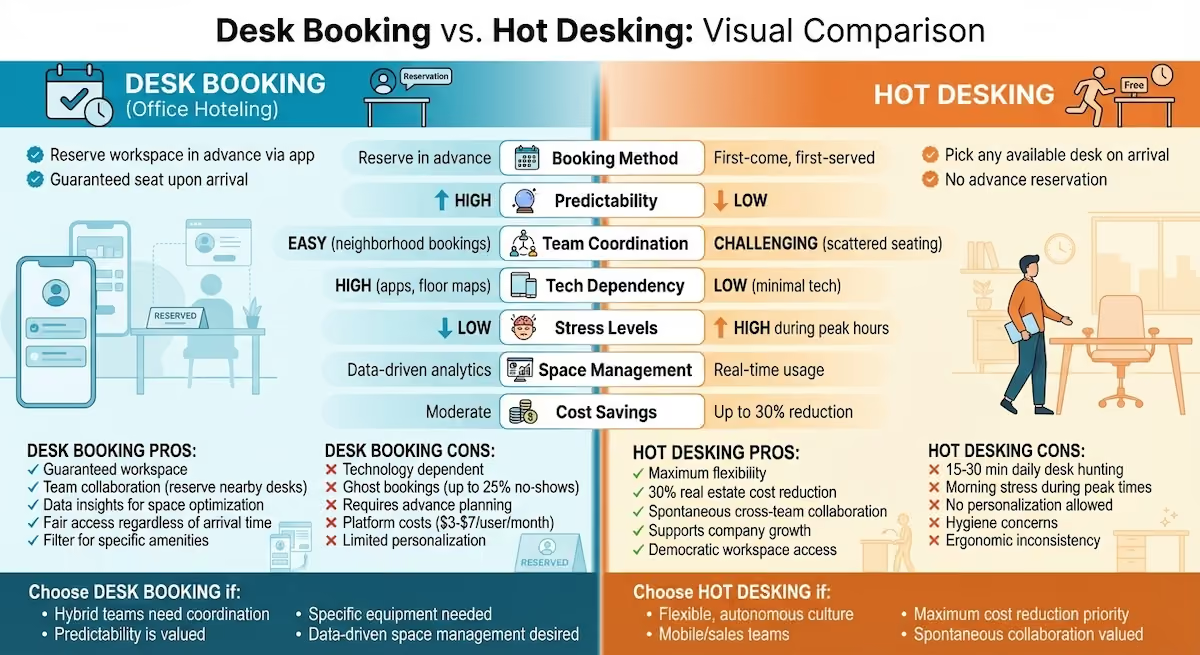
- Desk Booking: Employees reserve a specific workspace in advance using an app or platform. This system offers predictability, supports team coordination, and provides data insights for better space management. However, it depends on technology, requires planning, and can lead to unused reservations ("ghost bookings").
- Hot Desking: Employees pick any available desk upon arrival. It’s flexible, reduces office space costs, and encourages spontaneous interactions. But it may cause morning stress, lack of personalization, and scattered team seating.
Key Differences:
Desk booking works best for structured setups, offering certainty and collaboration tools, while hot desking thrives in flexible, less formal environments. Both aim to optimize office space and cut costs but cater to different workplace dynamics.
Quick Comparison:
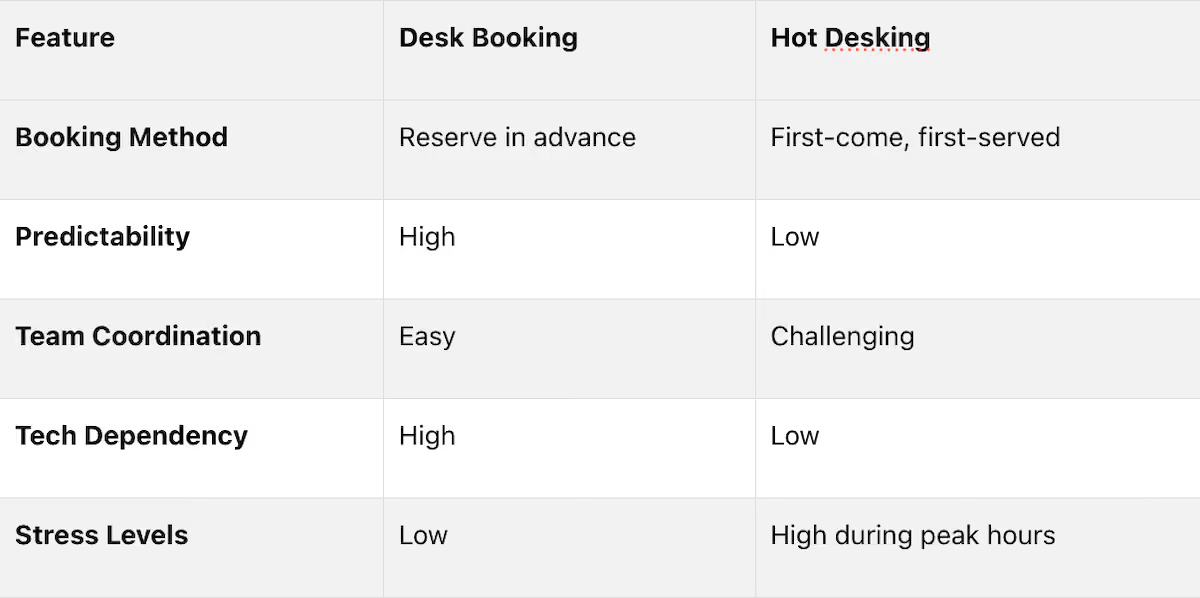
Which to choose?
If your team values certainty and collaboration, desk booking is ideal. For a more casual, flexible approach, hot desking might be the way to go.
What Is Desk Hoteling Desk Hoteling vs Hot Desking
What Is Hot Desking?
Hot desking is an office setup where desks are shared among employees instead of being individually assigned. In this system, employees choose an available desk when they arrive at the office, rather than having a fixed workspace.
The concept traces its roots to the naval practice of "hot racking", where sailors on alternating shifts shared the same bunk. In a modern office, this means the desk you use today might be occupied by someone else tomorrow.
How Hot Desking Works
The process is simple: employees arrive, pick an open desk, and get to work. Once their day is done, they clear the desk of personal items, leaving it ready for the next person.
There are several ways offices manage hot desking. Some use a first-come, first-served approach, while others group desks into "office neighborhoods" by team or function. Some companies take it a step further with Activity-Based Working zones, where specific areas are tailored for tasks like focused work, collaboration, or private calls.
To make this system efficient, many offices equip every desk with standardized tools like monitors, docking stations, and power outlets, ensuring that any desk can accommodate any employee. Personal belongings are usually stored in lockers or cubbies to keep the space clutter-free.
When to Use Hot Desking
Hot desking works particularly well for hybrid workplaces, where employees divide their time between remote and in-office work. For teams that only come in a few days a week, this setup helps avoid wasted space - studies show that about two-thirds of desks in traditional offices are often unused [6].
It’s also a great fit for mobile teams, like sales staff who spend most of their time meeting clients and only occasionally need office space. Startups and quickly growing companies can also benefit, as it allows them to accommodate more employees without immediately expanding their office footprint.
Another advantage is the way hot desking can foster collaboration. By sitting in different spots each day, employees are more likely to interact with colleagues from other teams. In fact, one large company reported an 80% boost in teamwork after adopting this flexible seating model [6].
Now that we’ve covered hot desking, let’s dive into desk booking to explore how the two approaches compare. Understanding their differences can help you decide which strategy aligns best with your return-to-office goals.
What Is Desk Booking?
Desk booking - also known as office hoteling - is a system that allows employees to reserve a desk or workspace ahead of time through a digital platform like a mobile app or web interface [1][2]. Instead of showing up and hoping for an available spot, employees can plan their day by securing a workspace before leaving home.
The process is straightforward. Employees select a date, filter for specific amenities (like dual monitors or sit-stand desks), view a real-time floor map, and confirm their booking [8]. Many platforms also sync with tools like Slack, Microsoft Teams, and Google or Outlook calendars, making the process seamless [7]. To address "ghost bookings" - when a reserved desk goes unused - most systems require users to check in within a set time (usually about 15 minutes) by scanning a QR code, tapping a badge, or using the app [8].
Next, let’s break down how desk booking operates and when it’s most effective.
How Desk Booking Works
One of the main perks of desk booking is its reliability. Knowing you have a reserved workspace eliminates the chaos of scrambling for a desk upon arrival. This is particularly helpful for hybrid workers who visit the office on specific days and want to align with their teams. Unlike hot desking, which operates on a first-come, first-served basis, desk booking ensures predictability [1].
Most systems feature interactive, real-time floor plans that show open desks, nearby workstations, and available equipment. Teams can even reserve desks in the same area or "neighborhood", making it easier to collaborate on project days [2]. On the management side, facilities teams can use these systems to track desk usage, identify peak times, and pinpoint underutilized areas, helping them make smarter decisions about space allocation [4].
Now that we’ve covered how it works, let’s explore when desk booking is the right fit.
When to Use Desk Booking
Desk booking shines in structured office setups where certainty and coordination are priorities. It’s ideal for hybrid teams who split their time between home and the office, as it guarantees a workspace for collaborative days. This system is especially useful for employees who need specific equipment or accommodations, like a sit-stand desk or dual monitors, since they can filter and reserve what they need [8]. Unlike hot desking, desk booking ensures fair access to workspaces, regardless of arrival time - a big plus for those with long commutes or caregiving responsibilities [8].
Companies have seen real-world benefits from desk booking. For example, a fintech company in Singapore with 200 employees adopted a reservation system after 135 workers showed up on a Tuesday for just 120 desks, causing major conflicts [8].
These features make desk booking a structured and reliable alternative to hot desking, especially for teams looking to streamline their workdays.
Desk Booking vs. Hot Desking: Main Differences
Now that we’ve defined both systems, let’s dive into what sets them apart.
Although both approaches move away from assigned seating, the key difference lies in control and predictability. Hot desking works on a first-come, first-served basis - employees arrive and pick any open desk, similar to snagging a table at a coffee shop [1][2]. Desk booking, on the other hand, allows employees to reserve a specific desk in advance through an app or website [2].
These systems influence more than just seating arrangements - they impact real estate costs, operational workflows, and even workplace culture [3]. Desk booking, in particular, relies on technology like mobile apps and interactive floor plans to keep things running smoothly [1][2].
Team coordination is another big factor. With desk booking, teams can reserve desks near each other for easier collaboration [2][5]. Hot desking, while encouraging spontaneous cross-departmental interactions, may disrupt team cohesion due to scattered seating [2][5]. From a management perspective, desk booking also provides detailed data on how spaces are used, helping facilities teams better allocate resources [2].
Stress levels also vary between the two systems. Desk booking ensures employees have a reserved spot, avoiding the hassle of searching for a desk during busy times [1][5]. Hot desking, however, can lead to stress when the office is crowded and finding a suitable desk becomes a challenge [2]. This uncertainty has contributed to the growing popularity of hybrid work models - 82% of CFOs now favor them, often incorporating desk booking as part of their cost-effective strategies [10].
Comparison Table
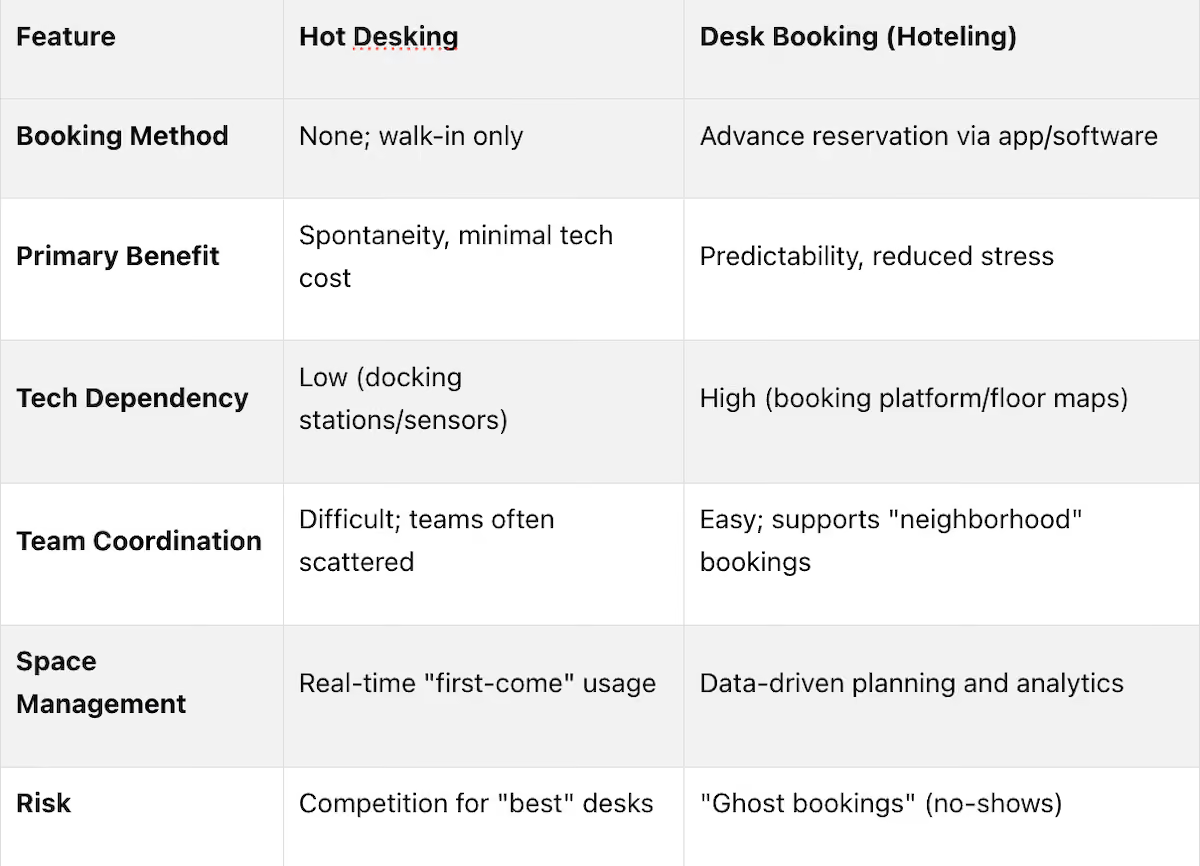
These differences play a critical role in determining which workspace strategy aligns best with your office's needs and goals.
Hot Desking: Pros and Cons
Hot desking isn't a universal solution, but understanding its upsides and downsides can help you decide if it aligns with your workplace needs.
Benefits of Hot Desking
Hot desking can reduce real estate costs by as much as 30%, thanks to aligning the number of desks with actual daily attendance[11][4][5].
This setup also encourages collaboration by breaking down silos. Imagine marketing sharing space with engineering one day and finance the next - these chance interactions can spark ideas and foster teamwork that might not happen with fixed seating arrangements. Plus, by eliminating corner offices and other status markers, hot desking ensures everyone has access to desirable workspaces, leveling the playing field.
Another big plus? Flexibility. Employees can pick a workspace that matches their tasks for the day, whether they need a quiet corner for focus or a collaborative area for brainstorming. This adaptability supports growth, allowing companies to expand their workforce without immediately committing to larger, more expensive office spaces. Smaller office footprints also mean lower energy use for heating, cooling, and lighting.
Drawbacks of Hot Desking
One common complaint is the daily scramble for a desk. Employees can spend 15–30 minutes each morning hunting for a spot, which not only wastes time but also causes stress. Over time, this unpredictability can lead to "desk squatting", where workers claim the same space daily to avoid the hassle[13].
Another downside is the loss of personalization. Without a dedicated desk, employees can't keep personal touches like family photos or plants, which can make them feel disconnected. As Harvard Business Review points out, "A sense of belonging is a fundamental human need, and a lack of it can lead to lower engagement and higher turnover"[13]. This lack of ownership can slowly chip away at job satisfaction.
Technology and ergonomics can also become pain points. Shared desks often lack consistent setups, meaning employees might struggle to find monitors, docking stations, or other equipment they need. Constantly readjusting chairs and monitors can lead to poor posture and discomfort. Hygiene is another concern - shared surfaces can harbor germs or be left cluttered by previous users[12][13][4]. Finally, scattering team members across the office can disrupt collaboration, making it harder to find colleagues for quick discussions or impromptu teamwork[5][13].
Next, we’ll explore how desk booking systems can help tackle some of these challenges.
Desk Booking: Pros and Cons
Desk booking addresses several challenges associated with hot desking but comes with its own set of trade-offs. Weighing the benefits and drawbacks can help you decide if it's the right fit for your workspace.
Benefits of Desk Booking
One major perk of desk booking is predictability. Employees can reserve a desk before heading to the office, avoiding the hassle and uncertainty of finding a spot in the morning.
Desk booking systems also offer valuable data insights that hot desking can't provide. As Officely explains, "The real benefits of a desk booking system lie in the data. It transforms your workspace management from a guessing game into a smart, data-driven strategy" [14]. For instance, analytics might reveal that office occupancy peaks at 58.6% on Tuesdays but dips to 34.5% on Fridays [8]. A real-world example: In 2024, a 500-person software company in Singapore adopted the Kadence platform to manage a 1.5:1 desk-sharing ratio. By reducing from 500 assigned desks to 333 bookable ones, they cut office space from 50,000 to 30,000 square feet, saving $300,000 annually on rent. Utilization jumped from 35% to 78%, and employee satisfaction remained high at 81% [8].
Desk booking also makes collaboration more intentional. Interactive floor maps help teams locate colleagues and reserve nearby desks for group projects. This "neighborhood" approach fosters teamwork while maintaining flexibility. Many platforms even allow users to filter for amenities and automate cleaning workflows after checkouts [14].
Despite these advantages, there are challenges that businesses need to address.
Drawbacks of Desk Booking
While desk booking offers predictability and data-driven insights, it comes with some notable downsides.
Reliance on technology can be a problem. Since these systems depend on digital platforms, software glitches or outages can bring office operations to a standstill [1].
There’s also the matter of costs. Platforms like Envoy charge $3 to $7 per active user per month [8], and maintaining accurate digital floor plans requires ongoing administrative effort.
Ghost bookings are another issue. Employees might reserve desks but fail to show up, leading to wasted space. Without proper management, ghost booking rates can climb as high as 25% [8]. To combat this, many companies implement a 15-minute grace period - if an employee doesn’t check in via app or QR code, the desk is automatically released [8].
The system's need for advanced planning can frustrate employees who prefer spontaneity or decide to visit the office on the fly [1][2]. Additionally, booking systems limit personalization - employees can’t decorate their desks with personal items like family photos or plants, which can reduce their sense of belonging [2][5]. Premium spots, like desks near windows, can also be monopolized by early bookers, creating feelings of unfairness [8].
Lastly, shared desks can lead to ergonomic and security concerns. Daily adjustments to chairs and monitors may cause discomfort, and the transient nature of desk sharing increases the risk of sensitive documents being left unsecured [4][5].
How to Choose Between Desk Booking and Hot Desking
What to Consider Before Deciding
When deciding between desk booking and hot desking, it's important to weigh factors like office size, work culture, attendance patterns, and the specific needs of different roles.
For starters, office size plays a big role. Hot desking often works better in smaller offices, while desk booking is more effective in larger spaces where managing seating can get complicated [1].
Work culture is another key consideration. According to Officely, "Hot desking is most successful in environments built on trust and autonomy" [5]. If your team thrives on flexibility and spontaneity, hot desking might be the way to go. On the other hand, if your employees value predictability and prefer having a guaranteed workspace, desk booking offers that assurance [1][2].
Attendance patterns matter too. For teams with irregular office attendance, desk booking eliminates the uncertainty of finding an available desk upon arrival [1]. However, in high-utilization scenarios, hot desking might lead to a scramble for seats [2]. If your office data reveals that nearly half of the desks remain unused even on busy days, it could be a sign you're paying for more space than you need [16].
Certain departments, like HR, Legal, or Finance, may find hot desking unsuitable due to the sensitive nature of their work. These teams often need dedicated seating zones [5][6]. Similarly, teams that rely on specialized equipment may benefit from consistent setups, avoiding the hassle of reconfiguring hardware daily.
Once you've identified your needs, the next step is choosing furniture that aligns with your workspace strategy.
Choosing the Right Office Furniture
To make your flexible workspace strategy effective, it's crucial to select furniture that adapts to both hot desking and desk booking setups. The right furniture can make all the difference in creating a functional and comfortable environment.
Universal workstations are a great option. Outfitting desks with dual monitors, universal docking stations, and adjustable monitor arms allows employees to move seamlessly between workstations without the hassle of resetting equipment [6][9].
Ergonomics should also be a top priority in shared spaces. Fully adjustable chairs and monitor arms that suit a variety of body types can help prevent discomfort and enhance productivity [5][6]. Additionally, providing secure personal lockers or mobile pedestals can address the loss of personal storage space, solving issues like the "backpack commute" [5][6][15].
If you're looking for expert guidance, companies like Office Gallery International offers on-site consultations in your city - call to inquire about availability. They provide end-to-end project management, from design to installation, ensuring your furniture choices align with your workspace needs. Whether you're setting up team neighborhoods for desk booking or creating activity-based zones for hot desking, they can help bring your vision to life.
Conclusion
This comparison sheds light on how different workspace models tackle modern office challenges. The choice between hot desking and desk booking depends on what aligns best with your business needs. Hot desking suits independent teams that thrive on flexibility and don’t require assigned seating, while desk booking offers the structure and predictability that hybrid teams often rely on. Both approaches help optimize space and reduce real estate costs, but each comes with its own set of trade-offs. Hot desking fosters collaboration across departments and adaptability but can create morning stress as employees compete for available seats. Desk booking removes that uncertainty by ensuring a reserved workspace, though it requires proper booking tools and planning. As Leesman research highlights, "Employees who have a dedicated desk report higher levels of pride in their workplace" [2], emphasizing how predictability can enhance morale.
The infrastructure supporting your chosen model plays a key role. Items like universal docking stations, ergonomic chairs, and personal lockers aren’t mere extras - they’re crucial for making shared workspaces practical and comfortable.
For those in the Boston area or nearby towns such as Beverly, Marlborough, Plymouth, Quincy, or Waltham, Office Gallery International offers tailored solutions. With on-site consultations and comprehensive project management, they ensure your office design and furniture align with your team’s workflow and needs.
Ultimately, the best choice comes down to what works for your team. Consider factors like attendance trends, workplace culture, and team preferences when making your decision. Reflect on your office data and dynamics, and don’t underestimate how well-chosen furniture can elevate your workspace strategy.
FAQs
Can we use desk booking and hot desking together?
Yes, desk booking and hot desking work well together as strategies for managing flexible workspaces. Hot desking gives employees the freedom to pick any open desk on a first-come, first-served basis, while desk booking allows them to reserve specific desks ahead of time. By combining these methods, organizations can make better use of their space, cater to different employee needs, and encourage collaboration in hybrid or flexible work setups.
How do you stop ghost bookings in desk booking?
To minimize ghost bookings in desk booking systems, implement check-in policies and auto-release rules. Requiring employees to check in ensures their presence, while auto-release automatically cancels reservations if they’re not confirmed or canceled within a set timeframe. These strategies help reduce no-shows, free up unused desks, and provide more accurate data on desk usage.
What furniture do shared desks need to work well?
Shared workspaces, like those in hot desking or desk booking setups, require furniture that balances flexibility, comfort, and space efficiency. Essentials include ergonomic chairs for proper support, adjustable desks to suit different users, and modular furniture that can fit various layouts. To keep things practical, surfaces should be durable and easy to clean, while desks should come equipped with built-in cable management and power outlets to ensure seamless connectivity. These features help create a shared workspace that’s both comfortable and productive.
•••
Ready to transform your workspace? Contact us today to explore how our expert team can design a tailor-made solution that aligns with your brand and enhances productivity. From design inspiration to project management, we'll guide you through every step of the process to create an office space that fosters creativity, collaboration, and success. Let's embark on a journey to redefine your workspace together.
Key Points
How do desk booking and hot desking differ in their approach to workspace access and employee experience?
- Access model is the fundamental distinction — Hot desking operates on a first-come, first-served basis comparable to claiming a table at a coffee shop, while desk booking allows employees to secure a specific workspace before leaving home, eliminating the uncertainty of arrival entirely.
- Predictability vs. spontaneity defines the user experience — Desk booking prioritizes certainty, particularly valuable for employees with long commutes or caregiving responsibilities who cannot afford to arrive early to compete for desks. Hot desking prioritizes flexibility, rewarding employees who are comfortable with ambiguity and variable daily routines.
- Team coordination differs significantly between the two models — Desk booking platforms allow teams to reserve desks in the same neighborhood or zone for collaborative days, making intentional coordination straightforward. Hot desking can scatter team members across the floor, disrupting cohesion and making impromptu collaboration harder to facilitate.
- Morning stress is a measurable cost of unmanaged hot desking — Employees in hot desking environments can spend 15 to 30 minutes each morning searching for a suitable desk, representing a direct productivity loss before the workday has begun and a recurring source of dissatisfaction that compounds over time.
- Desk squatting undermines the efficiency rationale for hot desking — When the unpredictability of the system becomes chronic, employees develop informal workarounds by arriving early to claim the same desk daily, effectively recreating assigned seating without the administrative structure that makes assigned seating manageable.
- Desk booking requires more employee behavior change upfront but less daily friction — The planning requirement of desk booking demands a shift in how employees approach their workday, but once established as a habit it eliminates the daily friction that hot desking's uncertainty creates.
What are the operational and financial advantages of each system for facilities and HR teams?
- Hot desking reduces real estate costs by aligning desk supply with actual attendance — By removing the one-desk-per-employee assumption, hot desking can reduce real estate costs by as much as 30%, with the greatest savings achieved in hybrid environments where a significant portion of the workforce is remote on any given day.
Desk booking generates actionable utilization data that hot desking cannot produce — Analytics from desk booking platforms reveal occupancy rates by day of week, peak usage windows, and chronically underutilized zones, enabling facilities teams to make evidence-based decisions about space allocation rather than relying on observation or assumption.
The Singapore software company case quantifies the financial return of desk booking data — Reducing from 500 assigned desks to 333 bookable desks based on utilization data cut office square footage by 40% and delivered $300,000 in annual rent savings while improving utilization from 35% to 78%, demonstrating that the platform cost is marginal relative to the real estate savings.
Ghost bookings represent the primary efficiency risk of desk booking systems — Reservation no-shows can waste as much as 25% of bookable capacity without active management. Implementing a 15-minute check-in window with automatic desk release if the employee does not check in via app or QR code is the most effective mitigation.
Hot desking carries hidden operational costs that offset its simplicity — Ergonomic complaints from inconsistent desk setups, hygiene management of shared surfaces, equipment reconfiguration time, and the productivity loss from morning desk searches are real costs that do not appear in the desk-count calculation but affect both employee wellbeing and operational efficiency.
82% of CFOs now favor hybrid work models — The executive-level preference for hybrid structures, which almost always incorporate some form of flexible seating, means that facilities and HR teams making seating decisions are increasingly aligned with financial leadership rather than working against cost-reduction priorities.
What are the key criteria for choosing between desk booking and hot desking for a specific organization?
- Office size influences which system is practical to administer — Hot desking is generally more manageable in smaller offices where the total number of desks is low enough that daily first-come access does not create significant conflict. Desk booking becomes increasingly valuable as office size grows and the coordination complexity of unmanaged seating increases.
- Work culture determines employee readiness for each model — Hot desking is most successful in environments built on trust and autonomy where employees are comfortable with daily variability. Organizations where employees derive significant satisfaction from workspace predictability and personalization are better served by desk booking.
- Attendance pattern data should drive the decision where available — If office data shows that nearly half of desks are unused even on the busiest days, the organization is paying for significantly more space than it uses, and either system would improve efficiency. If attendance is dense and unpredictable, desk booking prevents the conflict that unmanaged hot desking creates at high utilization rates.
- Role sensitivity should disqualify hot desking for certain departments — HR, legal, finance, and other functions handling sensitive or confidential information often require dedicated seating zones rather than shared open desks, regardless of the organization's overall seating philosophy. Hot desking in these departments creates document security and privacy risks.
- Specialized equipment needs favor desk booking — Employees who require specific hardware configurations, accessibility accommodations, or ergonomic setups benefit from desk booking's ability to filter and reserve workstations with the required specifications rather than competing for equipped desks on arrival.
- Hybrid deployment is a viable middle path — Desk booking and hot desking can coexist within the same office, with different zones operating under different rules. Dedicated desk booking neighborhoods for teams with high coordination needs can sit alongside open hot desking areas for more independent workers, giving the organization the benefits of both models.
What furniture and infrastructure is essential for making shared workspace models function effectively?
- Universal workstations eliminate the daily reconfiguration burden — Equipping every shared desk with dual monitors, universal docking stations, and adjustable monitor arms ensures that any employee can sit at any desk and be productive immediately, which is the foundational infrastructure requirement for both hot desking and desk booking to function without friction.
- Ergonomic adjustability is a non-negotiable in shared desk environments — Chairs and monitor arms that accommodate a wide range of body types reduce the musculoskeletal discomfort that arises when employees constantly adjust to equipment calibrated for someone else, addressing one of the most common complaints in hot desking environments.
- Personal storage solutions compensate for the loss of dedicated desk ownership — Providing secure personal lockers or mobile pedestals gives employees a consistent place for belongings, reducing the backpack commute burden and addressing the sense of disconnection that comes from having no permanent corner of the office to call their own.
- Activity-based working zones require furniture designed for distinct work modes — Spaces designated for focused work, collaboration, and private calls each require different furniture configurations, including quiet individual workstations, collaborative tables with power access, and acoustically separated seating for calls, to make the zone system function as intended rather than as a label applied to undifferentiated open space.
- Cable management and power access determine desk usability in practice — Desks without integrated cable management and accessible power outlets create clutter and connectivity friction that undermines the productivity rationale for flexible seating. Standardized infrastructure at every desk is as important as the seating policy itself.
- Hygiene and surface durability become operational requirements in shared environments — Shared desk surfaces experience higher contact frequency than assigned desks and require materials that are easy to clean, resistant to wear, and compatible with regular sanitization protocols. Specifying appropriate surface materials at the furniture selection stage prevents ongoing maintenance problems.
How do ghost bookings undermine desk booking systems and what operational measures address them effectively?
- Ghost booking rates of up to 25% represent significant wasted capacity — When nearly a quarter of reserved desks go unused because employees book and do not show up, the efficiency gains of the desk booking system are substantially eroded, and employees attempting to book on short notice face artificial scarcity in a space that is physically underutilized.
- The 15-minute check-in window with automatic release is the most widely adopted mitigation — Requiring employees to check in via app, QR code, or badge tap within 15 minutes of their reservation start time, with the desk automatically released to the pool if they do not, addresses ghost bookings without penalizing employees for genuine delays.
- Repeat ghost booking patterns should trigger policy review rather than just automatic release — Automatic release handles the immediate capacity problem, but employees who consistently book and do not show up represent a deeper behavioral issue that warrants follow-up through HR or facilities management to understand whether the booking system itself is creating the behavior.
- Booking data provides visibility into ghost booking frequency by location and time — Platforms that track check-in rates alongside reservation rates allow facilities teams to identify which desk neighborhoods, floors, or time slots have the highest ghost booking rates, enabling targeted intervention rather than blanket policy changes.
- Same-day booking availability reduces the motivation for speculative reservations — When employees can book a desk the same morning they decide to come in, they are less likely to make precautionary advance reservations they may not use. Systems that allow same-day access reduce ghost bookings by removing the scarcity anxiety that drives speculative booking behavior.
- Platform licensing costs should be evaluated against the capacity recovered through ghost booking reduction — At $3 to $7 per active user per month, desk booking platforms represent a real ongoing cost. Organizations should model that cost against the square footage savings enabled by accurate utilization data and the capacity recovered through automated ghost booking management before making a platform decision.
How should organizations in the Boston area approach implementing a flexible workspace strategy with the right furniture and design support?
- On-site consultation is the most reliable starting point for workspace strategy decisions — The interaction between office layout, furniture specification, and seating policy is complex enough that remote or catalog-based planning frequently produces mismatches between the furniture selected and the workflow it needs to support. On-site assessment captures constraints and opportunities that floor plans alone do not reveal.
- Furniture selection should follow seating policy definition, not precede it — Organizations that select furniture before deciding whether they are implementing hot desking, desk booking, or a hybrid approach frequently end up with equipment that does not support their chosen model. Defining the seating strategy first allows furniture specifications to be derived from operational requirements.
- Team neighborhood design requires coordination between facilities, HR, and department leadership — Desk neighborhoods that group teams for collaborative days only work if the neighborhoods are sized and located correctly for the teams they serve. Getting that right requires input from the teams themselves, not just facilities management.
- Phased implementation reduces the risk of organization-wide rollout failures — Piloting a flexible seating model in one department or floor before rolling it out organization-wide provides real utilization data, surfaces friction points in the booking or hot desking workflow, and allows furniture specifications to be refined before the full investment is committed.
- End-to-end project management support reduces implementation risk significantly — From space planning and furniture specification through delivery and installation, having a single point of coordination prevents the scheduling conflicts, specification errors, and installation delays that commonly occur when organizations manage workspace projects through multiple disconnected vendors.
- Boston-area organizations have access to local consultation and project management support — Office Gallery International provides on-site consultations and end-to-end project management for workspace design and furniture implementation across Boston, Beverly, Marlborough, Plymouth, Quincy, and Waltham, ensuring that flexible workspace strategy translates into a physical environment that works for the teams using it daily.